
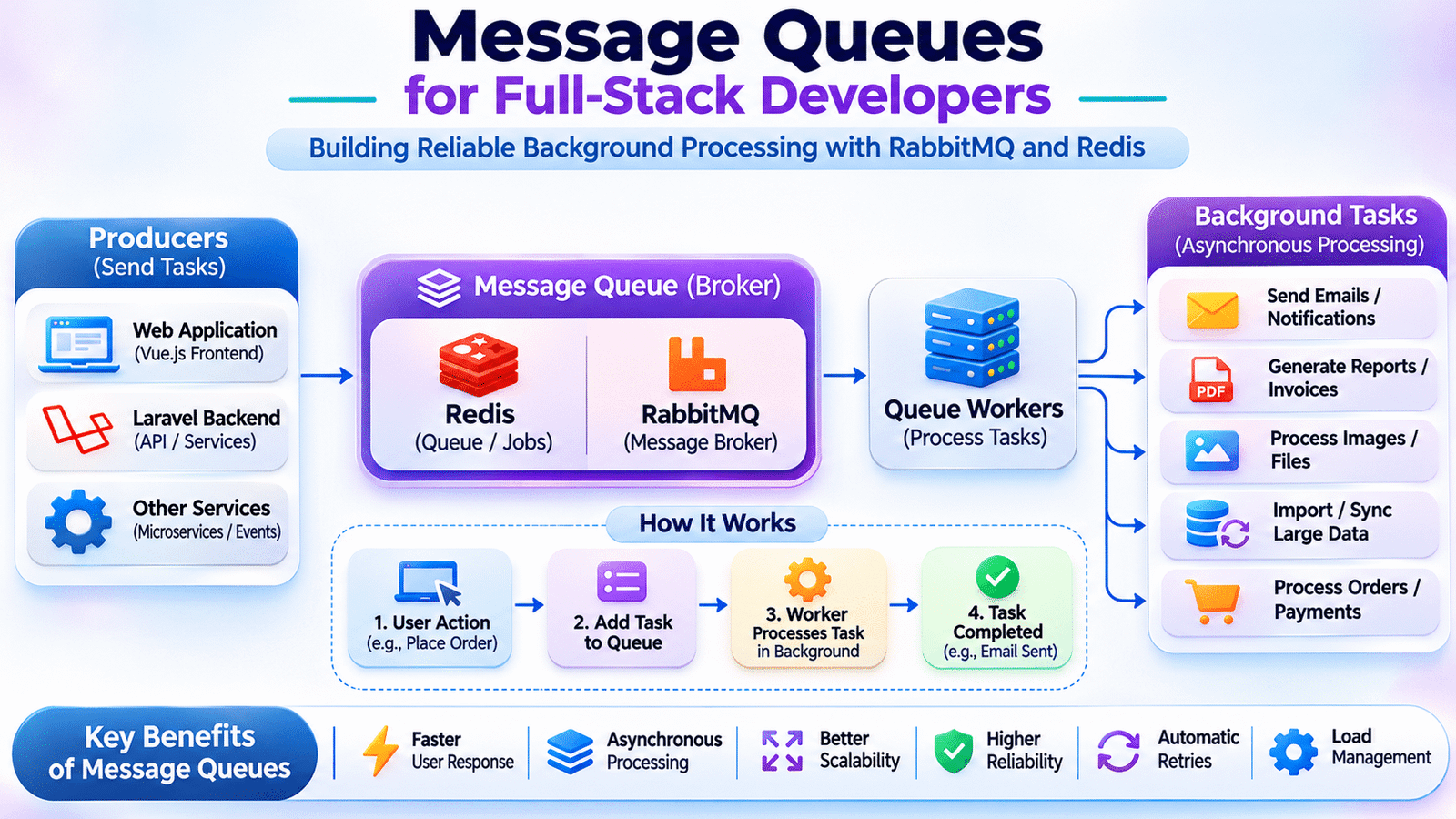
Message queues are an essential part of modern full-stack application development. They allow applications to process background tasks asynchronously, improve response times, and manage communication between independent services without blocking user requests.
Consider an e-commerce application where a customer places an order. The application needs to save the order, process payment, update inventory, generate an invoice, and send an order confirmation email.
If every operation runs within the same HTTP request, the customer may have to wait until all processing is completed. If one external service responds slowly, the entire request can become delayed.
This creates performance and reliability challenges as application traffic increases.
Message queues provide a way to move time-consuming operations outside the main request-response lifecycle. Instead of executing every task immediately, an application can place work into a queue and allow background workers to process it independently.
For full-stack developers, understanding message queues is important when building applications that need background processing, asynchronous communication, reliable task execution, and scalable backend services.
This article explains how message queues work, how Redis and RabbitMQ support background processing, and how to implement queue-based workflows using Laravel.
1. Understanding Message Queues in Modern Applications
A message queue is a communication mechanism that allows one application component to send tasks or messages to another component for processing.
Instead of directly executing a task, the application publishes a message to a queue. A separate worker retrieves that message and performs the required operation.
For example, when a user registers on a platform, the backend can create the account and place a welcome-email task into a queue.
The user registration request can finish without waiting for the email delivery process.
A typical workflow looks like this:
       User Registration
               |
               v
         Backend API
               |
               v
       Save User Details
               |
               v
       Add Email Job
               |
               v
          Message Queue
               |
               v
         Queue Worker
               |
               v
        Send Welcome Email
This separation helps application teams manage background operations without unnecessarily increasing the response time of user-facing requests.
Message queues are commonly used for:
- Email and SMS notifications.
- Invoice and PDF generation.
- Image and video processing.
- Payment-related background operations.
- Data synchronization.
- Report generation.
- Importing and exporting large datasets.
- Processing events from other services.
2. Why Applications Need Background Processing
Not every operation needs to be completed before an API response is returned.
Consider a platform where administrators upload an Excel file containing thousands of product records.
Processing the entire file inside a single HTTP request may cause:
- Long response times.
- Request timeouts.
- High memory consumption.
- Database performance issues.
- Poor user experience.
A better approach is to accept the file, store it, and dispatch a background job to process the records.
The API can immediately return a response indicating that processing has started.
The background worker then reads the file, validates records, inserts valid data, and records any errors.
The frontend can periodically check the processing status or receive updates through a real-time communication mechanism.
This approach separates the user’s interaction from resource-intensive backend processing.
3. Understanding How Message Queues Work
A typical queue-based architecture contains four important components.
Producer
A producer creates and sends messages to a queue.
For example, a Laravel controller may dispatch a job when an order is placed.
Queue or Broker
The queue stores messages until they are ready to be processed.
Depending on the technology, it may also support routing, persistence, acknowledgments, and delivery management.
Consumer
A consumer receives messages and performs the required operations.
For example, a background worker may process an email job or generate a report.
Message
A message contains the information required to perform a task.
A simplified message might look like:
{
  "task": "send_order_confirmation",
  "order_id": 501,
  "user_id": 25
}
The worker reads the message and uses the referenced information to execute the task.
A simplified architecture looks like this:
        Producer
           |
           v
      Message Queue
           |
           v
        Consumer
           |
           v
     Process the Task
This separation allows producers and consumers to operate independently.
4. Synchronous vs. Asynchronous Processing
Understanding the difference between synchronous and asynchronous processing helps developers decide when to use queues.
Synchronous Processing
In synchronous processing, the application waits for an operation to complete before continuing.
For example:
Mail::to($user->email)->send(
    new WelcomeMail()
);
The request waits while the email-sending operation executes.
This can be appropriate for simple operations that must return an immediate result.
Asynchronous Processing
In asynchronous processing, the application dispatches a task and allows a background worker to execute it separately.
For example:
SendWelcomeEmail::dispatch($user);The task is placed into the configured queue, and a worker processes it.
| Area | Synchronous | Asynchronous |
|---|---|---|
| Execution | Immediate | Background |
| Request waiting | Waits for completion | Can return earlier |
| User response | May take longer | Usually faster |
| Failure handling | Within request flow | Can use retries |
| Typical usage | Immediate validation | Emails, reports, imports |
Asynchronous processing improves responsiveness, but developers must provide a way to track task completion and handle failures.
5. Understanding Redis as a Queue Backend
Redis is an in-memory data store commonly used for caching, session storage, and background job processing.
It supports data structures that allow applications to manage queued tasks efficiently.
When Redis is configured as a Laravel queue connection, jobs can be dispatched into Redis and processed by Laravel queue workers.
A typical workflow is:
         Laravel Application
                 |
                 v
          Dispatch Job
                 |
                 v
            Redis Queue
                 |
                 v
          Laravel Worker
                 |
                 v
          Execute Job
Redis is useful when teams need a lightweight queue backend that integrates with existing application infrastructure.
However, Redis queue reliability depends on its persistence, availability, configuration, and the application’s job-handling strategy.
Developers should configure Redis appropriately for production rather than assuming that every queued job is automatically protected against infrastructure failures.
6. Understanding RabbitMQ for Message Processing
RabbitMQ is a message broker that enables applications and services to communicate through queues and message routing.
It is commonly used in distributed systems where different services need to exchange messages without maintaining direct dependencies.
RabbitMQ introduces several important concepts.
Producer: Publishes messages.
Exchange: Receives messages from producers and routes them according to configured rules.
Queue: Stores messages until consumers process them.
Binding: Defines the relationship between an exchange and a queue.
Consumer: Retrieves and processes messages.
A simplified RabbitMQ architecture looks like:
          Producer
              |
              v
           Exchange
              |
              v
         Routing Rules
              |
       +------+------+
       |             |
       v             v
    Queue A        Queue B
       |             |
       v             v
   Consumer A    Consumer B
RabbitMQ supports different exchange types, including direct, fanout, topic, and headers exchanges.
These routing options help development teams distribute messages according to application requirements.
For example, an order-related event could be routed to separate queues for inventory processing, notifications, and analytics.
RabbitMQ is particularly useful when applications require flexible message routing, acknowledgment handling, and broker-managed queue behavior.
7. Redis vs. RabbitMQ: Choosing the Right Technology
Redis and RabbitMQ can both support asynchronous processing, but they are designed with different strengths and capabilities.
| Feature | Redis | RabbitMQ |
|---|---|---|
| Primary role | In-memory data store | Message broker |
| Queue integration | Supports queue-based processing | Native messaging and routing |
| Routing | Depends on application design | Exchanges and bindings |
| Data structures | Lists, streams, sets, etc. | Queues and exchanges |
| Common usage | Background jobs and caching | Service communication and messaging |
| Laravel integration | Built-in queue support | Available through integrations and packages |
Redis is often a practical choice when a Laravel application already uses Redis for caching or sessions.
RabbitMQ is useful when applications need more advanced message routing and broker-oriented messaging workflows.
The decision should depend on throughput, message durability, routing requirements, operational experience, and failure-handling needs.
Neither technology is automatically the best choice for every application.
8. Implementing Message Queues Using Laravel
Laravel provides a built-in queue system that supports several queue backends, including Redis and database-based queues.
This allows developers to move time-consuming operations into background jobs without writing all queue-management logic manually.
Consider an application that sends an order confirmation email after a customer completes checkout.
Step 1: Configure the Queue Connection
In the Laravel .env file, configure the required queue connection.
For Redis:
QUEUE_CONNECTION=redisThe Redis server connection should also be configured correctly in the application’s Redis settings.
Step 2: Create a Job Class
Generate a job using Artisan:
php artisan make:job SendOrderConfirmationA simplified job implementation:
namespace App\Jobs;

use App\Mail\OrderConfirmationMail;
use App\Models\Order;
use Illuminate\Bus\Queueable;
use Illuminate\Contracts\Queue\ShouldQueue;
use Illuminate\Foundation\Bus\Dispatchable;
use Illuminate\Queue\InteractsWithQueue;
use Illuminate\Queue\SerializesModels;
use Illuminate\Support\Facades\Mail;

class SendOrderConfirmation implements ShouldQueue
{
    use Dispatchable;
    use InteractsWithQueue;
    use Queueable;
    use SerializesModels;

    public function __construct(
        public Order $order
    ) {}

    public function handle(): void
    {
        Mail::to($this->order->user->email)
            ->send(new OrderConfirmationMail($this->order));
    }
}
By implementing ShouldQueue, Laravel treats the job as a queued task.
Step 3: Dispatch the Job
After creating an order, dispatch the job:
$order = Order::create([
    'user_id' => $user->id,
    'total' => $total,
    'status' => 'confirmed',
]);

SendOrderConfirmation::dispatch($order);
The job is sent to the configured queue connection.
Step 4: Start a Queue Worker
Run the worker using:
php artisan queue:workThe worker continuously retrieves available jobs and executes them.
In production, queue workers should be managed through a process manager or an appropriate hosting platform so they restart when required.
This implementation separates email delivery from the main checkout request.
For production systems, ensure that the order transaction has committed before the job accesses the order. Laravel provides mechanisms such as dispatching after database commit for this purpose.
9. Processing Background Jobs with Laravel Queues
A job can represent almost any operation that does not need to block the main user request.
For example, a document-management platform may need to generate PDF reports containing thousands of records.
Instead of generating the report during the API request, the application can dispatch a job.
GenerateMonthlyReport::dispatch($reportId);The job can retrieve the required data, generate the document, store it, and update its processing status.
The frontend can display:
- Pending
- Processing
- Completed
- Failed
This makes background processing easier to integrate into real application workflows.
Developers should also avoid placing large collections or unnecessary sensitive data directly into job payloads. Passing record identifiers and retrieving the latest data inside the job is often more maintainable.
10. Configuring Job Retries and Failed Job Handling
Background jobs may fail because of temporary network problems, unavailable external services, database errors, or invalid data.
Laravel supports retry configuration for queued jobs.
For example:
public $tries = 3;

public $backoff = [10, 30, 60];
This configuration allows the job to be attempted up to three times, with increasing delays between retries.
A job can also define a failure handler:
public function failed(?Throwable $exception): void
{
    // Record failure details or notify administrators.
}
Failed jobs can be inspected using:
php artisan queue:failedFailed jobs may be retried using:
php artisan queue:retry allRetrying a job should be done carefully.
If a job performs a payment or creates a financial transaction, repeating the operation without checking its previous state may cause duplicate processing.
Applications should use idempotency checks and appropriate transaction identifiers to prevent unintended side effects.
11. Understanding Message Acknowledgments and Delivery
Message acknowledgment is an important concept in message-processing systems.
An acknowledgment indicates that a consumer has successfully processed a message.
In broker-based systems such as RabbitMQ, consumers can acknowledge messages after successful processing.
If processing fails or the consumer becomes unavailable before acknowledgment, the broker can make the message available again according to its configuration.
This improves reliability but also means consumers may receive duplicate messages.
Developers should design consumers to handle duplicate delivery safely.
For example, before processing a payment confirmation event, the application can check whether the corresponding payment transaction has already been recorded.
Message delivery guarantees and acknowledgment behavior differ across queue technologies. Teams should understand the selected broker’s delivery model rather than assuming that every queue provides exactly-once processing automatically.
12. Scaling Background Workers
As application usage increases, the number of queued jobs may grow.
For example, an application may receive thousands of email requests, document-generation tasks, and import jobs within a short period.
A single worker may not process all tasks quickly enough.
One solution is to run multiple workers.
php artisan queue:work redis --queue=defaultMultiple worker processes can retrieve jobs from the queue and execute them concurrently.
For larger systems, developers can separate queues based on workload:
          Redis Queue
               |
       +-------+-------+
       |       |       |
       v       v       v
     Emails  Reports  Imports
     Worker  Worker   Worker
This allows resource-intensive report generation to be managed separately from time-sensitive notifications.
Teams should monitor queue depth, job execution time, worker memory usage, and failure rates when scaling worker infrastructure.
13. Integrating Queue Processing with a Vue.js Frontend
Background jobs often require frontend visibility so users understand what is happening after submitting an operation.
Consider a Vue.js application where a user uploads an Excel file.
The backend accepts the file and dispatches an import job.
The API may return:
{
  "success": true,
  "message": "Import processing started",
  "job_id": 501,
  "status": "pending"
}
The frontend can then request the job status:
const response = await fetch('/api/imports/501/status');

if (!response.ok) {
    throw new Error('Unable to retrieve import status');
}

const result = await response.json();

console.log(result.status);
The backend can return the current status:
{
  "job_id": 501,
  "status": "processing",
  "processed_records": 450,
  "total_records": 1000
}
The Vue.js interface can display a progress indicator and update it when new status information becomes available.
For applications that need immediate updates, WebSockets or server-sent events can be used instead of repeatedly polling the API.
The important architectural point is that the queue worker performs the processing while the frontend displays the processing state.
14. Monitoring and Troubleshooting Queue Systems
Background processing requires monitoring because queued work can accumulate without immediately affecting the main application request.
Important metrics include:
- Number of pending jobs.
- Number of completed jobs.
- Failed job count.
- Average processing time.
- Queue waiting time.
- Worker availability.
- Memory and CPU utilization.
- Retry frequency.
For example, if an import queue contains thousands of pending jobs, administrators should be able to identify whether workers are unavailable or processing is slower than expected.
Laravel Horizon provides a dashboard for monitoring Redis-backed Laravel queues.
For RabbitMQ, its management interface and monitoring integrations help inspect queue depth, consumers, message rates, and broker health.
Monitoring makes it easier to detect bottlenecks before they affect application workflows.
15. Common Challenges in Message Queue Implementation
Message queues improve application architecture, but incorrect implementation can introduce new problems.
Growing queue backlog: Jobs arrive faster than workers can process them.
Duplicate processing: A task may be executed more than once after retries or redelivery.
Worker failures: Background processes may stop because of memory issues, deployment changes, or unexpected exceptions.
Long-running jobs: Large tasks may consume resources and delay other operations.
Incorrect retry configuration: Excessive retries can increase load and repeatedly execute failing operations.
Missing status tracking: Users may not know whether their background task is pending, processing, or failed.
Message loss risks: Incorrect broker persistence or infrastructure configuration can affect queued work.
These problems should be addressed through appropriate queue configuration, monitoring, job design, and failure-handling strategies.
16. Best Practices for Building Reliable Queue-Based Applications
Development teams should follow these practices when implementing background processing:
- Move long-running operations outside the main request lifecycle.
- Keep job payloads small and focused.
- Use separate queues for different workloads.
- Configure retry limits and backoff strategies.
- Make jobs safe to execute more than once.
- Handle permanent failures explicitly.
- Monitor queue depth and processing time.
- Use appropriate worker supervision.
- Avoid dispatching dependent jobs before database transactions commit.
- Store task status when frontend visibility is required.
- Protect sensitive information in messages.
- Test worker failures and retry scenarios.
- Review resource usage as queue volume increases.
The objective is not simply to process tasks in the background. It is to ensure that those tasks are executed reliably and that failures can be understood and recovered from.
17. Frequently Asked Questions
What are message queues used for?
Message queues are used to transfer tasks or messages between application components, particularly when work needs to be processed asynchronously.
What is the difference between Redis and RabbitMQ?
Redis is an in-memory data store that can support queue-based processing, while RabbitMQ is a dedicated message broker with exchanges, queues, and routing capabilities.
What is a queue worker?
A queue worker is a background process that retrieves queued jobs and executes the associated application logic.
Can Laravel use Redis for background jobs?
Yes. Laravel provides Redis queue support through its queue system and allows developers to dispatch jobs that are processed by background workers.
Why should applications use asynchronous processing?
Asynchronous processing helps prevent time-consuming operations from delaying user-facing requests and allows background workloads to be handled independently.
What happens when a queued job fails?
Depending on the queue configuration, a failed job may be retried, delayed, or moved to failed-job storage for investigation.
Are message queues required for every application?
No. Smaller applications may not need a queue system initially. Queues become useful when background processing, workload separation, or asynchronous communication provides a clear benefit.
Final Thoughts
Message queues are an important part of modern backend engineering because they allow applications to process time-consuming tasks independently of user-facing requests.
For full-stack developers, understanding producers, consumers, brokers, background workers, retries, acknowledgments, and monitoring provides a strong foundation for building reliable application workflows.
Redis and RabbitMQ offer different approaches to queue-based processing, while Laravel provides a practical way to integrate background jobs into PHP applications.
The real value of message queues comes from designing tasks that can be processed independently, handling failures safely, and ensuring users receive clear feedback about long-running operations.