
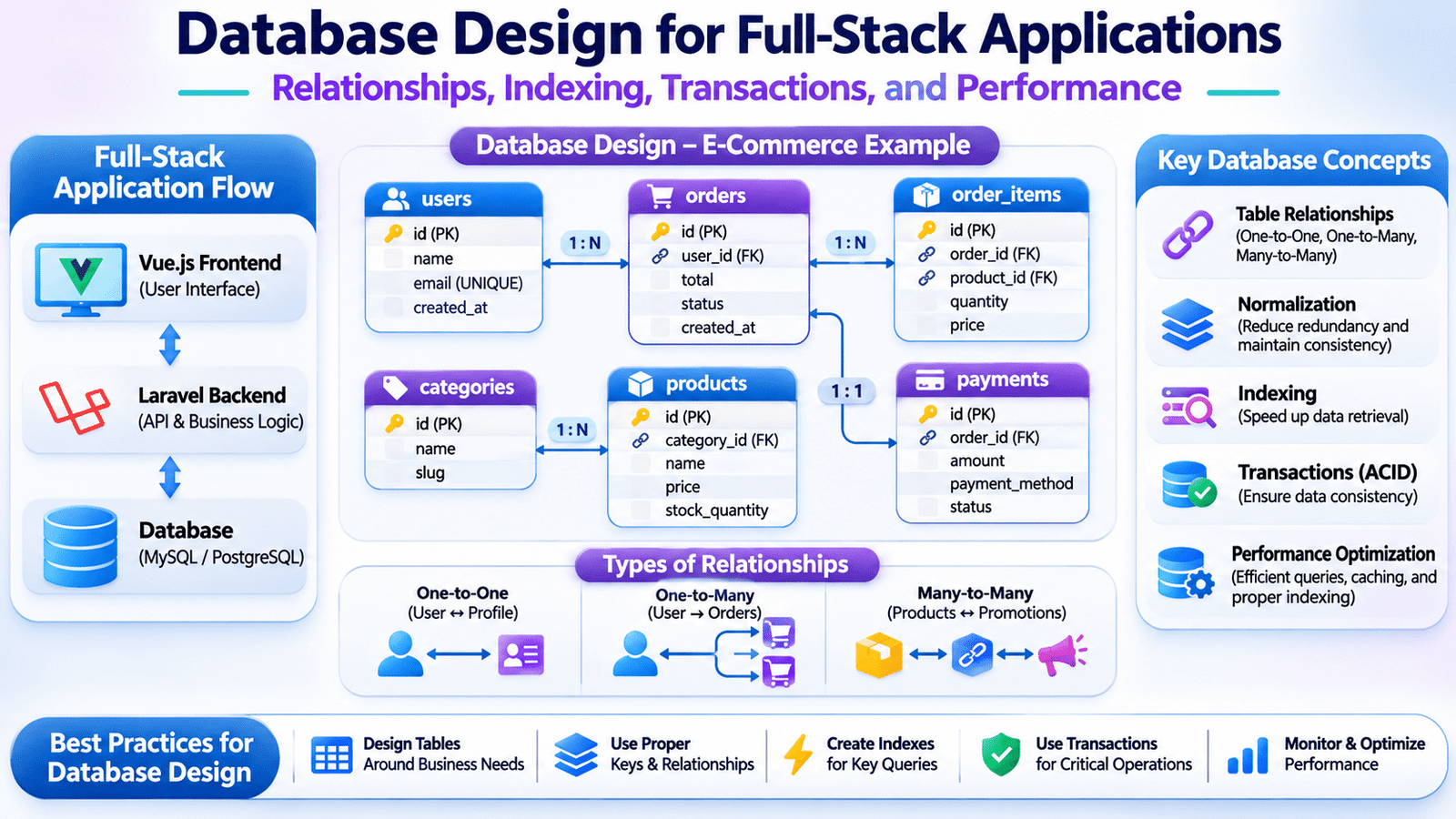
Relational database design is a fundamental part of building reliable full-stack applications. It helps developers organize application data, establish meaningful table relationships, maintain data integrity, and improve database performance as applications grow.
These problems are not always caused by the database technology itself. In many cases, they originate from decisions made during the initial application design.
This is where database design becomes an important part of full-stack development.
Database design is the process of organizing application data into structured tables, defining relationships, establishing constraints, and planning how information will be stored and retrieved efficiently.
For full-stack developers, understanding database design means more than creating tables and writing SQL queries. It involves translating business requirements into reliable data structures that support application functionality, performance, and long-term maintenance.
Let’s explore how developers approach database design in real-world applications using practical examples.
1. Understanding Database Design in Full-Stack Applications
Database design begins with understanding what information an application needs to store and how different pieces of information are connected.
For example, an online shopping application may require the following entities:
- Users
- Products
- Categories
- Orders
- Order Items
- Payments
- Addresses
- Inventory
Each entity represents a specific part of the application’s business domain.
A user can place multiple orders, an order can contain multiple products, and a product can belong to a category.
These relationships must be represented correctly in the database.
A simplified architecture looks like this:
          Vue.js Frontend
                 |
                 v
           Laravel Backend
                 |
                 v
           Database Layer
                 |
       +---------+---------+
       |         |         |
       v         v         v
     Users    Products   Orders
                           |
                           v
                       Order Items
                           |
                           v
                         Payments
The frontend communicates with backend APIs, while the backend handles database operations.
The database should not be accessed directly by browser-based frontend code because doing so would expose credentials and bypass important application security and business rules.
A well-designed database provides a consistent foundation for every application layer.
2. Choosing the Right Database Technology
The first architectural decision is selecting a database technology that fits the application’s data and access requirements.
Two commonly used database categories are relational and NoSQL databases.
Relational Databases
Relational databases organize information into tables containing rows and columns.
They support relationships between tables, constraints, transactions, and structured query operations.
Common examples include:
- MySQL
- PostgreSQL
- Microsoft SQL Server
- Oracle Database
Consider an application with separate users, orders, and products tables.
The tables can be connected using primary keys and foreign keys.
Relational databases are commonly used for applications involving financial transactions, inventory, customer management, and structured business records.
NoSQL Databases
NoSQL databases support different data models, including document, key-value, graph, and wide-column storage.
Examples include:
- MongoDB
- Redis
- Apache Cassandra
- Neo4j
A document database such as MongoDB can store related information in flexible document structures.
NoSQL databases are useful when the application’s access patterns, data structure, or scalability requirements benefit from their specific data model.
The decision should be based on actual application requirements rather than assuming one database category is always better.
3. Identifying Entities and Designing Database Tables
A practical database design process starts with identifying the application’s business entities.
For an e-commerce application, the development team may identify users, products, categories, orders, and payments as separate entities.
Each entity can become a database table.
For example, a users table might contain:
| Column | Data type | Purpose |
|---|---|---|
| id | BIGINT | Primary identifier |
| name | VARCHAR | User’s name |
| VARCHAR | Email address | |
| password | VARCHAR | Hashed password |
| created_at | TIMESTAMP | Record creation time |
| updated_at | TIMESTAMP | Last update time |
A products table might contain:
| Column | Data type | Purpose |
|---|---|---|
| id | BIGINT | Product identifier |
| category_id | BIGINT | Related category |
| name | VARCHAR | Product name |
| price | DECIMAL | Product price |
| stock_quantity | INTEGER | Available stock |
| created_at | TIMESTAMP | Record creation time |
The table structure should reflect business requirements.
For example, product prices should generally use an appropriate decimal representation rather than floating-point values when storing financial amounts.
Similarly, email fields may require unique constraints if the business rules allow only one account per email address.
Good table design starts with understanding how information will be created, updated, searched, and related.
4. Understanding Primary Keys and Foreign Keys
Primary keys and foreign keys are fundamental to relational database design.
Primary Keys
A primary key uniquely identifies each record in a table.
For example, every user in a users table can have a unique id.
CREATE TABLE users (
    id BIGINT PRIMARY KEY AUTO_INCREMENT,
    name VARCHAR(150) NOT NULL,
    email VARCHAR(255) UNIQUE NOT NULL
);
The primary key allows application queries to identify records reliably.
Foreign Keys
A foreign key connects one table to another by referencing a key in the related table.
For example, an orders table can contain a user_id column referencing the users table.
CREATE TABLE orders (
    id BIGINT PRIMARY KEY AUTO_INCREMENT,
    user_id BIGINT NOT NULL,
    total DECIMAL(12, 2) NOT NULL,

    CONSTRAINT fk_orders_user
        FOREIGN KEY (user_id)
        REFERENCES users(id)
);
This relationship ensures that an order references an existing user, subject to the configured constraint behavior.
Foreign keys help maintain referential integrity and prevent invalid relationships.
However, developers should also consider deletion behavior, update rules, and the performance implications of database constraints.
5. Understanding One-to-One, One-to-Many, and Many-to-Many Relationships
Real-world applications contain different types of relationships between entities.
Understanding these relationships helps developers structure tables correctly.
A well-planned relational database design makes it easier to manage one-to-one, one-to-many, and many-to-many relationships.
One-to-One Relationship
A one-to-one relationship means one record in a table is associated with one record in another table.
For example, a user may have one profile record.
Users
  |
  | One-to-One
  |
User Profiles
A user_profiles table can contain a unique user_id foreign key.
One-to-Many Relationship
A one-to-many relationship means one record can be associated with multiple records in another table.
For example, one customer can place multiple orders.
Users
  |
  | One-to-Many
  |
Orders
The orders table contains the user_id foreign key.
Many-to-Many Relationship
A many-to-many relationship means multiple records in one table can be associated with multiple records in another table.
For example, a product can belong to multiple promotional collections, and each collection can contain multiple products.
A pivot table can represent this relationship.
Products
    |
    | Many-to-Many
    |
Product Promotions
    |
    | Many-to-Many
    |
Promotions
A product_promotion table may contain:
- id
- product_id
- promotion_id
This structure avoids duplicating product and promotion information.
Selecting the correct relationship type is important because it affects how application queries, validations, and business operations are implemented.
6. Database Normalization and Data Integrity
Database normalization is the process of organizing relational data to reduce unnecessary duplication and improve consistency.
Consider an order table that stores the customer’s name, email, product name, product price, and order details directly in every row.
If the same customer places several orders, their information may be duplicated repeatedly.
If the customer’s email changes, multiple records may need to be updated.
Effective relational database design reduces unnecessary data duplication and helps maintain consistency across related tables.
A normalized structure separates information into related tables.
For example:
- Users store customer information.
- Products store product details.
- Orders store order information.
- Order Items store the products included in each order.
This separation reduces duplication and improves data maintenance.
Understanding Normal Forms
Some commonly discussed normalization levels include:
First Normal Form (1NF): Each column should contain atomic values rather than repeating groups or multiple unrelated values in a single field.
Second Normal Form (2NF): The table should satisfy 1NF, and non-key attributes should depend on the whole candidate key rather than only part of a composite key.
Third Normal Form (3NF): The table should satisfy 2NF and avoid inappropriate transitive dependencies among non-key attributes.
Normalization is useful for maintaining data consistency, but it should be balanced against application query requirements.
In some read-heavy systems, carefully planned denormalization may improve performance.
7. Understanding Database Indexing
As application data grows, searching records can become slower if the database must examine a large number of rows.
Database indexes help improve data retrieval by providing an efficient way to locate records.
Consider an application that frequently searches users by email:
SELECT *
FROM users
WHERE email = 'user@example.com';
If the table contains millions of records, an appropriate index on the email column can improve query performance.
Relational database design should consider indexing strategies based on frequently executed queries and application access patterns.
A simple index can be created using:
CREATE INDEX idx_users_email
ON users(email);
A unique index can also enforce uniqueness.
Composite Indexes
Some queries filter using multiple columns.
For example:
SELECT *
FROM orders
WHERE user_id = 25
AND status = 'completed';
A composite index may help:
CREATE INDEX idx_orders_user_status
ON orders(user_id, status);
The order of columns in a composite index matters because database engines use index prefixes according to their query-planning rules.
When Should Developers Create Indexes?
Indexes are useful for columns frequently involved in:
- WHERE conditions.
- JOIN operations.
- ORDER BY clauses.
- Unique lookups.
- Foreign-key access patterns.
However, indexes are not free.
They consume storage and can increase the cost of INSERT, UPDATE, and DELETE operations.
Developers should inspect actual query patterns and execution plans rather than creating indexes on every column.
8. Writing Efficient SQL Queries and Joins
Applications frequently need information stored across multiple related tables.
SQL JOIN operations allow developers to retrieve related records in a single query.
For example, an application may need to display each order along with the customer’s name.
SELECT
    orders.id,
    users.name,
    orders.total,
    orders.status
FROM orders
INNER JOIN users
    ON orders.user_id = users.id;
This query combines information from the orders and users tables.
Common JOIN types include:
INNER JOIN: Returns records with matching values in both tables.
LEFT JOIN: Returns all records from the left table and matching records from the right table.
RIGHT JOIN: Returns all records from the right table and matching records from the left table.
CROSS JOIN: Returns combinations of rows from the two tables.
Understanding JOIN operations helps developers avoid unnecessary queries and retrieve related information efficiently.
For example, instead of executing one query for every order to retrieve its customer, an application can use a JOIN or an appropriate ORM relationship-loading strategy.
9. Preventing N+1 Query Problems
One common performance issue in ORM-based applications is the N+1 query problem.
Consider a Laravel application retrieving a list of orders:
$orders = Order::all();

foreach ($orders as $order) {
    echo $order->user->name;
}
The application executes one query to retrieve orders and additional queries to retrieve each associated user when the relationship is accessed.
For a large number of orders, this can create unnecessary database requests.
Laravel provides eager loading to reduce this problem:
$orders = Order::with('user')->get();The ORM retrieves the orders and their related users using a more efficient query strategy.
For production applications, developers should inspect generated SQL, measure query execution time, and avoid loading unnecessary relationships.
Database performance depends not only on schema design but also on how application code accesses data.
10. Understanding Database Transactions and ACID Properties
Transactions are important when an operation involves multiple database changes that must succeed or fail together.
Consider an e-commerce checkout process.
The application may need to:
- Create an order.
- Insert order items.
- Reduce inventory.
- Record payment information.
If one operation fails after the others have completed, the database may be left in an inconsistent state.
Transactions help prevent this by grouping related operations into a single logical unit.
Laravel provides transaction support:
use Illuminate\Support\Facades\DB;

DB::transaction(function () use ($orderData) {

    $order = Order::create([
        'user_id' => $orderData['user_id'],
        'total' => $orderData['total'],
    ]);

    foreach ($orderData['items'] as $item) {
        $order->items()->create($item);
    }

});
If an exception occurs within the transaction, Laravel rolls back the database operations performed within that transaction.
Understanding ACID Properties
Database transactions are commonly described using four ACID properties:
- Atomicity: A transaction is completed entirely or rolled back.
- Consistency: A transaction preserves defined database rules and constraints.
- Isolation: Concurrent transactions are controlled to prevent inappropriate interference.
- Durability: Successfully committed changes are retained according to the database’s durability guarantees.
Developers should understand transaction boundaries, locking behavior, isolation levels, and concurrency when implementing important business operations.
11. Implementing Database Design Using Laravel Migrations
Laravel migrations provide a version-controlled approach to creating and modifying database structures.
Instead of manually creating tables in a database management tool, developers can define schema changes in PHP files.
For example:
php artisan make:migration create_products_tableA migration may look like:
use Illuminate\Database\Migrations\Migration;
use Illuminate\Database\Schema\Blueprint;
use Illuminate\Support\Facades\Schema;

return new class extends Migration
{
    public function up(): void
    {
        Schema::create('products', function (Blueprint $table) {
            $table->id();

            $table->foreignId('category_id')
                ->constrained()
                ->cascadeOnDelete();

            $table->string('name');
            $table->decimal('price', 12, 2);
            $table->integer('stock_quantity')->default(0);

            $table->timestamps();

            $table->index(['category_id', 'name']);
        });
    }

    public function down(): void
    {
        Schema::dropIfExists('products');
    }
};
Developers can execute migrations using:
php artisan migrateMigrations make database changes easier to review, share, reproduce, and maintain across development environments.
In production, migrations should be reviewed carefully. Destructive schema changes may affect application availability or break compatibility with existing application versions.
12. Managing Database Relationships with Laravel Eloquent
Laravel Eloquent provides an ORM that allows developers to work with database records through model classes.
Relationships can be defined directly in the models.
For example, a User model can define a one-to-many relationship with orders:
class User extends Model
{
    public function orders()
    {
        return $this->hasMany(Order::class);
    }
}
The Order model can define the inverse relationship:
class Order extends Model
{
    public function user()
    {
        return $this->belongsTo(User::class);
    }
}
Developers can then retrieve related records:
$user = User::with('orders')->findOrFail(25);

foreach ($user->orders as $order) {
    echo $order->total;
}
For many-to-many relationships, Eloquent provides belongsToMany().
Using ORM relationships improves code organization, but developers should still understand the SQL generated behind these operations.
13. Connecting Database Operations with Frontend Applications
The frontend should interact with application data through backend APIs.
Consider a Vue.js product listing page.
The frontend sends a request:
const response = await fetch('/api/products');

if (!response.ok) {
    throw new Error('Unable to load products');
}

const products = await response.json();
The Laravel backend retrieves the records:
public function index()
{
    return Product::query()
        ->select([
            'id',
            'name',
            'price',
            'stock_quantity'
        ])
        ->paginate(20);
}
The API returns structured JSON that Vue.js can use to display the product list.
This separation allows developers to maintain database logic on the backend while keeping the frontend focused on presentation and user interaction.
For larger datasets, pagination, filtering, sorting, and server-side search should be implemented efficiently rather than loading every database record into the browser.
14. Handling Database Performance in Production
A database that performs well during development may behave differently under production workloads.
As the number of users and records increases, inefficient queries and poorly planned data access patterns can become noticeable.
Important optimization practices include:
Query optimization: Inspect slow queries and improve their structure.
Index management: Create indexes based on actual query patterns.
Pagination: Retrieve large datasets in manageable sections.
Connection management: Configure database connections appropriately for application traffic.
Caching: Cache frequently accessed data when the underlying consistency requirements permit it.
Eager loading: Prevent unnecessary repeated queries in ORM-based applications.
Archiving: Move historical information into suitable storage when business requirements allow it.
Monitoring: Track query duration, database load, connection usage, and resource consumption.
Database optimization should be based on measurements and execution plans rather than assumptions.
15. Database Security and Backup Strategies
Application databases often contain sensitive information such as customer details, transactions, and business records.
A production database should be protected through appropriate security and operational controls.
Important practices include:
- Use strong database credentials.
- Apply least-privilege database permissions.
- Restrict database network access.
- Encrypt connections where appropriate.
- Protect sensitive application data.
- Validate input through backend application logic.
- Keep database software updated.
- Monitor database access and suspicious activity.
- Maintain regular backups.
- Test database restoration procedures.
Database backups are particularly important because accidental deletion, infrastructure failures, and application defects can affect stored information.
A backup strategy should define backup frequency, retention periods, storage locations, and recovery objectives.
A backup should never be considered reliable until restoration has been tested successfully.
16. Common Database Design Mistakes
Database problems often originate from decisions made during application development.
Some common mistakes include:
Storing multiple values in one column: This makes searching, updating, and maintaining relationships difficult.
Ignoring foreign keys: Invalid references can lead to inconsistent data.
Using inappropriate data types: Incorrect types can cause precision problems, storage inefficiency, and validation issues.
Creating unnecessary indexes: Excessive indexes increase storage and write overhead.
Ignoring query performance: Queries that work with small datasets may become slow at scale.
Duplicating business information: Repeated data can create update inconsistencies.
Using transactions incorrectly: Missing transaction boundaries can leave partially completed business operations.
Ignoring backup requirements: Data recovery becomes difficult when backups are unavailable or untested.
A thoughtful database design process helps avoid these problems before they become expensive to fix.
17. Best Practices for Building Maintainable Databases
Development teams should consider the following practices when designing databases for production applications:
- Understand business requirements before creating tables.
- Identify entities and relationships clearly.
- Use appropriate primary and foreign keys.
- Select suitable data types.
- Apply normalization where appropriate.
- Create indexes based on query patterns.
- Use transactions for related database operations.
- Avoid unnecessary duplicate information.
- Optimize ORM relationships and query loading.
- Maintain database changes through migrations.
- Implement pagination for large datasets.
- Secure database access and sensitive information.
- Monitor query performance.
- Maintain and test backup procedures.
- Document important relationships and business constraints.
A maintainable database is one that supports current business requirements while remaining adaptable to future application changes.
18. Frequently Asked Questions
What is database design in full-stack development?
Database design is the process of organizing application data into tables, defining relationships, applying constraints, and planning efficient data access.
What is the difference between MySQL and MongoDB?
MySQL is a relational database that organizes data into tables and relationships. MongoDB is a document-oriented database that stores information in flexible document structures.
What are primary keys and foreign keys?
A primary key uniquely identifies a record in a table. A foreign key connects records between tables by referencing a key in another table.
What is database normalization?
Database normalization organizes relational data to reduce unnecessary duplication and improve consistency.
Why is database indexing important?
Indexes help databases locate records more efficiently for supported queries, although they introduce additional storage and write overhead.
What are database transactions?
Transactions group related database operations into a logical unit that can be committed or rolled back.
How does Laravel manage database relationships?
Laravel Eloquent provides relationship methods such as hasOne(), hasMany(), belongsTo(), and belongsToMany().
How can developers improve database performance?
Developers can inspect slow queries, create appropriate indexes, use pagination, optimize joins, apply eager loading, and monitor database resources.
https://www.enigmacommunity.com
Final Thoughts
Database design is one of the foundations of reliable application development. The way information is structured directly affects application functionality, data consistency, query performance, and long-term maintenance.
For full-stack developers, understanding relationships, normalization, indexing, transactions, migrations, and query optimization helps create applications that can support changing business requirements and growing datasets.
A successful database is not simply a collection of tables. It is a carefully structured data layer that supports the application’s business operations while maintaining accuracy, security, and performance.
By making database design an important part of the development process, teams can reduce future maintenance challenges and build more dependable full-stack applications.