
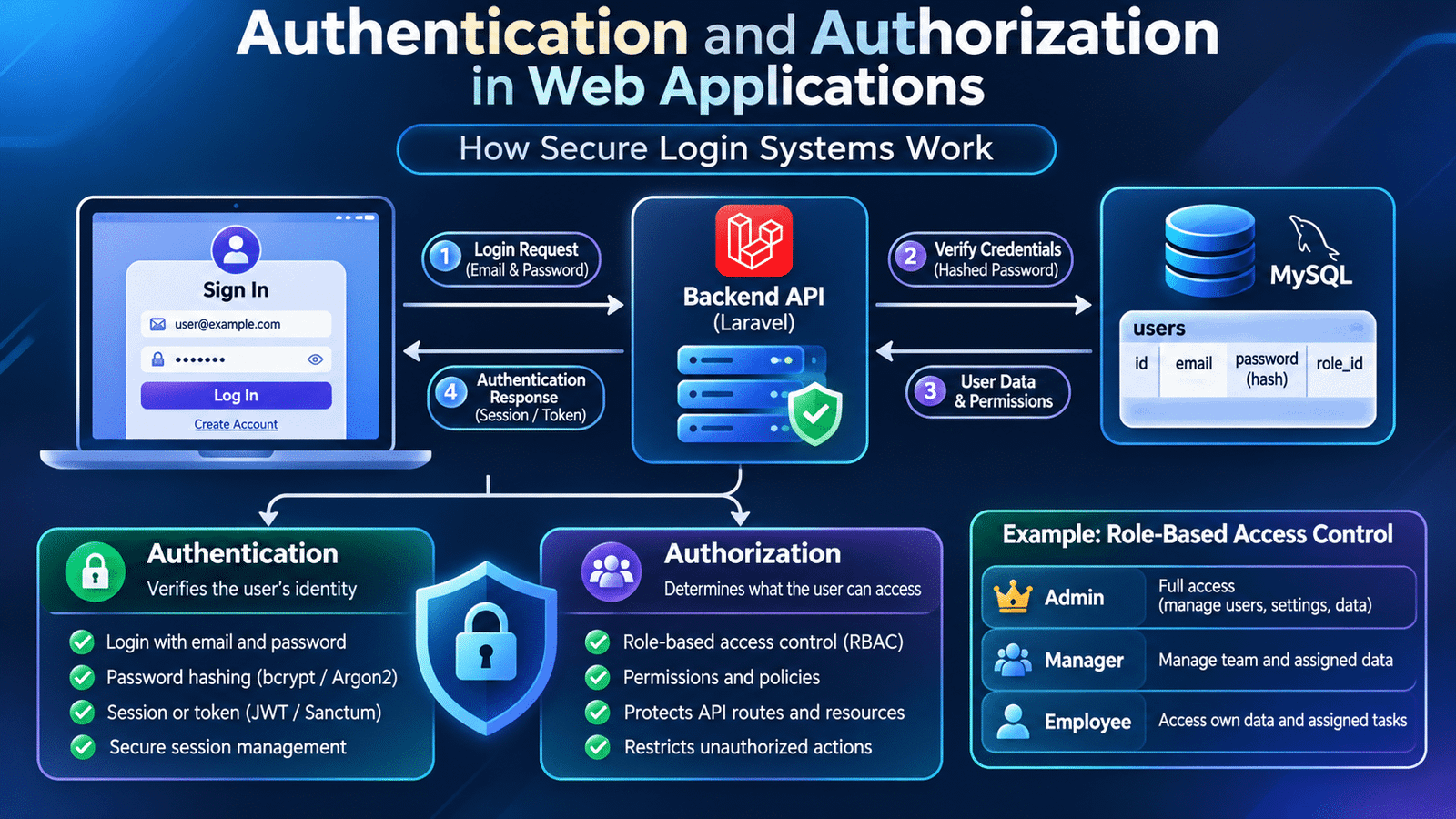
Authentication and authorization are essential components of modern web applications, helping developers verify user identities and control access to protected resources. From secure login systems to role-based permissions, these mechanisms protect application data and ensure users can access only the features they are allowed to use.
This process involves two closely related security concepts: authentication and authorization.
Although these terms are often used together, they solve different problems. Authentication verifies a user’s identity, while authorization determines which resources and operations that user can access.
For full-stack developers, understanding how these mechanisms work is essential when building secure applications. A login form alone does not provide application security. The backend must validate credentials, establish a trusted identity, protect API endpoints, and enforce permissions throughout the application.
Let’s explore how authentication and authorization work in real-world web application development.
1. Understanding Authentication and Authorization
Authentication and authorization are separate stages of an application’s security process.
Authentication answers the question: Who are you?
For example, when a user enters an email address and password, the application verifies whether those credentials belong to a registered account.
Authorization answers the question: What are you allowed to access?
After successful authentication, the application checks whether the user has permission to perform a particular operation.
Consider an employee management application:
- An employee can view their own profile.
- A manager can view information about their team.
- An administrator can manage employee accounts and system settings.
All three users may successfully log in, but their access permissions are different.
This distinction is important because verifying a user’s identity does not automatically grant permission to access every application feature.
2. How a Login System Works in a Web Application
A typical login workflow involves communication between the frontend, backend, and database.
Consider an application built using Vue.js, Laravel, and MySQL.
The process generally follows these steps:
- The user opens the login page.
- The frontend collects the email address and password.
- The application sends the credentials to a backend authentication endpoint over HTTPS.
- The backend validates the submitted information.
- The backend retrieves the corresponding user record.
- The submitted password is verified against the stored password hash.
- If the credentials are valid, the application establishes an authenticated session or issues an authentication token.
- The frontend uses the authenticated state when accessing protected features.
The database should never store plain-text passwords. Passwords must be stored using an appropriate password-hashing algorithm, such as Argon2id or bcrypt.
A simplified request might look like:
POST /api/login
Content-Type: application/json
{
"email": "user@example.com",
"password": "user-password"
}The backend verifies the credentials and returns an appropriate authentication response.
The exact response depends on whether the application uses session-based authentication or token-based authentication.
3. Password Hashing and Secure Credential Storage
Password security is one of the most important responsibilities of an authentication system.
When a user registers, the application should never save the original password directly in the database.
Instead, it should generate a password hash using a dedicated password-hashing algorithm.
For example, Laravel provides built-in password hashing functionality:
use Illuminate\Support\Facades\Hash;

$hashedPassword = Hash::make($request->password);
The resulting hash is stored in the users table.
During login, the backend verifies the submitted password:
$isValid = Hash::check(
    $request->password,
    $user->password
);
The application does not need to retrieve or decrypt the original password.
Password hashing protects stored credentials if the database is exposed. However, it should be combined with HTTPS, secure password reset workflows, rate limiting, and other security controls.
4. Session-Based Authentication
Session-based authentication is a common approach used by traditional web applications.
After successful login, the backend creates an authenticated session and maintains the user’s authentication state.
A simplified workflow looks like this:
User Login
    |
    v
Backend Validates Credentials
    |
    v
Session Created
    |
    v
Session Identifier Sent to Browser
    |
    v
Browser Sends Session Cookie
    |
    v
Backend Validates Session
    |
    v
Protected Resource Access
The browser typically stores a session identifier in a cookie. The actual session data is maintained by the server or a configured session store.
Session-based authentication is particularly useful for applications where the frontend and backend operate within a compatible session and cookie architecture.
For security, session cookies should use appropriate settings such as HttpOnly, Secure, and SameSite. Applications should also protect against cross-site request forgery where applicable.
5. Token-Based Authentication and JWT
Token-based authentication is widely used in applications that expose APIs to different clients, including web applications and mobile applications.
After successful authentication, the backend issues a token that the client can present when making subsequent requests.
JSON Web Token (JWT) is one commonly used token format.
A JWT typically contains three parts:
- Header: Identifies the token type and signing algorithm.
- Payload: Contains claims such as the subject and expiration time.
- Signature: Allows the receiving system to verify token integrity.
A simplified JWT structure looks like:
xxxxx.yyyyy.zzzzzFor an authenticated API request, the client may send:
GET /api/profile
Authorization: Bearer <access_token>
The backend validates the token before processing the protected request.
JWTs should be signed using an appropriate algorithm and securely managed. Sensitive information such as passwords should never be placed in the token payload because its contents are not inherently encrypted.
Applications should also consider token expiration, refresh strategies, revocation, and secure token storage.
6. Session Authentication vs Token Authentication
Both approaches can support secure authentication, but their implementation and operational requirements differ.
| Area | Session-Based | Token-Based |
|---|---|---|
| Authentication state | Server-side session | Token-based credentials |
| Client storage | Usually cookies | Depends on client architecture |
| Server state | Session storage required | May support stateless validation |
| Revocation | Session can be invalidated | Depends on token and revocation design |
| Common use cases | Traditional web applications | API-driven and multi-client applications |
Neither approach is automatically more secure in every situation.
The right choice depends on application architecture, client requirements, infrastructure, and security controls.
7. Understanding Authorization and Access Control
After authentication, applications must determine what the authenticated user is permitted to access.
Authorization is commonly implemented through roles, permissions, or policies.
Consider an administration dashboard with three roles:
| Role | Permissions |
|---|---|
| Admin | Manage users, roles, settings, and records |
| Manager | View team information and manage assigned records |
| Employee | Access personal information and assigned tasks |
The backend must enforce these permissions.
Hiding a button in the frontend is not sufficient. A user could still attempt to access the corresponding API endpoint directly.
For example, an employee should not be able to delete another employee’s account simply by sending a manually constructed API request.
The backend must validate authorization for every protected operation.
8. Role-Based Access Control (RBAC)
Role-Based Access Control, commonly called RBAC, assigns permissions through predefined roles.
Instead of assigning individual permissions to every user, developers create roles and associate permissions with them.
A typical database structure may include:
users
  |
  |
user_roles
  |
  |
roles
  |
  |
role_permissions
  |
  |
permissions
For example:
- The Administrator role can manage users.
- The Manager role can manage assigned projects.
- The Employee role can view assigned tasks.
When a user requests a protected operation, the backend checks whether their assigned role provides the required permission.
RBAC is useful when an application has clearly defined user categories and predictable permission requirements.
For more complex applications, developers may also use attribute-based or policy-based authorization.
9. Implementing Authentication in Laravel
Laravel provides authentication features and tools that help developers build secure login systems.
For API-driven applications, Laravel Sanctum is commonly used for first-party SPA authentication and API token authentication.
A simplified example of a login controller might look like:
use Illuminate\Http\Request;
use Illuminate\Support\Facades\Auth;
use Illuminate\Support\Facades\Hash;
use App\Models\User;

public function login(Request $request)
{
    $credentials = $request->validate([
        'email' => ['required', 'email'],
        'password' => ['required'],
    ]);

    $user = User::where(
        'email',
        $credentials['email']
    )->first();

    if (
        !$user ||
        !Hash::check(
            $credentials['password'],
            $user->password
        )
    ) {
        return response()->json([
            'message' => 'Invalid credentials'
        ], 401);
    }

    // Authentication response depends on
    // the configured session or token strategy.
}
This example demonstrates credential validation and password verification. It is not a complete production authentication implementation.
In a real Laravel application, developers should use the appropriate authentication guard or package, apply rate limiting, configure secure cookies, and implement logout and token lifecycle management.
10. Protecting API Routes in Laravel
Authentication middleware helps protect backend routes from unauthenticated requests.
For example, an API route can require an authenticated user:
Route::middleware('auth:sanctum')->group(function () {
    Route::get('/profile', [ProfileController::class, 'show']);

    Route::get('/orders', [OrderController::class, 'index']);
});
When a request reaches these endpoints, the authentication middleware verifies the user’s authentication state.
If the request is unauthenticated, the application rejects access.
However, authentication middleware alone does not determine whether a user can access a particular order or modify a specific record.
That requires authorization checks, such as Laravel policies, gates, or permission-based middleware.
11. Implementing Authentication in Vue.js
The frontend manages the user experience around authentication.
A Vue.js application typically provides:
- Login and registration forms.
- Input validation and error messages.
- Authenticated user information.
- Protected navigation.
- Logout functionality.
- Authentication state management.
For example, an Axios request can send login credentials to the backend:
import axios from 'axios';

export async function login(
    email: string,
    password: string
) {
    const response = await axios.post(
        '/api/login',
        {
            email,
            password
        }
    );

    return response.data;
}
The frontend should handle the response according to the authentication mechanism being used.
For cookie-based authentication, the application must correctly configure credentials, cookie domains, and CSRF protection.
For token-based authentication, token handling and storage must follow the application’s security design.
Frontend route guards can improve navigation and user experience, but they must never replace backend authorization checks.
12. Common Authentication and Authorization Security Risks
Authentication systems handle sensitive user information and must be designed with security in mind.
Some common risks include:
Weak password policies: Easily guessed passwords increase the risk of unauthorized access.
Brute-force attacks: Attackers may repeatedly submit login attempts to discover valid credentials. Rate limiting and monitoring help reduce this risk.
Insecure token storage: Exposed tokens can allow unauthorized users to access protected resources.
Broken access control: Users may access records or operations that should be restricted to other roles.
Session hijacking: Stolen session identifiers may allow attackers to impersonate authenticated users.
Insecure password reset workflows: Poorly designed reset links or verification mechanisms can compromise accounts.
Missing backend authorization: Protecting frontend pages without protecting API endpoints leaves important operations exposed.
Developers should follow security best practices throughout the application rather than treating login as the only security boundary.
13. Best Practices for Building Secure Authentication Systems
A reliable authentication and authorization implementation should include:
- Store passwords using secure password-hashing algorithms.
- Enforce HTTPS across application communication.
- Validate login and registration requests on the backend.
- Apply rate limiting to authentication endpoints.
- Use secure session cookies where applicable.
- Implement appropriate access-token expiration and revocation strategies.
- Enforce permissions on every protected backend operation.
- Use policies or permission-based checks for resource-level access.
- Implement secure logout and password reset workflows.
- Avoid exposing sensitive information in API responses and logs.
- Keep authentication dependencies and frameworks updated.
- Test unauthorized and forbidden access scenarios.
Security should be considered during application architecture and development, not added only after a vulnerability is discovered.
14. Frequently Asked Questions
What is the difference between authentication and authorization?
Authentication verifies a user’s identity, while authorization determines which resources and operations that user is permitted to access.
What is JWT authentication?
JWT authentication uses signed JSON Web Tokens to represent claims about an authenticated user or client. The backend validates the token before granting access to protected resources.
Is JWT more secure than session authentication?
Not automatically. Both approaches can be secure when implemented correctly. Security depends on token or session handling, storage, expiration, transport security, and access control.
What is RBAC?
Role-Based Access Control is an authorization approach where users receive permissions through assigned roles, such as administrator, manager, or employee.
What is Laravel Sanctum?
Laravel Sanctum provides authentication capabilities for first-party SPAs and API token-based applications. It supports different authentication requirements depending on the application architecture.
Why should authorization be checked on the backend?
Frontend restrictions can be bypassed. Backend authorization ensures users cannot perform operations or access resources beyond their assigned permissions.
Final Thoughts
Authentication and authorization are essential components of modern web application security. Authentication establishes user identity, while authorization ensures that each user can access only the resources and operations permitted by the application.
For full-stack developers, understanding password hashing, sessions, tokens, API middleware, roles, and permissions is important when building real-world applications.
A secure login system is not simply a form connected to a database. It is a complete security workflow that protects user accounts, application data, and business operations across every layer of the system.
Outbound links
Developers should follow the OWASP Authentication Security Guidelines when implementing secure login and credential management.
Internal links
To understand how frontend applications communicate with backend services, read our guide to Full-Stack Development.
Learn more about REST API Development and how backend endpoints handle application requests.
Explore our guide to Database Design for Web Applications to understand how user records and application data are structured.