
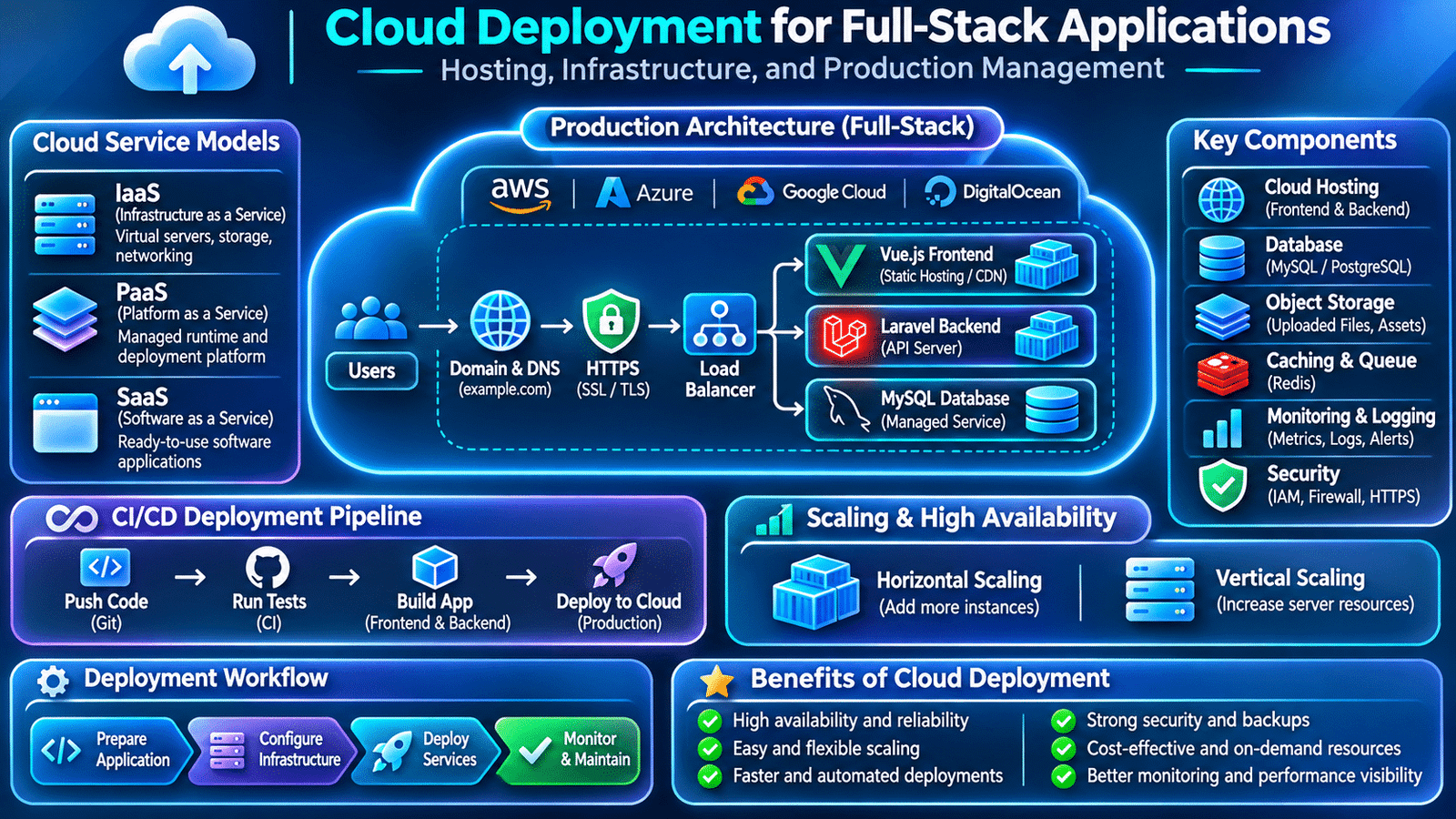
Cloud deployment is an essential part of modern full-stack development. Cloud deployment allows developers to host frontend applications, backend services, and databases on reliable infrastructure while maintaining security, availability, and application performance.
Consider a full-stack application built using Vue.js, Laravel, and MySQL. During development, the frontend may run on a local development server, the backend may use a local PHP environment, and the database may run on the developer’s computer.
However, production requires a different setup. The application needs a publicly accessible frontend, a backend server, a reliable database, secure communication, environment-specific configuration, and a process for deploying updates.
This is where cloud deployment for full stack applications becomes important.
Cloud deployment allows development teams to host application components on cloud infrastructure instead of depending entirely on locally managed machines. It provides access to computing resources, storage, networking, managed databases, monitoring services, and deployment tools.
For full-stack developers, understanding cloud deployment means knowing how application code moves from development into a production environment and how that environment is maintained after release.
Let’s explore the architecture, deployment process, and practical considerations involved in hosting modern full-stack applications.
1. Understanding Cloud Deployment for Full-Stack Applications
Cloud deployment is the process of hosting an application and its supporting services on cloud infrastructure so users can access them over a network.
Instead of maintaining every physical server, organizations can provision computing, storage, database, and networking resources through cloud service providers.
A typical full-stack application may use:
- Vue.js or Nuxt for the frontend.
- Laravel and PHP for backend processing.
- MySQL or PostgreSQL for persistent data.
- Redis for caching and queue processing.
- Object storage for uploaded files.
- A web server or load balancer for incoming traffic.
- Monitoring services for operational visibility.
These components do not necessarily need to run on one machine. They can be deployed separately based on application requirements.
For example, the frontend may be hosted through a static hosting platform or CDN, while the Laravel backend runs on cloud compute infrastructure and connects to a managed database.
This separation allows teams to manage each component according to its workload and operational needs.
2. Understanding Cloud Service Models
Cloud providers offer different service models depending on how much infrastructure the customer wants to manage.
Infrastructure as a Service (IaaS)
IaaS provides virtual computing resources such as virtual machines, storage, and networking.
The development or operations team manages the operating system, runtime, application configuration, and deployment.
For example, a team may provision a Linux virtual machine, install PHP and Nginx, configure Laravel, and connect it to a database.
IaaS provides flexibility but requires more infrastructure management.
Platform as a Service (PaaS)
PaaS provides a managed environment for deploying applications without requiring teams to manage every underlying server component.
Developers generally focus on application code, runtime configuration, environment variables, and deployment settings.
This can reduce operational effort for teams that do not need complete infrastructure control.
Software as a Service (SaaS)
SaaS provides complete software products through a service.
Examples include hosted email platforms, project management applications, and collaboration tools.
SaaS is different from deploying your own application, but a full-stack project may integrate with SaaS products for authentication, communication, analytics, or other functionality.
Choosing the right model depends on infrastructure requirements, team expertise, cost, and the level of operational control needed.
3. Planning the Architecture Before Deployment
A production deployment should begin with an understanding of how the application’s components communicate.
Consider a Vue.js frontend connected to a Laravel backend and MySQL database.
A simplified architecture looks like this:
                Users
                  |
                  v
             DNS / Domain
                  |
                  v
             HTTPS Gateway
                  |
          +-------+-------+
          |               |
          v               v
      Frontend         Backend API
       Hosting          Server
          |               |
          |               v
          |            Laravel
          |               |
          |          +----+----+
          |          |         |
          |          v         v
          |       MySQL      Redis
          |          |
          +----------+
In a real deployment, the frontend and backend may be hosted independently.
The architecture should define:
- Where frontend assets are served.
- Where backend requests are processed.
- How the database is accessed.
- Where uploaded files are stored.
- How background jobs are executed.
- How HTTPS and domain routing are configured.
- How application logs and metrics are collected.
Planning these responsibilities early helps avoid deployment problems caused by unclear service boundaries.
4. Choosing a Cloud Provider
Cloud providers offer computing, networking, storage, database, and application deployment services.
Some widely used providers include:
- Amazon Web Services (AWS).
- Microsoft Azure.
- Google Cloud.
- DigitalOcean.
Each platform provides different infrastructure options and pricing models.
For example, a Laravel application might run on a virtual machine, a managed application platform, or a container service.
Its MySQL database could run on the same server for a small setup or on a separate managed database service for a larger production environment.
When evaluating providers, development teams should consider:
- Required CPU and memory resources.
- Database and storage requirements.
- Expected application traffic.
- Regional availability and latency.
- Security and access management.
- Backup and recovery options.
- Monitoring capabilities.
- Operational complexity.
- Monthly infrastructure costs.
The most suitable provider is not necessarily the one with the largest number of services. It is the one that meets the application’s requirements without introducing unnecessary complexity.
5. Preparing the Application for Production
An application that runs successfully in development may still require changes before production deployment.
For a Laravel and Vue.js project, preparation may include:
Frontend preparation:
- Generate production assets.
- Remove development-only dependencies from the production workflow.
- Configure the correct backend API URL.
- Optimize images and static assets.
- Verify routing and environment-specific settings.
Backend preparation:
- Install production dependencies.
- Configure database connections.
- Set the correct application environment.
- Disable debug mode.
- Configure logging and storage.
- Prepare queue workers and scheduled tasks.
- Verify authentication and authorization behavior.
For example, Laravel production configuration may include:
APP_ENV=production
APP_DEBUG=false

DB_CONNECTION=mysql
DB_HOST=database-host
DB_PORT=3306
DB_DATABASE=application_db
DB_USERNAME=app_user
DB_PASSWORD=secure-password
These values are illustrative. Actual credentials should be stored through an appropriate secret-management system rather than committed to source control.
Production configuration should be reviewed before deployment because incorrect settings can expose sensitive information or prevent application services from connecting.
6. Deploying a Vue.js or Nuxt Frontend
The frontend is the application layer users interact with through their browsers.
A Vue.js application is commonly built into static assets that can be served through a web server, object storage with static hosting, or a CDN.
A typical build command might be:
pnpm install --frozen-lockfile
pnpm build
The resulting production files can then be uploaded to the selected hosting platform.
For Nuxt applications, deployment depends on the rendering strategy.
Static generation: The application generates static files that can be served through static hosting.
Server-side rendering: A Node.js server runs the Nuxt application and generates responses when requests arrive.
Hybrid rendering: Different routes can use different rendering strategies based on application requirements.
Developers should verify that API URLs, routing behavior, asset paths, and runtime configuration are correct in the deployed environment.
A frontend that works locally but points to a development API URL will not communicate correctly with the production backend.
7. Deploying a Laravel Backend
The Laravel backend handles business logic, authentication, database operations, API responses, and other server-side functionality.
A production Laravel deployment generally involves:
- Provisioning a suitable server or application runtime.
- Installing the required PHP version and extensions.
- Configuring the web server and PHP-FPM.
- Installing Composer dependencies.
- Setting environment variables.
- Configuring database connectivity.
- Running compatible database migrations.
- Preparing storage permissions.
- Configuring queues and scheduled tasks.
- Verifying application health.
A typical dependency installation command is:
composer install \
    --no-dev \
    --prefer-dist \
    --optimize-autoloader
Laravel’s production optimization command can also be used:
php artisan optimizeThe web server must be configured to serve the Laravel application’s public directory rather than exposing the project root.
The deployment should also ensure that required storage and cache directories are writable by the correct application user.
8. Configuring Production Databases
A production database stores important application information, including user accounts, transactions, orders, and business records.
For a full-stack application, database configuration should consider:
- Database engine and version.
- Network access restrictions.
- Credentials and permissions.
- Connection limits.
- Backup schedules.
- Recovery procedures.
- Query performance.
- Monitoring and maintenance.
For example, a Laravel application may connect to a managed MySQL database hosted separately from the backend server.
The database should not be publicly accessible without a strong reason. Access should be restricted to authorized application infrastructure and administrative systems.
Managing Database Migrations
Laravel migrations provide a version-controlled way to modify database structures.
A deployment may require:
php artisan migrate --forceHowever, database migrations must be reviewed carefully before production execution.
Removing a column or changing a data type can break older application versions during a rolling deployment.
A safer approach is to introduce backward-compatible schema changes, deploy application updates, migrate existing data where necessary, and remove obsolete structures in a later release.
Database backups and recovery plans should also be tested rather than simply assumed to work.
9. Configuring Domains, DNS, and HTTPS
After deploying application services, users need a domain through which they can access the application.
Domain configuration involves connecting the registered domain to the appropriate hosting infrastructure using DNS records.
Common DNS record types include:
- A record: Points a domain to an IPv4 address.
- AAAA record: Points a domain to an IPv6 address.
- CNAME record: Creates an alias to another hostname.
- MX record: Specifies mail servers for a domain.
For example, a frontend and backend may use separate subdomains:
www.example.com
api.example.com
The frontend can communicate with the backend API using the configured API domain.
HTTPS should be enabled for production communication. TLS certificates help encrypt data transferred between browsers and application servers.
Teams should also configure:
- Secure HTTP redirects.
- Correct certificate renewal.
- CORS policies.
- Secure cookie settings.
- Appropriate security headers.
Domain and HTTPS configuration should be verified before exposing the application to users.
10. Managing File Storage and Uploaded Documents
Many applications allow users to upload profile pictures, documents, reports, and other files.
Storing these files only on the local filesystem of one application server can create problems when the application scales to multiple instances.
For example, a file uploaded to one server may not be available when another backend instance handles the next request.
Cloud object storage provides a separate storage layer that application instances can access through configured credentials and permissions.
A Laravel application can use its filesystem abstraction to work with local or cloud storage.
A simplified example:
$path = $request->file('document')
    ->store('documents', 's3');
This example assumes an appropriately configured S3-compatible disk.
Production file storage should also consider:
- Private and public access.
- File validation.
- Upload size limits.
- Secure download URLs.
- Access permissions.
- Retention policies.
- Backup and recovery requirements.
Object storage helps separate file management from the lifecycle of individual application servers.
11. Integrating CI/CD with Cloud Deployment
Cloud deployment becomes more efficient when integrated with a CI/CD pipeline.
Instead of manually transferring code and executing deployment commands for every release, teams can automate the process.
A typical workflow may look like:
Developer Pushes Code
        |
        v
Git Repository
        |
        v
CI Pipeline
        |
        v
Run Automated Tests
        |
        v
Build Frontend and Backend
        |
        v
Prepare Deployment Artifacts
        |
        v
Deploy to Cloud Environment
        |
        v
Health Checks and Monitoring
Tools such as GitHub Actions can automate these stages.
A deployment workflow can be configured to:
- Install project dependencies.
- Run frontend and backend tests.
- Build application assets.
- Create container images where required.
- Publish validated artifacts.
- Deploy to staging or production.
- Verify application health.
Production deployments should use protected credentials and controlled approval processes where appropriate.
For applications using Docker and Kubernetes, CI/CD pipelines can build container images and deploy versioned releases to the cluster.
12. Monitoring Production Applications
Deployment does not finish when the application becomes accessible.
Production applications need continuous monitoring because users may encounter problems that were not visible during development or testing.
Development teams should monitor:
- Application response times.
- API error rates.
- Server CPU and memory utilization.
- Database performance.
- Queue processing delays.
- Storage utilization.
- Network errors.
- Authentication failures.
- Application logs.
For example, an API endpoint may respond normally during testing but become slow when real users access it simultaneously.
Monitoring helps developers identify whether the issue is related to database queries, server capacity, network latency, or application logic.
Tools such as cloud monitoring services, application performance monitoring platforms, and centralized logging systems provide useful visibility into production behavior.
Monitoring should include alerts for important failures so that teams can respond before issues significantly affect users.
13. Scaling Cloud-Deployed Applications
As an application grows, its infrastructure may need to support additional users and requests.
There are two common scaling approaches.
Vertical Scaling: Increasing the resources of an existing server, such as CPU, memory, or storage.
Horizontal Scaling: Adding more application instances and distributing incoming requests across them.
For example, a Laravel application initially running on one server may later use multiple backend instances behind a load balancer.
Horizontal scaling requires careful consideration of shared application state.
Teams may need:
- Centralized session storage.
- Shared caching infrastructure.
- Shared file storage.
- Database connection management.
- Background queue processing.
- Load balancing.
- Health checks.
Kubernetes and cloud container services can help manage horizontally scaled workloads, but the application itself must also be designed to operate correctly across multiple instances.
14. Cloud Security and Production Access Management
Cloud environments contain important application resources and sensitive information.
A security mistake in infrastructure configuration can expose databases, storage, credentials, or administrative interfaces.
Developers and operations teams should follow security practices such as:
- Restricting access to infrastructure resources.
- Using least-privilege identity and access policies.
- Protecting API keys and database credentials.
- Enabling HTTPS.
- Restricting database network access.
- Keeping operating systems and dependencies updated.
- Configuring firewall rules.
- Monitoring suspicious access.
- Maintaining secure backup policies.
- Reviewing cloud permissions regularly.
Administrative access should be limited to authorized team members.
Secrets should be managed through appropriate secret-management services rather than being stored in public repositories or included in container images.
Security must be considered across the application, infrastructure, storage, and deployment pipeline.
15. Backup, Recovery, and Production Reliability
Production applications must be prepared for unexpected failures.
A server may become unavailable, a deployment may introduce a problem, or important data may be accidentally modified.
A recovery plan should define how the team restores application services and data.
Important considerations include:
Database backups: Schedule regular backups and verify that restoration works.
File backups: Protect important uploaded documents and stored application assets.
Application releases: Retain previous validated application versions for recovery.
Infrastructure configuration: Keep deployment and infrastructure definitions under version control where appropriate.
Recovery objectives: Define acceptable recovery time and potential data loss.
Two useful concepts are:
- Recovery Time Objective (RTO): The target time within which service should be restored.
- Recovery Point Objective (RPO): The acceptable amount of data loss measured in time.
A backup is useful only if it can be restored successfully. Teams should periodically test their recovery procedures.
16. Common Cloud Deployment Challenges
Cloud deployment introduces operational responsibilities that developers must understand.
Configuration differences: Applications may behave differently across development, staging, and production environments.
Incorrect permissions: Backend services may fail to access storage, databases, or required infrastructure resources.
Network connectivity issues: Firewall rules, DNS configuration, or service endpoints may prevent communication between components.
Deployment failures: Missing dependencies, incorrect build artifacts, or failed migrations can interrupt releases.
Unexpected costs: Unused infrastructure, excessive storage, and high network traffic can increase cloud expenses.
Database bottlenecks: Increasing application instances does not automatically increase database capacity.
Insufficient monitoring: Problems may remain unnoticed until users report them.
Recovery limitations: Backups and rollback procedures may be ineffective if they have not been tested.
A reliable deployment process requires planning, monitoring, documentation, and continuous improvement.
17. Best Practices for Cloud Deployment
Development teams should follow these practices when deploying full-stack applications:
- Plan the application architecture before provisioning infrastructure.
- Separate development, staging, and production environments.
- Store secrets securely.
- Use HTTPS for application communication.
- Deploy validated application builds.
- Automate testing and deployment where practical.
- Restrict infrastructure and database access.
- Use managed services when they reduce operational complexity.
- Configure regular backups and test recovery.
- Monitor application performance and infrastructure health.
- Review resource utilization and cloud costs.
- Maintain documented deployment and rollback procedures.
Cloud deployment should be treated as an ongoing engineering responsibility rather than a one-time setup activity.
18. Frequently Asked Questions
What is cloud deployment in full-stack development?
Cloud deployment is the process of hosting frontend, backend, database, and supporting application services on cloud infrastructure so users can access the application over a network.
Which cloud providers are commonly used for web applications?
Amazon Web Services, Microsoft Azure, Google Cloud, and DigitalOcean are commonly used platforms that provide infrastructure and application hosting services.
Can Vue.js and Laravel be deployed separately?
Yes. Vue.js can be hosted as a static application or through a suitable Nuxt runtime, while Laravel can run on separate backend infrastructure. They communicate through configured API endpoints.
Is Docker necessary for cloud deployment?
No. Applications can be deployed directly to servers or managed platforms. Docker is useful when teams want consistent containerized environments across development, testing, and production.
What is the difference between vertical and horizontal scaling?
Vertical scaling increases the resources of an existing server. Horizontal scaling adds more application instances and distributes workloads across them.
Why is monitoring important after deployment?
Monitoring helps teams identify slow requests, application errors, resource limitations, and infrastructure problems before they significantly affect users.
Why are database backups important?
Database backups help organizations recover important application information after accidental data changes, infrastructure failures, or other unexpected incidents.
Final Thoughts
Cloud deployment connects application development with the infrastructure required to make software available to real users.
For full-stack developers, understanding hosting, server configuration, database connectivity, domain management, storage, security, monitoring, and scaling is essential when working with production applications.
A successful deployment is not simply uploading application files to a server. It involves creating a secure, reliable, and maintainable environment where every application component can communicate and operate correctly.
As applications grow, cloud infrastructure and deployment practices become important parts of long-term software engineering.
Internal links
Kubernetes for Full-Stack Developers
Docker for Full-Stack Developers
CI/CD for Full-Stack Applications