
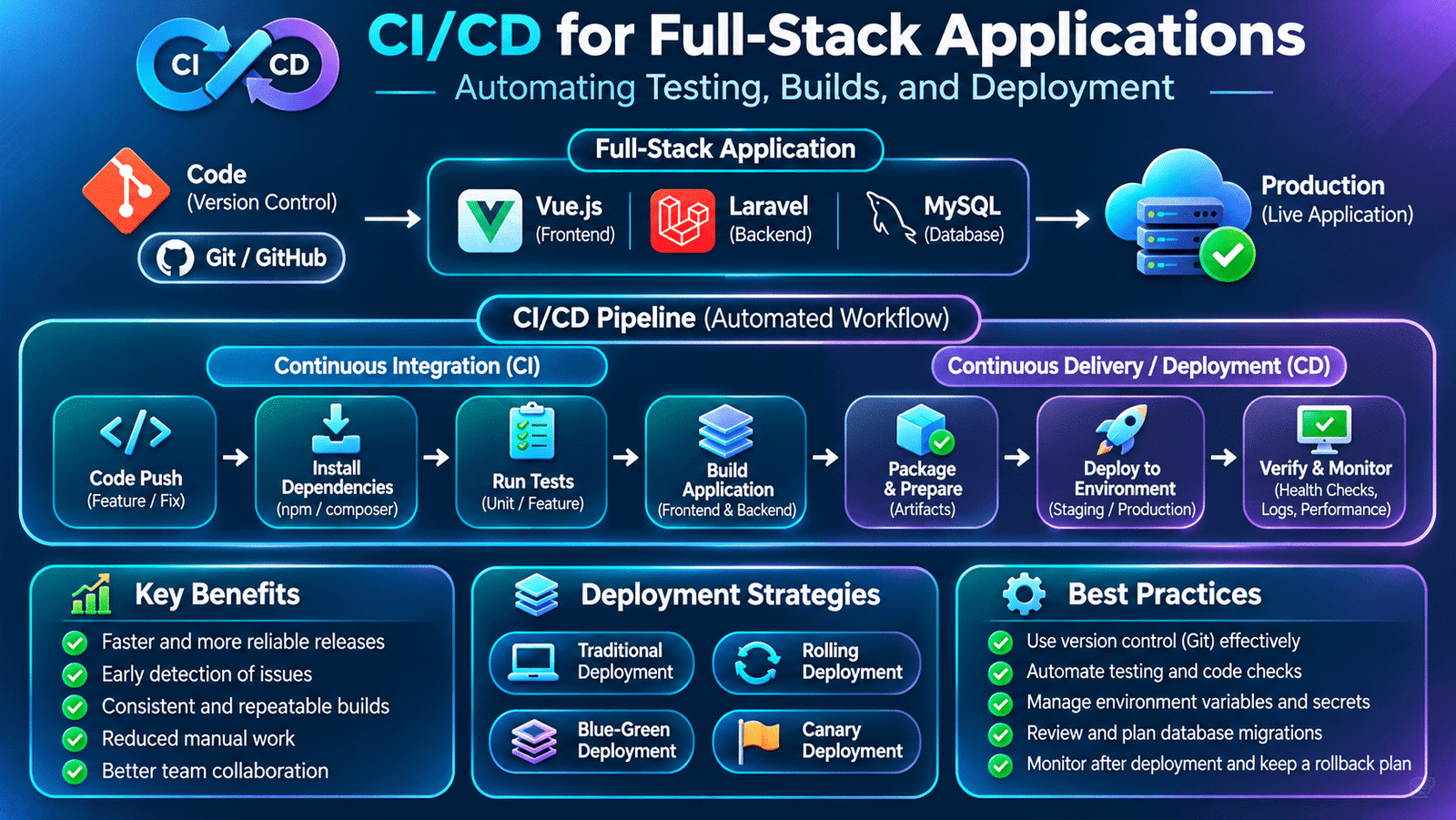
CI/CD for full stack applications helps development teams automate code integration, testing, application builds, and deployment. It creates a consistent workflow that allows developers to validate changes and deliver software more reliably.
In a development team, these activities happen continuously. Multiple developers may work on different features, submit code changes, fix bugs, and release updates to the same application. Managing this process manually can introduce inconsistencies, deployment mistakes, and delays.
This is where CI/CD for full stack applications becomes important.
Continuous Integration and Continuous Delivery or Deployment help development teams automate repetitive software delivery activities. Instead of relying entirely on manual steps, teams create pipelines that validate code changes, build applications, run tests, and prepare or release updates.
For full-stack developers, understanding CI/CD is an important part of working with production applications. It connects everyday development activities with reliable software delivery.
1. Understanding CI/CD in Modern Software Development
CI/CD represents a collection of practices that automate the process of integrating, validating, and delivering application changes.
It consists of two closely related concepts.
Continuous Integration (CI) is the practice of frequently integrating code changes into a shared repository. Each change can trigger automated checks such as code validation, testing, and build verification.
Continuous Delivery (CD) extends this process by preparing validated application changes for release. The production deployment may still require manual approval.
Continuous Deployment takes automation further by automatically releasing changes to production after they pass the required pipeline stages.
These approaches help teams identify problems earlier and reduce the manual effort involved in software delivery.
2. Why CI/CD Is Important for Full-Stack Applications
Consider a project built using Vue.js, Laravel, and MySQL.
A frontend developer updates a product listing page, while a backend developer modifies the product API. Another developer updates database migrations.
Before these changes reach production, the team needs to verify that:
- The frontend application builds successfully.
- Backend dependencies are valid.
- Automated tests pass.
- API integrations continue to work.
- Database migrations are compatible with the release.
- Required environment configurations are available.
Without an automated workflow, developers may need to perform these checks manually for every release.
Implementing CI/CD for full stack applications reduces repetitive deployment tasks and helps development teams identify integration problems before releasing updates.
A CI/CD pipeline provides a consistent process for validating and delivering changes.
Some important benefits include:
- Earlier detection of integration problems.
- Consistent application builds.
- Faster feedback for developers.
- Reduced repetitive deployment work.
- Better release visibility.
- More predictable software delivery.
- Improved collaboration across development teams.
CI/CD does not guarantee that every release will be error-free, but it makes the delivery process more controlled and repeatable.
3. Understanding CI/CD for Full-Stack Applications
A CI/CD pipeline is an automated sequence of steps that runs when code changes are submitted or a release is initiated.
A typical full-stack pipeline may follow this workflow:
Developer Writes Code
        |
        v
Push Changes to Git
        |
        v
Continuous Integration
        |
        v
Install Dependencies
        |
        v
Run Code Quality Checks
        |
        v
Execute Automated Tests
        |
        v
Build Frontend Application
        |
        v
Prepare Backend Application
        |
        v
Deployment Approval
        |
        v
Deploy to Environment
        |
        v
Post-Deployment Verification
Each stage has a specific responsibility.
If an important validation step fails, the pipeline can stop before the changes reach the next stage.
This helps prevent known problems from progressing through the release process.
4. Version Control as the Foundation of CI/CD
CI/CD pipelines usually begin with a version control system such as Git.
Developers use Git to track changes, collaborate through branches, and review modifications before merging them into shared code.
A typical feature development workflow looks like this:
git checkout -b feature/product-dashboard

git add .

git commit -m "Add product dashboard"

git push origin feature/product-dashboard
After pushing the branch, the developer can create a pull request.
The CI pipeline can automatically run checks against the proposed changes before the team approves and merges them.
This creates an important connection between code review and automated validation.
For larger teams, branch protection rules can require successful checks and approvals before merging changes into important branches.
5. Setting Up Continuous Integration with GitHub Actions
GitHub Actions is an automation platform that allows developers to run workflows directly from a GitHub repository.
Workflows are defined using YAML files stored inside the .github/workflows directory.
For example:
project/
  .github/
    workflows/
      ci.yml
  frontend/
  backend/
A workflow can run whenever code is pushed or a pull request is created.
A simplified example:
name: Application CI

on:
  push:
    branches: [main, develop]
  pull_request:
    branches: [main, develop]

jobs:
  validate:
    runs-on: ubuntu-latest

    steps:
      - name: Checkout repository
        uses: actions/checkout@v4

      - name: Display repository information
        run: echo "Running CI checks"
This workflow checks out the repository and executes a simple command.
In a real project, additional steps would install dependencies, configure required services, run automated tests, and build the application.
The exact pipeline depends on the project’s framework, repository structure, and deployment requirements.
6. Automating Frontend Builds and Validation
Frontend applications need to pass validation before they are prepared for deployment.
For a Vue.js or Nuxt application, this may include:
- Installing dependencies.
- Running lint checks.
- Performing TypeScript validation.
- Executing unit tests.
- Building the production application.
A simplified GitHub Actions job might look like:
frontend:
  runs-on: ubuntu-latest

  defaults:
    run:
      working-directory: frontend

  steps:
    - name: Checkout code
      uses: actions/checkout@v4

    - name: Setup Node.js
      uses: actions/setup-node@v4
      with:
        node-version: 22

    - name: Install dependencies
      run: npm ci

    - name: Run lint
      run: npm run lint

    - name: Run tests
      run: npm run test

    - name: Build application
      run: npm run build
This is an illustrative workflow. The commands should match the scripts and package manager configured in the actual project.
For example, a PNPM workspace should use the appropriate PNPM setup and lockfile-based installation rather than assuming npm is used.
If a validation or build step fails, GitHub Actions marks the job as failed.
This gives developers an opportunity to fix problems before the changes are merged or deployed.
7. Automating Backend Testing with Laravel
Backend validation is equally important in a full-stack application.
A Laravel project may need to verify:
- PHP syntax and framework compatibility.
- Composer dependencies.
- Application configuration.
- Unit tests.
- Feature tests.
- Database-related behavior.
- API response validation.
A simplified GitHub Actions workflow for Laravel might include:
backend:
  runs-on: ubuntu-latest

  defaults:
    run:
      working-directory: backend

  steps:
    - name: Checkout code
      uses: actions/checkout@v4

    - name: Setup PHP
      uses: shivammathur/setup-php@v2
      with:
        php-version: '8.4'
        extensions: mbstring, pdo_mysql

    - name: Install dependencies
      run: composer install --no-interaction --prefer-dist

    - name: Prepare environment
      run: |
        cp .env.example .env
        php artisan key:generate

    - name: Run tests
      run: php artisan test
This example demonstrates the main validation stages. A production-ready workflow must also configure database services, required PHP extensions, application environment variables, and any external dependencies used by the test suite.
Automated backend tests help detect problems in controllers, services, validation rules, database operations, and API behavior.
8. Testing Frontend and Backend Integration
A full-stack application contains multiple components that must work together.
Frontend tests may pass independently, and backend tests may also pass independently, but integration problems can still occur.
For example:
- The frontend expects a
product_namefield, but the backend returnsname. - An API endpoint changes its response structure.
- Authentication middleware rejects requests from the frontend.
- A database migration introduces an unexpected constraint.
- A frontend environment variable points to the wrong API URL.
Integration testing helps identify these problems.
Teams can use different testing levels:
Unit Testing: Verifies individual functions, classes, and components.
Feature or Integration Testing: Verifies interactions between application components and services.
End-to-End Testing: Simulates user workflows across the application, such as login, product selection, and checkout.
A reliable pipeline should include the testing stages that provide meaningful coverage for the application’s business-critical workflows.
9. Environment Configuration and Secret Management
Applications often run in multiple environments:
- Local development.
- Testing.
- Staging.
- Production.
Each environment may use different database connections, API URLs, credentials, storage services, and application settings.
For example, a Laravel application may use:
APP_ENV=production
APP_DEBUG=false

DB_CONNECTION=mysql
DB_HOST=database-host
DB_DATABASE=application_db
Actual credentials should not be committed to Git.
CI/CD platforms provide secret-management facilities for storing sensitive values such as deployment keys, database credentials, and API tokens.
GitHub Actions supports repository, environment, and organization secrets.
Workflows can access these values when required:
- name: Deploy application
  env:
    DEPLOY_HOST: ${{ secrets.DEPLOY_HOST }}
  run: echo "Deployment configuration loaded"
This example demonstrates secret access without printing the secret value.
Teams should apply least-privilege access, protect production environments, and avoid exposing sensitive information in logs.
10. Deploying Applications Through a CD Pipeline
After code passes the required validation steps, the deployment stage prepares or releases the application.
A typical deployment process may include:
- Select the validated version of the code.
- Prepare the deployment artifact.
- Connect to the deployment environment.
- Install or verify production dependencies.
- Apply required configuration.
- Run compatible database migrations.
- Restart or reload application services.
- Verify that the application is responding correctly.
For a Laravel application, production deployment may involve commands such as:
composer install --no-dev --optimize-autoloader

php artisan migrate --force

php artisan optimize
These commands are only part of a deployment process. Teams must also plan file permissions, storage, queue workers, scheduled tasks, cache behavior, service restarts, and rollback procedures.
Database migrations deserve particular attention. A migration that removes or renames a column may break an older application version if deployment is not coordinated carefully.
For high-availability systems, teams often use backward-compatible schema changes and staged rollout strategies.
11. Deployment Strategies for Production Applications
Not every application should use the same deployment strategy.
The choice depends on infrastructure, availability requirements, traffic, and the risk associated with a release.
Traditional Deployment
The application is updated directly on the existing server.
This approach can be straightforward for smaller applications, but deployment may temporarily interrupt availability if updates require service restarts.
Rolling Deployment
New application instances are deployed gradually while existing instances continue handling requests.
This helps reduce disruption during updates.
Blue-Green Deployment
Two environments are maintained: one serving production traffic and another prepared with the new release.
After validation, traffic is switched to the new environment.
This approach can make rollback easier, provided database changes and shared state are compatible.
Canary Deployment
A new version is released to a limited portion of users or traffic before a wider rollout.
Teams monitor errors and performance before increasing exposure.
These strategies help organizations manage release risk and maintain application availability.
12. Monitoring and Rollback After Deployment
A successful deployment pipeline should not end immediately after the application is released.
Teams need to verify that the application behaves correctly in the target environment.
Useful post-deployment checks include:
- Application health endpoints.
- API response checks.
- Error-rate monitoring.
- Database connectivity.
- Queue processing status.
- Application logs.
- Response-time monitoring.
- Critical user workflows.
If a deployment introduces a serious problem, teams need a rollback or recovery strategy.
Rollback may involve restoring a previous application release, reversing traffic routing, or applying a forward-fix.
Database changes require separate planning because not every migration can be safely reversed after new data has been written.
This is why deployment verification and rollback planning should be part of the release process.
13. Common CI/CD Challenges in Real Development Teams
CI/CD improves software delivery, but implementing it requires careful planning.
Some common challenges include:
Unstable automated tests: Tests that fail intermittently make it difficult to trust pipeline results.
Environment differences: Applications may behave differently in local, testing, and production environments.
Slow pipelines: Running unnecessary jobs or rebuilding unchanged components can increase feedback time.
Dependency failures: External package repositories or incompatible dependency versions may interrupt builds.
Secret management problems: Incorrect or missing credentials can cause deployment failures.
Database migration risks: Changes to existing schemas may affect application compatibility.
Insufficient monitoring: A pipeline may report successful deployment even when important application workflows are broken.
Development teams should continuously improve pipeline reliability and make failures easy to investigate.
14. Best Practices for CI/CD in Full-Stack Applications
A maintainable CI/CD process should support the team’s development workflow without introducing unnecessary complexity.
Consider these practices:
- Use version control consistently.
- Create separate validation stages for frontend and backend.
- Run automated tests before merging important changes.
- Use lockfiles for reproducible dependency installation.
- Store secrets in protected secret-management systems.
- Keep development, testing, and production configurations separate.
- Use environment protection for production deployments.
- Review database migrations before release.
- Monitor applications after deployment.
- Maintain documented rollback procedures.
- Keep workflows readable and reusable.
- Review pipeline performance and reliability regularly.
CI/CD should evolve alongside the application and the team’s release requirements.
15. Frequently Asked Questions
What is CI/CD in software development?
CI/CD refers to practices that automate code integration, testing, application builds, and software delivery or deployment.
What is the difference between Continuous Integration and Continuous Deployment?
Continuous Integration automatically validates code changes as they are integrated. Continuous Deployment automatically releases changes to production after they pass the required checks.
Is GitHub Actions useful for full-stack applications?
Yes. GitHub Actions can automate frontend builds, backend tests, code quality checks, integration workflows, and deployment tasks.
Does CI/CD eliminate manual testing?
No. Automated tests improve repeatability and feedback, but manual exploratory testing and human review remain valuable.
What is the difference between Continuous Delivery and Continuous Deployment?
Continuous Delivery keeps validated changes ready for release, often with a manual production approval. Continuous Deployment automatically releases validated changes to production.
Why are database migrations important in CI/CD?
Migrations allow database schema changes to be version-controlled and applied consistently. They must be planned carefully to preserve compatibility and protect existing data.
Final Thoughts
CI/CD is an important part of modern full-stack development because it connects code changes with reliable software delivery.
By automating dependency installation, code validation, testing, application builds, and deployment, development teams can reduce repetitive work and identify problems earlier.
For full-stack developers, understanding CI/CD means looking beyond writing frontend and backend code. It means understanding how application changes move from a developer’s machine into testing and production environments.
A well-designed pipeline helps teams release software more consistently, respond to problems faster, and maintain confidence as applications continue to grow.
Internal links
Web Application Performance Optimization