
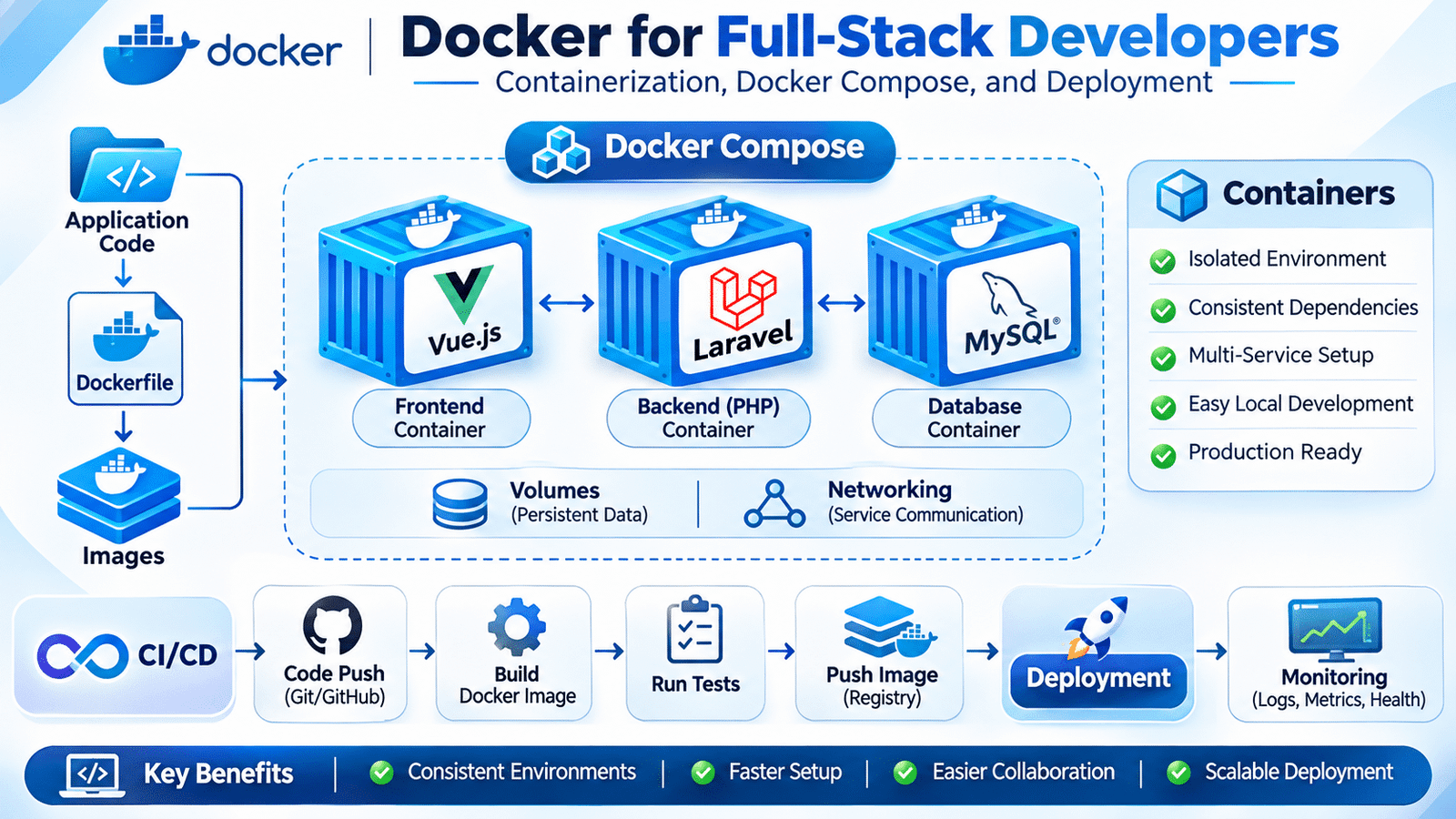
Docker for full stack development helps developers create consistent application environments using containers. It simplifies the process of managing frontend frameworks, backend services, databases, and dependencies across development, testing, and production environments.
Consider a full-stack application built using Vue.js, Laravel, and MySQL. A developer may have PHP 8.4 installed locally, while another developer uses PHP 8.3. The application might also depend on a specific MySQL version, Redis configuration, and additional PHP extensions.
Maintaining these dependencies manually across multiple development environments can become difficult.
This is where Docker for full stack development becomes useful. Docker allows developers to package applications and their required dependencies into containers, making it easier to create consistent environments across development, testing, and production.
For full-stack developers, understanding Docker is increasingly important because modern applications often contain multiple services that must work together.
Let’s explore how Docker works and how it can be used in real-world application development.
1. Understanding Docker in Full-Stack Development
Docker is a platform used to build, package, and run applications inside containers.
A container provides an isolated environment containing an application and the dependencies required to run it.
Instead of installing every application dependency directly on a developer’s computer, teams can define the environment using Docker configuration files.
Docker for full stack development makes it easier for teams to manage multiple application services without manually configuring every dependency on each developer’s machine.
For example, a full-stack application might contain:
- Vue.js or Nuxt for the frontend.
- Laravel and PHP for the backend.
- MySQL or PostgreSQL for the database.
- Redis for caching and queues.
- Nginx for handling HTTP requests.
Docker allows these services to run as separate containers while communicating through a shared container network.
This makes the development environment more predictable and easier to reproduce.
2. Understanding Containers and Virtual Machines
Containers and virtual machines both provide isolated environments, but they use different approaches.
A virtual machine runs its own guest operating system on virtualized hardware.
A container shares the host operating system’s kernel while isolating application processes and resources.
| Feature | Containers | Virtual Machines |
|---|---|---|
| Operating system | Shares host kernel | Runs a guest OS |
| Startup | Generally faster | Generally slower |
| Resource usage | Usually lower | Usually higher |
| Isolation | Process and resource isolation | Virtual hardware and OS isolation |
| Common use | Application packaging | Full operating system virtualization |
Containers are particularly useful for application development because they can start quickly and run multiple services without requiring a separate full operating system for each service.
However, containers are not identical to virtual machines, and their isolation and security characteristics must be considered when designing production infrastructure.
3. Understanding Docker Images and Containers
Two important concepts in Docker are images and containers.
Docker Image: An image is a packaged template containing the application files, runtime, dependencies, and configuration required to create a container.
Docker Container: A container is a running instance of an image.
Consider a Laravel application.
A PHP image can contain the required PHP runtime and extensions. Docker uses that image to create a container in which the Laravel application runs.
The same image can be used to create multiple containers when required.
A simplified workflow looks like this:
Application Source Code
        |
        v
Dockerfile
        |
        v
Docker Image
        |
        v
Docker Container
        |
        v
Running Application
This separation makes it easier to build application environments consistently.
4. Installing Docker and Understanding Its Components
Docker development generally involves a few important components.
- Docker Engine: Builds and runs containers.
- Docker CLI: Allows developers to interact with Docker through commands.
- Docker Desktop: Provides a desktop application for supported operating systems.
- Docker Hub: Provides a registry where developers can find and publish container images.
- Docker Compose: Allows multiple containers to be defined and managed together.
After installing Docker, developers can verify the installation:
docker --version

docker compose version
To verify that Docker can run a container:
docker run hello-worldThis downloads and runs a small test image when necessary.
5. Creating a Dockerfile for an Application
A Dockerfile contains instructions used to build a Docker image.
Consider a simple PHP application. A Dockerfile might look like this:
FROM php:8.4-fpm

WORKDIR /var/www/html

RUN docker-php-ext-install pdo_mysql

COPY . .

CMD ["php-fpm"]
Let’s understand the instructions.
FROMselects the base image.WORKDIRdefines the working directory.RUNexecutes commands while building the image.COPYcopies application files into the image.CMDdefines the default process executed when the container starts.
This example provides a basic PHP-FPM environment. A production Laravel image would need additional configuration for required extensions, Composer dependencies, file permissions, and application startup.
Dockerfiles make the application environment reproducible because the required setup steps are defined as code.
6. Dockerizing a Laravel Backend Application
A Laravel backend requires PHP, Composer dependencies, the necessary PHP extensions, and a suitable runtime configuration.
A simplified Dockerfile for a Laravel application could be:
FROM php:8.4-fpm

WORKDIR /var/www/html

RUN apt-get update && apt-get install -y \
    git \
    unzip \
    libzip-dev \
    && docker-php-ext-install \
    pdo_mysql \
    zip

COPY --from=composer:2 /usr/bin/composer /usr/bin/composer

COPY . .

RUN composer install \
    --no-dev \
    --no-interaction \
    --prefer-dist \
    --optimize-autoloader

CMD ["php-fpm"]
This demonstrates how PHP, required extensions, Composer, and application files can be included in a container image.
For an actual production application, developers should use a carefully designed multi-stage build, avoid copying secrets into images, manage permissions, and ensure Laravel’s storage and cache directories are writable.
The image should also be built and tested using the same application requirements expected in the deployment environment.
7. Dockerizing a Vue.js Frontend Application
Frontend applications also benefit from containerization.
A Vue.js or Nuxt project may require a specific Node.js version, dependency installation, and build configuration.
A simplified Dockerfile for a Vue.js application might look like:
FROM node:22-alpine

WORKDIR /app

COPY package*.json ./

RUN npm ci

COPY . .

RUN npm run build

CMD ["npm", "run", "preview"]
This example assumes an application with the relevant npm scripts configured.
In a production environment, developers may use a multi-stage build to create static assets and serve them through Nginx or another suitable web server.
For Nuxt applications, the runtime strategy depends on whether the project uses static generation or server-side rendering.
The important principle is to define the frontend runtime and build requirements consistently.
8. Managing Multiple Services with Docker Compose
Most full-stack applications require more than one container.
For example, a typical application may need:
- A frontend container.
- A Laravel backend container.
- A MySQL database container.
- A Redis container.
- An Nginx container.
Managing these services separately can become inconvenient.
Docker Compose solves this problem by allowing developers to define multiple services in a single YAML file.
Consider this simplified example:
services:
  backend:
    build: ./backend
    container_name: app_backend
    volumes:
      - ./backend:/var/www/html
    depends_on:
      - database

  frontend:
    build: ./frontend
    container_name: app_frontend
    ports:
      - "3000:3000"

  database:
    image: mysql:8.4
    container_name: app_database
    environment:
      MYSQL_DATABASE: application_db
      MYSQL_USER: app_user
      MYSQL_PASSWORD: example_password
      MYSQL_ROOT_PASSWORD: example_root_password
    volumes:
      - mysql_data:/var/lib/mysql

volumes:
  mysql_data:
This configuration defines three services and a persistent database volume.
The database credentials are illustrative only. For shared or production environments, use protected secrets rather than hardcoding real credentials in the Compose file.
Developers can start the services using:
docker compose up -dTo view running services:
docker compose psTo stop the services:
docker compose downDocker Compose simplifies local development by allowing the team to start the application’s required services using a consistent configuration.
9. Understanding Docker Volumes and Persistent Data
Containers are designed to be replaceable. Data stored only inside a container’s writable filesystem may be lost when the container is removed.
This creates an important concern for database applications.
Consider a MySQL container storing customer information and order records. If the container is removed without persistent storage, the database data may be lost.
Docker volumes provide a way to preserve data independently of the container lifecycle.
For example:
services:
  database:
    image: mysql:8.4
    volumes:
      - mysql_data:/var/lib/mysql

volumes:
  mysql_data:
Here, mysql_data is a named volume mounted at MySQL’s data directory.
Even if the database container is recreated, the volume can retain its data.
Developers should understand the difference between named volumes and bind mounts:
- Named volumes: Managed by Docker and useful for persistent application data.
- Bind mounts: Connect a specific host filesystem path to a container path, often useful during local development.
Persistent volumes are not a replacement for database backups. Production systems still require a proper backup and recovery strategy.
10. Container Networking and Service Communication
When multiple containers run together, they need a way to communicate.
Docker Compose automatically creates a network for the services defined in a project.
Each service can usually be reached by its service name from another container on that network.
For example, a Laravel application connecting to MySQL should use the database service name as its database host:
DB_CONNECTION=mysql
DB_HOST=database
DB_PORT=3306
DB_DATABASE=application_db
DB_USERNAME=app_user
DB_PASSWORD=example_password
Here, database refers to the Compose service name.
A common mistake is using localhost as the database host inside the backend container.
Inside a container, localhost refers to that same container, not another service.
Understanding container networking helps developers avoid connection problems when running multiple application services.
11. Environment Variables and Configuration Management
Different environments often require different configurations.
A development environment may connect to a local database, while production uses a managed database service.
Docker allows environment variables to be passed into containers.
For example:
services:
  backend:
    environment:
      APP_ENV: local
      DB_CONNECTION: mysql
      DB_HOST: database
      DB_PORT: 3306
Applications can then read these values through their normal configuration mechanisms.
Sensitive information such as passwords, API keys, and database credentials should be managed through appropriate secret-management facilities.
Developers should also avoid including .env files containing secrets in Docker images.
A .dockerignore file helps prevent unnecessary files from entering the build context:
.git
.env
node_modules
vendor
storage/logs
The exact exclusions depend on the application’s build strategy.
12. Docker in CI/CD Pipelines
Docker and CI/CD work well together.
A development team can use a pipeline to build container images, run tests, publish validated images to a registry, and deploy them to an environment.
A typical workflow looks like this:
Developer Pushes Code
        |
        v
GitHub Actions
        |
        v
Install Dependencies
        |
        v
Run Automated Tests
        |
        v
Build Docker Images
        |
        v
Push Images to Registry
        |
        v
Deploy Containers
        |
        v
Monitor Application
For example, a pipeline may build a backend image using:
docker build -t application-backend:latest ./backendThe image can then be tagged with a release version and pushed to a container registry.
In production, teams should prefer immutable versioned tags or image digests instead of relying only on the latest tag.
Combining Docker for full stack development with CI/CD pipelines helps teams build, test, package, and deploy applications using consistent environments.
This makes releases easier to identify, reproduce, and roll back.
13. Docker Security and Production Best Practices
Containerization simplifies application packaging, but containers still require security controls.
Some important practices include:
- Use trusted and maintained base images.
- Keep application dependencies updated.
- Avoid running application processes as root where possible.
- Do not store secrets inside Docker images.
- Use
.dockerignoreto exclude unnecessary files. - Scan container images for known vulnerabilities.
- Limit container privileges and resource access.
- Use specific image versions.
- Keep production configuration separate from development settings.
- Monitor running containers and their resource usage.
Developers should also review Docker image layers carefully because removing a secret in a later layer does not necessarily remove it from the image’s history.
Security should be considered during image creation, container execution, and deployment.
14. Common Docker Problems in Real Development Projects
Docker simplifies environment management, but developers may encounter several issues.
Port conflicts: Another application may already be using a port required by a container.
Database connection failures: Incorrect service names, credentials, or startup timing can prevent the backend from connecting to MySQL.
Permission errors: Container users may not have the required permissions to access mounted files.
Large Docker images: Unnecessary dependencies and files can increase image size and deployment time.
Missing environment variables: Containers may fail because required configuration values were not provided.
Data loss: Database information may disappear if it was stored only in a removable container rather than persistent storage.
Dependency inconsistencies: Incorrect image versions or dependency installation steps can create different environments across machines.
Understanding Docker commands, logs, volumes, networks, and container configuration makes these problems easier to investigate.
15. Frequently Asked Questions
What is Docker used for in full-stack development?
Docker is used to package and run frontend, backend, database, and supporting services in isolated containers, helping developers maintain consistent environments.
What is the difference between a Docker image and a container?
A Docker image is a template used to create containers. A container is a running or stopped instance created from an image.
What is Docker Compose?
Docker Compose is a tool for defining and managing applications that use multiple containers through a YAML configuration file.
Why are Docker volumes important?
Docker volumes provide persistent storage that can survive container replacement, making them useful for databases and other stateful services.
Can Docker be used with Laravel and Vue.js?
Yes. Laravel can run in a PHP container, while Vue.js can use a Node.js build environment or a suitable production web server. Both can communicate through Docker networking.
Is Docker required for CI/CD?
No. CI/CD pipelines can run without Docker. However, Docker can make application packaging and deployment environments more consistent.
Final Thoughts
Docker has become an important tool in modern full-stack development because it helps teams package applications and their dependencies into consistent environments.
For developers working with Vue.js, Laravel, MySQL, and other technologies, containerization makes it easier to manage multiple services, reproduce development environments, and prepare applications for deployment.
Understanding images, containers, Dockerfiles, Compose, volumes, and networking provides a practical foundation for working with containerized applications.
Writing application code is only one part of software development. Understanding how that code runs across different environments is equally important when building reliable production systems.
Internal links
CI/CD for Full-Stack Applications
Web Application Performance Optimization