
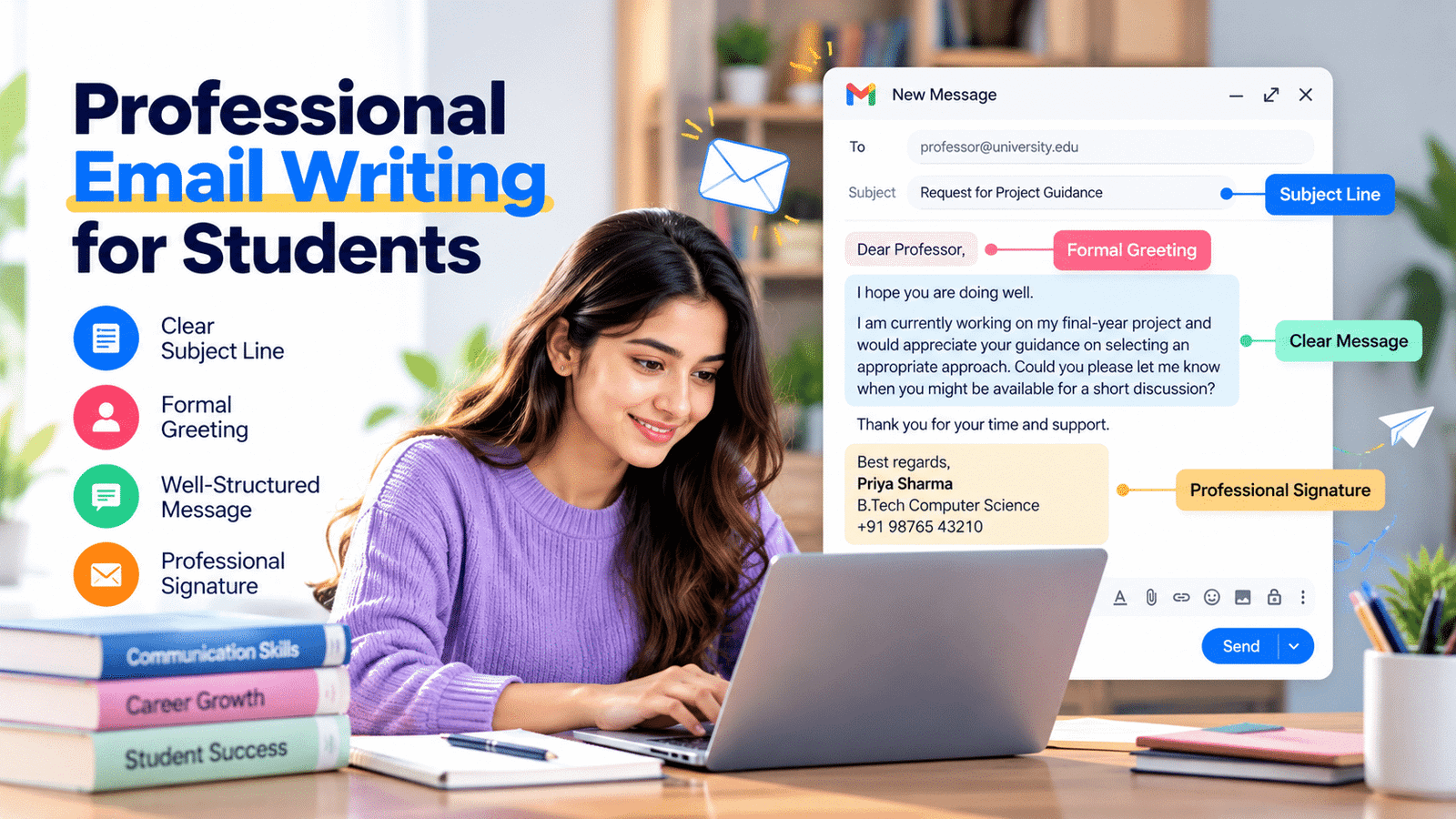
Professional Email Writing for Students: A Complete Guide
Professional email writing for students is an essential skill for communicating with teachers, recruiters, internship coordinators, and industry professionals. It helps students express their purpose clearly, make a positive first impression, and handle academic and career-related communication confidently.
Professional email writing for students is an important skill that helps learners communicate clearly, make positive first impressions, and handle academic and career-related conversations confidently.
Whether you are requesting information, applying for an internship, submitting an assignment, asking for guidance, or following up after an interview, knowing how to write a professional email can make communication more effective.
In this article, we will explore the essential elements of professional emails, common mistakes to avoid, practical examples, and ways students can improve their email writing skills.
1. Why Professional Email Writing for Students Matters
Email remains an important communication method in educational institutions and professional workplaces. Students may need to contact professors, request academic information, communicate with recruiters, or apply for internship opportunities.
A well-written email helps the recipient understand the purpose of the message without confusion. It also demonstrates that the sender can communicate respectfully and organize information clearly.
For example, a student requesting an internship should explain who they are, why they are contacting the organization, and what information or opportunity they are seeking.
A message with a clear subject line, polite greeting, and direct explanation is easier to understand than an informal message with incomplete information.
Professional email writing for students also builds useful habits such as attention to detail, clarity, courtesy, and accountability. These habits can support communication throughout their future careers.
2. What Makes an Email Professional?
A professional email is a clear, respectful, and well-organized message written for a specific purpose.
It does not need complicated vocabulary or lengthy explanations. In most situations, simple and direct language is more effective.
A professional email generally includes the following elements:
- Subject line: Briefly explains the purpose of the email.
- Greeting: Addresses the recipient respectfully.
- Introduction: Explains who you are when necessary.
- Main message: Clearly communicates your request or information.
- Closing: Ends the message politely.
- Signature: Includes your name and relevant contact details.
For example, when contacting a professor about an assignment, a student should mention the course or subject, explain the question, and politely request clarification.
Using these elements consistently makes emails easier to read and helps recipients understand what action may be required.
3. How to Choose a Clear and Meaningful Subject Line
The subject line is one of the first things a recipient sees. It should communicate the purpose of the email in a few words.
A vague subject such as “Hello” or “Important” does not explain what the message contains. A specific subject helps the recipient identify the email quickly.
Here are some examples:
- Internship Application – Web Development
- Request for Assignment Extension
- Meeting Confirmation – Project Discussion
- Follow-Up Regarding Interview
- Request for Academic Guidance
- Submission of Final-Year Project
Students should avoid writing entire messages in the subject line or using unnecessary capital letters.
A good subject line is short, relevant, and specific. Before sending an email, check whether the subject accurately represents the message.
4. How to Start an Email With the Right Greeting
A suitable greeting creates a respectful beginning and establishes the tone of the conversation.
The greeting depends on the recipient and the level of familiarity.
For example:
- Dear Professor Sharma, – Suitable for formal academic communication.
- Dear Hiring Manager, – Useful when the recipient’s name is unknown.
- Dear Mr. Kumar, – Suitable when addressing a professional by name.
- Hello Ms. Priya, – Appropriate for some professional conversations where a slightly less formal tone is acceptable.
If you know the recipient’s name and preferred form of address, use it correctly.
Avoid greetings such as “Hey bro,” “Hi buddy,” or “What’s up?” when contacting recruiters, professors, or unfamiliar professionals.
A respectful greeting helps establish a positive tone before the main message begins.
5. How to Structure a Professional Email
A well-structured email makes information easier to understand. Students should organize their message so that the recipient can quickly identify the reason for contacting them.
Start With a Brief Introduction
If the recipient does not know you, introduce yourself in one or two sentences. Mention your name, course, institution, or relevant background when necessary.
Explain the Purpose
Clearly state why you are writing. Avoid making the recipient read several paragraphs before understanding your request.
Provide Relevant Details
Include the information needed to understand or respond to your message. For example, when asking about an assignment, mention the subject, assignment name, and specific question.
Make Your Request Clear
If you need a response, meeting, clarification, or document, explain exactly what you are requesting.
End Politely
Thank the recipient for their time and use a suitable professional closing.
A simple structure makes emails more effective and reduces unnecessary back-and-forth communication.
6. How to Write Polite and Clear Email Messages
The main message should communicate your purpose without sounding demanding or confusing.
Students should use complete sentences, appropriate grammar, and respectful language. Avoid unnecessary abbreviations, slang, emojis, and casual expressions when writing formal emails.
Compare these examples:
Informal message:
“Sir, I need details about the project. Send them fast.”
Professional message:
“Dear Sir,
Could you please share the project guidelines when convenient? I would like to review the requirements before beginning the work.
Thank you for your time.
Regards,
Your Name”
The second message communicates the same request in a more respectful and organized way.
Students should also keep their emails reasonably short. If the message contains several questions, use separate points or short paragraphs to make the information easier to follow.
Before sending, check whether the message is polite, complete, and easy to understand.
7. How to End an Email Professionally
The closing is the final part of an email. It should leave the recipient with a polite and professional impression.
Common professional email closings include:
- Regards,
- Best regards,
- Kind regards,
- Sincerely,
- Thank you,
Choose a closing that suits the purpose and relationship.
For example, a student contacting a recruiter about an internship can use “Best regards.” A student thanking a professor for academic guidance may use “Thank you” or “Kind regards.”
After the closing, include your full name. You can also mention your course, college, phone number, or professional profile when relevant.
Avoid ending formal emails with casual phrases such as “Bye,” “See ya,” or “Catch you later.”
A consistent signature makes it easier for recipients to identify you and respond when needed.
8. Common Email Writing Mistakes Students Should Avoid
Even a simple email can create confusion when important details are missing or the message is poorly presented.
Here are some common mistakes students should avoid.
Using Unclear Subject Lines
A subject such as “Help” does not explain the purpose of the message. Write a specific subject that reflects your request.
Using Informal Language
Slang, excessive abbreviations, and casual expressions may not be appropriate in formal communication. Use clear and respectful language.
Writing Long and Unnecessary Messages
Avoid including unrelated information. Focus on the purpose and provide only the details the recipient needs.
Forgetting Attachments
If you mention a resume, assignment, or document, make sure the correct file is attached before sending the email.
Ignoring Grammar and Spelling
Typing mistakes can make a message difficult to understand. Review the email before sending it.
Using the Wrong Recipient Address
Check the recipient’s email address carefully, especially when sharing personal documents or applications.
Sending Emails Without a Signature
Include your name so the recipient knows who sent the message.
Following Up Too Frequently
If you do not receive an immediate response, allow a reasonable amount of time before sending a polite follow-up.
Avoiding these mistakes helps students communicate more professionally and reduces misunderstandings.
9. Professional Email Examples for Students
Understanding email structure becomes easier when students see examples they can adapt to different situations.
Example 1: Email to a Professor Requesting Guidance
Subject: Request for Guidance on Final-Year Project
Dear Professor,
I hope you are doing well.
I am currently working on my final-year project and would appreciate your guidance on selecting an appropriate approach. Could you please let me know when you might be available for a short discussion?
Thank you for your time and support.
Best regards,
Your Name
Your Department
Example 2: Email Applying for an Internship
Subject: Application for Web Development Internship
Dear Hiring Manager,
I am a computer science student interested in gaining practical experience in web development.
I would like to apply for the Web Development Internship opportunity at your organization. I have been learning HTML, CSS, JavaScript, and related technologies, and I have completed academic projects using these skills.
I have attached my resume for your consideration. I would appreciate the opportunity to discuss my application further.
Thank you for your time.
Best regards,
Your Name
Your Contact Details
Example 3: Email Following Up After an Interview
Subject: Follow-Up Regarding Interview
Dear Hiring Manager,
Thank you for giving me the opportunity to attend the interview for the position.
I am writing to politely follow up and ask whether there are any updates regarding the selection process.
I appreciate your time and consideration.
Best regards,
Your Name
These are sample formats. Students should customize the details, recipient, and purpose before sending an email.
10. How to Improve Professional Email Writing Skills
Professional email writing improves through regular practice and careful review.
Students can follow these practical steps:
Read professional emails: Observe how teachers, organizations, and professionals structure their messages.
Practise writing different emails: Write sample emails for internship applications, academic requests, meeting confirmations, and follow-ups.
Use simple language: Choose words that communicate your meaning clearly instead of trying to sound unnecessarily formal.
Review before sending: Check the subject, recipient, spelling, grammar, attachments, and closing.
Learn basic email etiquette: Understand when to use Reply, Reply All, CC, and BCC.
Ask for feedback: Request suggestions from teachers or mentors when you are unsure about your email structure or tone.
Use writing tools carefully: Grammar and spelling tools can help identify mistakes, but students should review the final message themselves to ensure that it communicates the intended meaning.
Students can also practise writing professional messages as part of their regular academic activities. Over time, this makes formal communication more natural and effective.
11. Email Etiquette Every Student Should Know
Email etiquette refers to the basic rules of respectful and responsible email communication.
Students should follow these practices when communicating with teachers, recruiters, and professionals:
- Use a professional email address whenever possible.
- Check the recipient’s address before sending.
- Use CC only when other recipients need to be included in the conversation.
- Use BCC when recipients should not see one another’s email addresses.
- Avoid using Reply All unless everyone needs the response.
- Do not send confidential information to unintended recipients.
- Avoid unnecessary follow-up messages.
- Respond within a reasonable time when a response is required.
- Use attachments with clear file names.
- Respect the recipient’s time and privacy.
These habits demonstrate consideration and responsibility. They are useful not only during college but also when communicating in professional workplaces.
12. How Professional Email Writing Supports Career Growth
Professional communication plays an important role in many career activities. Students may need to send internship applications, contact recruiters, request recommendations, confirm interviews, and communicate with future colleagues.
A clear email can
Outbound Links
Students can learn more about managing emails and using email features through Google Gmail Help.
Internal Links
Students can also improve their overall communication skills to express ideas clearly in academic and professional environments.