
Whether you’re a sysadmin stepping into DevOps, a support engineer transitioning into development, or simply looking to sharpen your automation skills—AI tools can dramatically accelerate your coding journey.
The IT landscape is evolving rapidly. Scripting, automation, and cloud-native development are no longer optional—they’re essential. The good news? AI has fundamentally changed how we learn and write code.
Instead of relying on static tutorials, you now have intelligent tools that:
- Write code alongside you
- Explain errors in plain English
- Adapt to your skill level in real time
Here are seven AI-powered tools every IT professional should have on their radar.
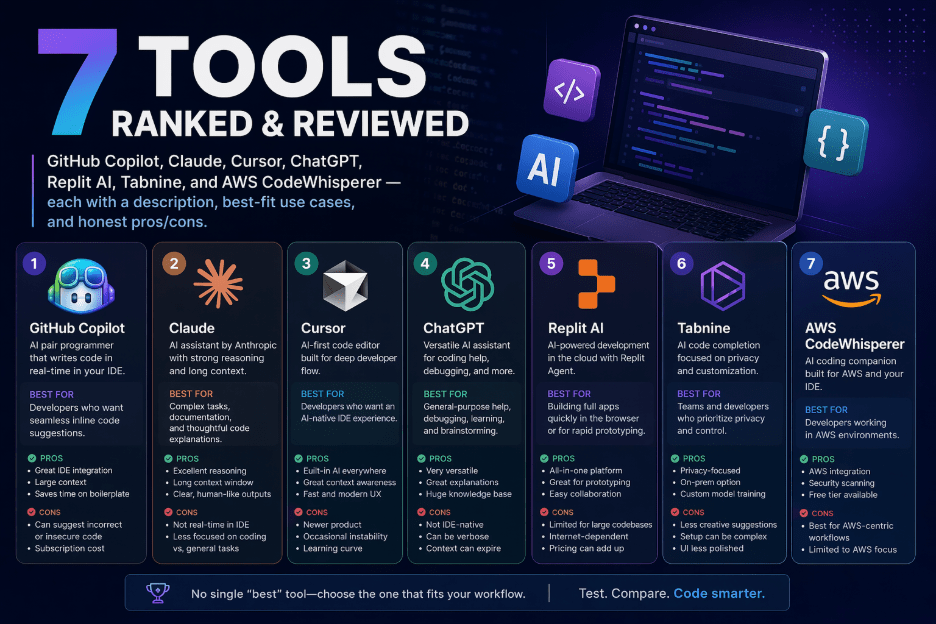
Top 7 AI Coding Tools for IT & Tech Professionals
1. GitHub Copilot — Your AI Pair Programmer
GitHub Copilot is widely considered the gold standard for AI-assisted development.
It integrates seamlessly with VS Code and JetBrains IDEs, offering real-time suggestions—from single lines to full functions and scripts. For IT professionals working with Bash, PowerShell, Python, or Terraform, it’s a serious productivity boost.
Best for:
Python, Bash, PowerShell, YAML, Terraform
Pros:
- Real-time inline suggestions
- Deep IDE integration
- Speeds up repetitive coding tasks
Cons:
- Requires a subscription (~$10/month)
- May occasionally suggest outdated patterns
2. Claude — Deep Thinking AI Assistant
Claude excels at explaining complex concepts and walking through code step by step.
It’s particularly strong for IT professionals who want to understand why something works—not just copy-paste solutions. From debugging scripts to analyzing cloud configurations, Claude offers clear, structured reasoning.
Best for:
Code review, debugging, DevOps concepts, scripting
Pros:
- Excellent explanations and reasoning
- Strong for learning and conceptual clarity
- Free tier available
Cons:
- No direct IDE integration
- No real-time autocomplete
3. Cursor — AI-Native Code EditorCursor is a reimagined VS Code experience built around AI.
You can interact with your entire codebase conversationally—ask it to fix errors, explain infrastructure code, or refactor scripts. It’s especially useful for learning tools like Ansible, Docker, and Kubernetes.
Best for:
Ansible, Docker, Kubernetes, infrastructure-as-code
Pros:
- Full codebase awareness
- Powerful contextual understanding
- Free plan available
Cons:
- Heavier than standard VS Code
- Learning curve for beginners
4. ChatGPT (GPT-4o) — Versatile Coding Companion
ChatGPT is a flexible, all-purpose coding assistant.
IT professionals use it to debug errors, generate boilerplate code, and understand everything from networking protocols to SQL queries. It’s like having a tutor on demand.
Best for:
Debugging, boilerplate generation, networking, SQL
Pros:
- Broad knowledge base
- Great for explanations and quick fixes
- Plugin ecosystem
Cons:
- Limited memory in free version
- Advanced models require a paid plan
5. Replit AI — Browser-Based Coding with AI
Replit offers a zero-setup coding environment with built-in AI assistance.
It’s ideal for beginners or IT professionals who want to quickly test scripts without configuring a local environment.
Best for:
Python, Node.js, quick experiments
Pros:
- No setup required
- Runs entirely in the browser
- Beginner-friendly
Cons:
- Not ideal for large or complex projects
- Performance limits on free tier
6. Tabnine — Privacy-First AI Autocomplete
Tabnine focuses on privacy and enterprise use.
It can run on-premise, making it a strong choice for organizations dealing with sensitive code. While it’s not as powerful as Copilot, it offers solid autocomplete without sending data externally.
Best for:
Enterprise environments, secure codebases
Pros:
- On-prem deployment available
- Strong privacy controls
- Multi-IDE support
Cons:
- Less capable than Copilot
- Smaller model, fewer suggestions
7. AWS CodeWhisperer — Built for Cloud Engineers
AWS CodeWhisperer is tailored for developers working within the AWS ecosystem.
Trained on AWS documentation, it provides highly relevant suggestions for services like Lambda, S3, and CloudFormation.
Best for:
AWS Lambda, CloudFormation, S3
Pros:
- Free for individual users
- Strong AWS-specific recommendations
- Built-in security scanning
Cons:
- Limited usefulness outside AWS
- AWS-centric by design
Editor’s Verdict: Where Should You Start?
If you’re new to coding, begin with Claude or ChatGPT for guided learning and debugging support.
Once you’re writing scripts regularly, add GitHub Copilot to speed up development.
Working heavily in AWS? Bring in AWS CodeWhisperer.
Need strict data privacy? Tabnine is your best bet.
Frequently Asked QuestionsCan AI tools help IT professionals learn coding from scratch?
Yes. Tools like Claude and ChatGPT can explain code line by line, adapt to your level, and answer follow-up questions instantly. They’re especially helpful for IT professionals who understand systems but need help with syntax and structure.
Which languages should IT professionals learn?
Focus on:
- Python — automation, APIs, data
- PowerShell — Windows environments
- Bash — Linux/Unix systems
- YAML — DevOps pipelines
- Terraform — infrastructure as code
Together, these cover the majority of modern IT workflows.
Are these tools safe for company code?
Use caution with cloud-based tools. Enterprise offerings from GitHub Copilot and Tabnine include stronger privacy controls.
For sensitive environments, prioritize on-premise or strict data-governance solutions.
Do I need prior programming experience?
No. Many IT professionals start by describing what they need in plain English and learning from AI-generated code. These tools lower the barrier to entry significantly.
Ready to Start Coding Smarter?
Pick one tool from this list and commit to using it consistently for 30 days.
IT professionals who combine hands-on practice with AI assistance tend to progress faster—and build more practical, job-ready skills—than those relying on traditional learning alone.