
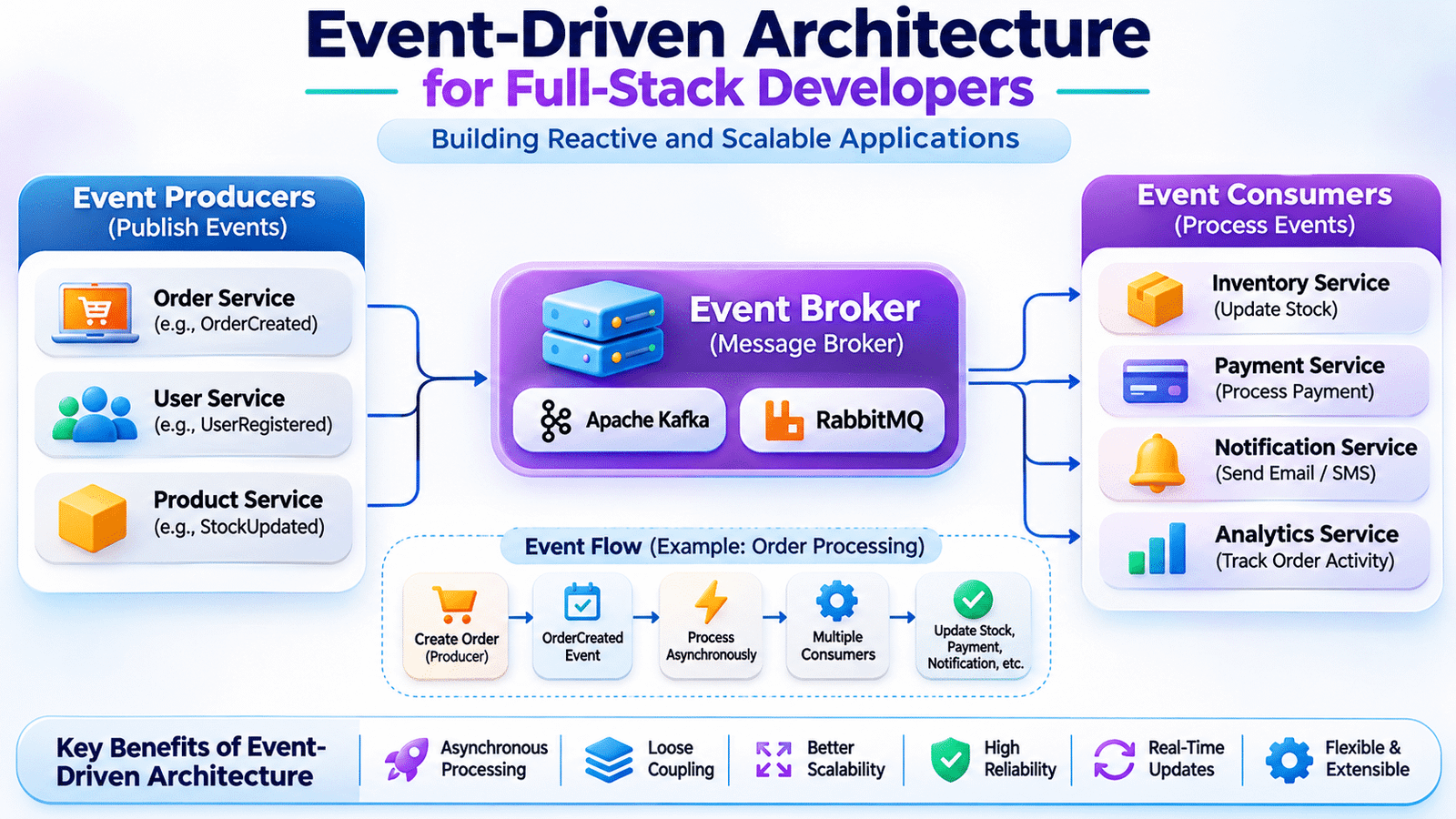
Event-driven architecture is a software design approach that allows application components to communicate through events instead of relying entirely on direct service-to-service requests. It helps development teams build scalable applications with asynchronous processing, independent services, and reliable business workflows.
In a traditional application, these operations may be executed through a sequence of direct function calls or API requests. As the application grows, however, coordinating these operations can introduce tight dependencies between different modules and services.
Consider an e-commerce platform where the Order Service directly communicates with the Inventory Service, Payment Service, and Notification Service. If one of these services becomes unavailable, the entire order workflow may experience delays or failures.
An alternative is to use event-driven architecture, where application components communicate by publishing and consuming events.
Instead of requiring every service to communicate directly with every other service, one service can publish an event describing something that has happened. Other services can independently receive and process that event.
This approach helps development teams build applications that support asynchronous processing, independent service communication, and scalable business workflows.
For full-stack developers, understanding event-driven architecture is particularly useful when working with microservices, background jobs, real-time notifications, payment workflows, and distributed applications.
Let’s explore how event-driven systems work and how they are implemented in real-world development environments.
1. Understanding Event-Driven Architecture in Modern Applications
Event-driven architecture is a software design approach in which application components communicate through events.
An event represents something that has already happened in an application.
Examples include:
- UserRegistered
- OrderCreated
- PaymentCompleted
- ProductStockUpdated
- InvoiceGenerated
- DocumentUploaded
- PasswordChanged
When an event occurs, the application publishes information about that event. Other components interested in that event can receive it and execute their own operations.
For example, after an order is created, the Order Service can publish an OrderCreated event.
The Inventory Service can use the event to update stock information, while the Notification Service can send an order confirmation.
These services do not need to be directly called by the Order Service for every operation.
This separation reduces unnecessary dependencies and allows different parts of the application to process business events independently.
2. Understanding the Main Components of Event-Driven Architecture
An event-driven system generally contains three important components.
Event Producer
An event producer is an application component that generates and publishes events.
For example, when a customer completes checkout, the Order Service can publish an OrderCreated event.
The producer is responsible for identifying when an important business event occurs and publishing the relevant information.
Event Consumer
An event consumer receives events and performs operations based on them.
For example:
- Inventory Service updates available stock.
- Notification Service sends confirmation emails.
- Analytics Service records order activity.
- Invoice Service generates an invoice.
A single event may be consumed by multiple independent services.
Event Broker
An event broker receives, routes, and distributes messages between producers and consumers.
Common technologies include Apache Kafka and RabbitMQ.
The broker helps separate event producers from event consumers, allowing them to communicate without requiring direct connections.
A simplified architecture looks like this:
          User Places Order
                  |
                  v
             Order Service
                  |
                  v
            Publish Event
                  |
                  v
             Event Broker
                  |
        +---------+---------+
        |         |         |
        v         v         v
    Inventory  Notification Invoice
     Service     Service    Service
Each component has a clear responsibility, making the overall workflow easier to extend.
3. Understanding How an Event-Driven Workflow Works
Consider a real-world e-commerce checkout process.
A customer selects products and completes the checkout form.
The application processes the request and creates an order.
After the order is successfully created, the Order Service publishes an OrderCreated event.
Other services can then process the event independently.
A typical workflow looks like this:
- The frontend submits the checkout request.
- The Order Service validates the request.
- The Order Service creates the order.
- An OrderCreated event is published.
- The Inventory Service processes the event and updates stock.
- The Notification Service sends an order confirmation.
- The Analytics Service records the transaction.
The customer does not necessarily need to wait for every background operation to finish before receiving an order confirmation.
This is one of the major advantages of asynchronous event processing.
However, the application must define which operations are essential before confirming the order and which can safely happen asynchronously.
For example, payment authorization and inventory reservation may need to be completed before the application considers an order confirmed.
4. Synchronous vs. Asynchronous Communication
Understanding the difference between synchronous and asynchronous communication is important when designing event-driven systems.
Synchronous Communication
In synchronous communication, one component sends a request and waits for another component to respond.
REST APIs are commonly used for this approach.
For example:
GET /api/products/101The requesting application waits for the Product Service to return the response.
Synchronous communication is useful when the application needs an immediate result.
However, it creates a dependency on the availability and response time of the receiving service.
Asynchronous Communication
In asynchronous communication, the producer publishes a message or event and continues its work without waiting for every consumer to finish.
For example, the Order Service publishes an OrderCreated event, and the Notification Service processes it independently.
The producer does not need to wait for the notification email to be delivered.
| Area | Synchronous | Asynchronous |
|---|---|---|
| Communication | Request and response | Event or message exchange |
| Waiting | Caller waits for response | Producer can continue |
| Dependency | More direct dependency | Looser coupling |
| Common technologies | REST, gRPC | Kafka, RabbitMQ |
| Typical use | Fetching required data | Notifications and background processing |
Neither approach is suitable for every situation. Real applications commonly combine both based on business requirements.
5. Understanding Message Brokers in Event-Driven Systems
Message brokers provide infrastructure for transferring messages between application components.
Instead of one service directly calling multiple other services, it can publish a message to a broker.
The broker makes that message available to the appropriate consumers.
Two widely used technologies are Apache Kafka and RabbitMQ.
Apache Kafka
Kafka is a distributed event-streaming platform designed to handle large volumes of events.
It stores events in topics, allowing consumers to read and process event streams.
Kafka is commonly used for:
- Event streaming.
- Activity tracking.
- Data integration.
- Real-time analytics.
- Distributed event processing.
Its partitioning and consumer-group capabilities help applications process large event streams.
RabbitMQ
RabbitMQ is a message broker that supports message routing and queue-based communication.
It is commonly used for:
- Background jobs.
- Task processing.
- Application notifications.
- Service-to-service messaging.
- Work distribution.
RabbitMQ supports exchanges, queues, bindings, and routing rules.
The choice between Kafka and RabbitMQ depends on message volume, ordering requirements, delivery guarantees, processing patterns, and infrastructure needs.
6. Designing Reliable Events and Message Structures
Events should communicate meaningful business information rather than exposing unnecessary internal implementation details.
Consider an OrderCreated event.
A possible event structure is:
{
  "event_id": "evt_1001",
  "event_type": "OrderCreated",
  "event_version": 1,
  "occurred_at": "2026-11-09T10:30:00Z",
  "data": {
    "order_id": 501,
    "user_id": 25,
    "total_amount": 2500,
    "currency": "INR"
  }
}
This structure includes:
- A unique event identifier.
- The event type.
- An event schema version.
- The time the event occurred.
- Business data associated with the event.
A consistent event structure makes it easier for different services to understand and process messages.
Event schemas should also be versioned carefully.
For example, adding a new optional field may be compatible with existing consumers, while renaming or removing an existing field may break older integrations.
Developers should avoid placing passwords, payment credentials, or unnecessary personal information inside event payloads.
7. Implementing Event-Driven Processing with Laravel
Laravel provides event and listener functionality that can help organize event-driven application logic.
Consider an application that creates an order and then triggers additional operations.
An event class can be created:
namespace App\Events;

use App\Models\Order;
use Illuminate\Foundation\Events\Dispatchable;

class OrderCreated
{
    use Dispatchable;

    public function __construct(
        public Order $order
    ) {}
}
The event can be dispatched after the order is created:
$order = Order::create([
    'user_id' => $user->id,
    'total' => $request->total,
    'status' => 'pending',
]);

OrderCreated::dispatch($order);
A listener can handle the event:
namespace App\Listeners;

use App\Events\OrderCreated;
use Illuminate\Contracts\Queue\ShouldQueue;

class SendOrderNotification implements ShouldQueue
{
    public function handle(OrderCreated $event): void
    {
        // Send order confirmation notification.
    }
}
By implementing ShouldQueue, the listener can be processed through Laravel’s queue system when queue infrastructure is configured.
This allows the notification operation to run separately from the main request.
For production applications, developers should also consider transaction timing, event delivery reliability, retry behavior, duplicate processing, and failure monitoring.
Laravel application events and distributed messaging systems are related concepts, but they are not identical. A local Laravel event does not automatically provide durable communication across independent services.
8. Integrating Event-Driven Architecture with Microservices
Microservices often need to coordinate business operations without creating excessive direct dependencies.
Event-driven communication provides one way to achieve this.
Consider an application with the following services:
- Order Service
- Inventory Service
- Payment Service
- Notification Service
When an order is created, the Order Service publishes an OrderCreated event.
The Inventory Service receives the event and checks stock availability.
The Payment Service processes the payment according to the workflow.
The Notification Service sends updates when the relevant business events occur.
A simplified architecture looks like this:
                 API Gateway
                      |
                      v
                 Order Service
                      |
                      v
                Event Broker
                      |
          +-----------+-----------+
          |           |           |
          v           v           v
      Inventory    Payment   Notification
       Service     Service     Service
This architecture reduces direct communication between services.
However, asynchronous communication does not remove all dependencies. Consumers still depend on event schemas, business semantics, and delivery guarantees.
Those contracts must be managed carefully.
9. Event-Driven Architecture for Real-Time Applications
Event-driven communication is also useful in applications that need to react quickly to changing information.
Consider a dashboard that displays order updates.
When an order status changes, the backend can publish an event indicating that the order has been updated.
A real-time communication layer can deliver that update to connected frontend clients.
For example:
Order Status Updated
        |
        v
Backend Event
        |
        v
Real-Time Broadcasting
        |
        v
WebSocket Connection
        |
        v
Vue.js Dashboard
The frontend can listen for updates and refresh the relevant interface without requiring users to reload the page.
Common use cases include:
- Live order tracking.
- Chat applications.
- Real-time dashboards.
- Inventory notifications.
- Collaboration platforms.
- Live activity feeds.
Technologies such as WebSockets, Laravel broadcasting, and managed real-time messaging services can support these workflows.
A message broker and a WebSocket server serve different roles. The broker handles backend event distribution, while the real-time layer delivers updates to connected clients.
10. Handling Event Failures and Duplicate Messages
Distributed event processing introduces reliability challenges.
A message may be delivered more than once, a consumer may become unavailable, or processing may fail after the message has been received.
Applications must be designed to handle these situations safely.
Retry Mechanisms
Temporary failures can be handled by retrying message processing.
For example, if an external notification service is temporarily unavailable, the application can retry sending the notification later.
Retries should use sensible limits and backoff strategies.
Idempotent Consumers
An event consumer should avoid repeating the same business operation when it receives a duplicate event.
For example, receiving the same payment confirmation twice should not result in two separate order payments being recorded.
A unique event identifier or business transaction identifier can help detect duplicate processing.
Dead-Letter Queues
Messages that repeatedly fail processing can be moved to a dead-letter queue for investigation.
This prevents problematic messages from blocking normal processing indefinitely.
Monitoring
Teams should monitor queue depth, processing failures, retry counts, consumer availability, and message-processing latency.
Reliable event processing requires both correct application logic and appropriate operational monitoring.
11. Understanding Eventual Consistency
In a distributed application, multiple services may maintain their own data.
When one service publishes an event, other services may receive and process it at different times.
This means the application may temporarily contain different versions of related information.
For example, after an order is created, the Order Service may immediately show the new order while the Analytics Service has not yet processed the corresponding event.
After processing completes, the Analytics Service becomes consistent with the updated information.
This is known as eventual consistency.
Developers should understand that not every operation needs immediate consistency.
However, critical business operations such as payment authorization, inventory reservation, and financial records require carefully designed consistency guarantees.
The application should clearly distinguish between operations that can be asynchronous and those that must complete before a transaction is considered successful.
12. The Transactional Outbox Pattern
One important reliability challenge occurs when an application must update its database and publish an event.
Consider this workflow:
- The Order Service saves a new order.
- The application publishes an OrderCreated event.
If the database transaction succeeds but event publishing fails, other services may never learn that the order was created.
The Transactional Outbox Pattern helps address this problem.
Instead of publishing the event directly, the application stores the event in an outbox table within the same database transaction as the business update.
A separate process reads unpublished outbox records and sends them to the message broker.
The workflow becomes:
       Create Order
            |
            v
      Database Transaction
            |
       +----+----+
       |         |
       v         v
    Save Order  Save Event
       |         |
       +----+----+
            |
            v
       Outbox Worker
            |
            v
       Message Broker
            |
            v
       Event Consumers
This approach reduces the risk of losing events when database updates and message publishing are not performed atomically.
The outbox worker must still handle retries and duplicate publication, so consumers should remain idempotent.
13. Security Considerations in Event-Driven Applications
Event-driven systems often exchange business information between multiple services.
Security should therefore be considered throughout the messaging workflow.
Important practices include:
- Authenticate services that publish and consume messages.
- Restrict access to topics, exchanges, and queues.
- Use encrypted connections where appropriate.
- Avoid publishing sensitive credentials.
- Validate incoming event payloads.
- Apply authorization rules at the consumer level.
- Maintain audit logs for important business events.
- Protect message broker management interfaces.
- Rotate credentials and review access permissions.
Applications should not assume that every event is trustworthy simply because it came from an internal service.
Each consumer should validate the event and apply the business rules relevant to its responsibility.
14. Monitoring and Observability in Event-Driven Systems
A successful event-driven architecture requires visibility into what happens after an event is published.
Developers should monitor:
- Number of published events.
- Number of consumed events.
- Message-processing latency.
- Queue depth.
- Consumer failures.
- Retry frequency.
- Dead-letter queue size.
- Broker availability.
- Event-processing throughput.
For example, if the Notification Service begins processing messages slowly, the notification queue may continue growing even though the Order Service is working correctly.
Monitoring helps identify such problems before they significantly affect users.
Distributed tracing and correlation identifiers can also help developers follow a business operation across multiple services.
Tools such as Prometheus, Grafana, and OpenTelemetry can support different parts of an observability strategy.
15. Common Challenges in Event-Driven Architecture
Event-driven systems provide flexibility, but they also introduce engineering challenges.
Duplicate message delivery: Consumers may receive the same event more than once.
Message ordering: Events may not always be processed in the exact order expected by the business workflow.
Eventual consistency: Different services may temporarily show different information.
Difficult debugging: A single business operation may involve several independent consumers.
Schema compatibility: Changes to event structures may break older consumers.
Consumer failures: A service may become unavailable while messages continue to arrive.
Operational complexity: Message brokers, queues, retries, and monitoring require additional infrastructure.
These challenges should be addressed during architecture design rather than after production problems appear.
16. Best Practices for Building Event-Driven Applications
Development teams should follow these practices when implementing event-driven systems:
- Publish events that represent meaningful business changes.
- Define clear and versioned event schemas.
- Keep event payloads focused and relevant.
- Use asynchronous processing for suitable background operations.
- Make consumers idempotent.
- Configure retry and dead-letter handling.
- Use the Transactional Outbox Pattern when reliable event publication is required.
- Monitor queue depth and processing latency.
- Protect message brokers and event communication.
- Document event ownership and consumer responsibilities.
- Test failure scenarios and duplicate delivery.
- Avoid using events when a simple synchronous operation is more appropriate.
A successful event-driven design balances independence with reliability and makes the flow of business operations understandable.
17. Frequently Asked Questions
What is event-driven architecture?
Event-driven architecture is a software design approach in which application components communicate by publishing and consuming events that represent business activities or changes.
What is the difference between an event and a message?
An event describes something that has happened, while a message is the communication unit used to transfer information. Events are commonly transported through messages.
What are event producers and consumers?
Producers publish events when business activities occur. Consumers receive those events and perform operations based on the information provided.
What is the difference between Kafka and RabbitMQ?
Kafka is a distributed event-streaming platform designed for durable, high-throughput event streams. RabbitMQ is a message broker commonly used for queue-based messaging and flexible message routing.
Can Laravel support event-driven architecture?
Yes. Laravel provides events, listeners, queued listeners, and queue infrastructure. It can also integrate with external messaging systems for communication across independent services.
What is eventual consistency?
Eventual consistency is a model in which distributed services may temporarily hold different information but converge to a consistent state after updates are processed.
When should developers use event-driven architecture?
It is useful when applications need asynchronous processing, independent service communication, real-time updates, background workflows, or integration between distributed systems.
Final Thoughts
Event-driven architecture provides a flexible way for application components to communicate through business events rather than relying entirely on direct service-to-service requests.
For full-stack developers, understanding producers, consumers, message brokers, asynchronous processing, event reliability, and eventual consistency is important when building distributed applications.
However, event-driven architecture is not simply about introducing Kafka or RabbitMQ into a project. It requires thoughtful event design, clear business responsibilities, reliable message handling, and effective monitoring.
When applied to the right business workflows, it helps development teams build applications that are easier to extend and better prepared for complex distributed operations.
https://www.enigmacommunity.com
Internal links
Cloud Deployment for Full-Stack Applications