
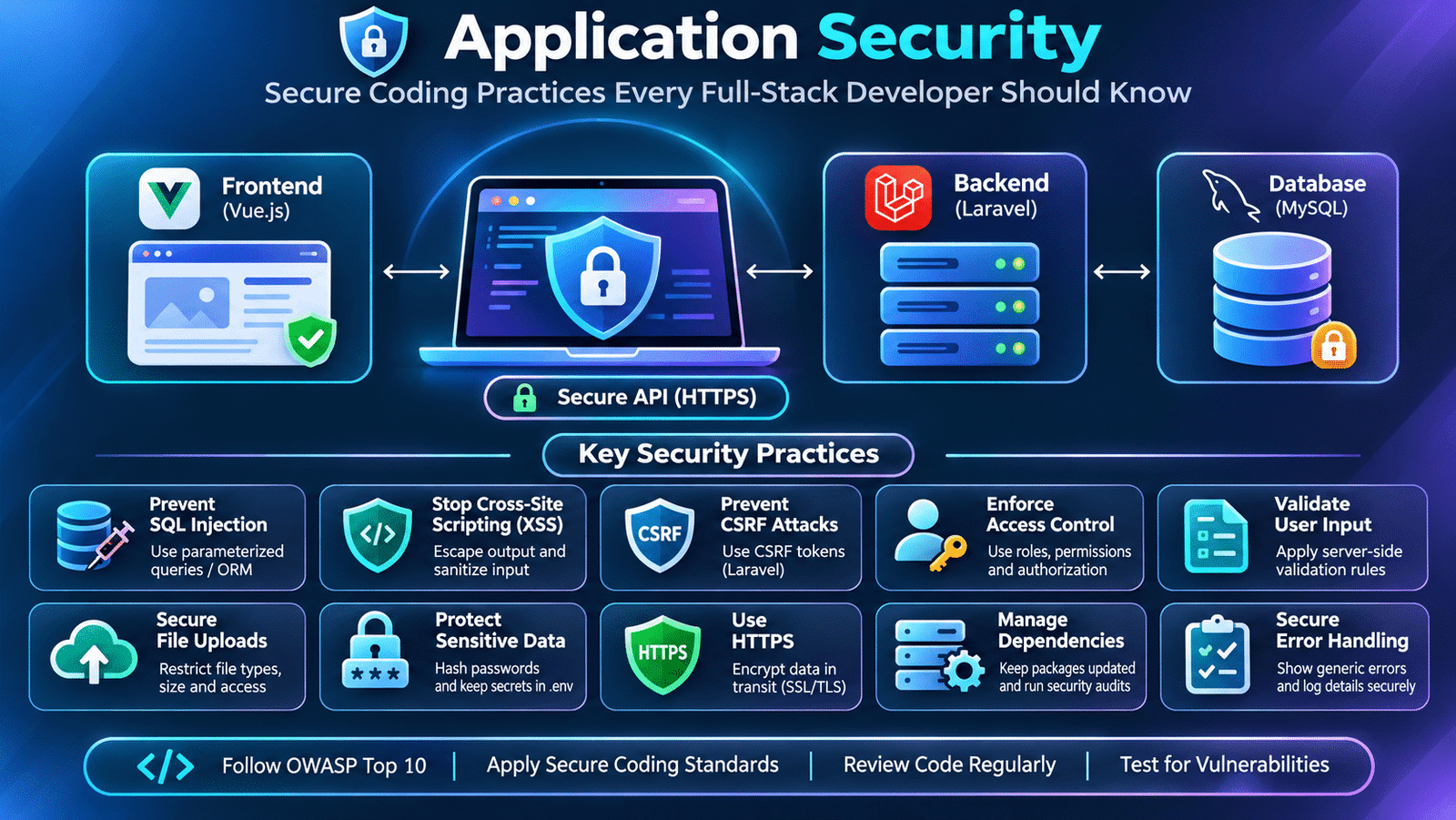
Application Security: Secure Coding Practices Every Full-Stack Developer Should Know
A web application may have a well-designed interface, a powerful backend, and a properly structured database, but these components alone do not make it secure. Every application that handles user information, processes requests, or stores business data must protect itself against security vulnerabilities.
Consider an e-commerce application that allows customers to register, browse products, and make payments. If an attacker can manipulate API requests, access another customer’s information, or execute malicious scripts through an input field, the application can expose sensitive data and disrupt business operations.
These problems are not always caused by infrastructure failures. Many security vulnerabilities originate from application code, incorrect validation, weak access controls, or unsafe data handling.
This is why application security is an essential part of modern software development. Developers must consider security while designing features, writing backend logic, integrating APIs, and managing application data.
Let’s explore the security practices that full-stack developers should understand when building real-world applications.
1. Understanding Application Security in Modern Development
Application security refers to the practices, technologies, and processes used to protect software applications against unauthorized access, data exposure, manipulation, and other security threats.
Security must be considered across every layer of an application.
For example, in an application built using Vue.js, Laravel, and MySQL:
- The frontend must handle user input safely and avoid exposing sensitive information.
- The backend must validate requests and enforce business rules.
- APIs must authenticate requests and authorize access to protected resources.
- The database must protect stored information and restrict unauthorized operations.
- The deployment environment must use secure configuration and communication.
A weakness in any one of these layers can affect the security of the entire application.
Application security is therefore not a separate development activity. It should be part of the normal software development lifecycle.
2. Understanding Common Web Application Vulnerabilities
Developers need to understand how common vulnerabilities occur before they can prevent them.
Some security problems appear when applications trust user input, construct database queries unsafely, or fail to enforce access restrictions.
Common vulnerabilities include:
- SQL Injection
- Cross-Site Scripting (XSS)
- Cross-Site Request Forgery (CSRF)
- Broken Access Control
- Insecure Direct Object References (IDOR)
- Security Misconfiguration
- Sensitive Data Exposure
- Insecure File Uploads
These vulnerabilities can affect different application components and require different prevention techniques.
Understanding their causes helps developers make better decisions during implementation and code review.
3. SQL Injection and Secure Database Queries
SQL Injection occurs when an application allows untrusted input to influence database queries in an unsafe way.
Consider a login implementation that directly combines user input with an SQL query:
$sql = "SELECT * FROM users
        WHERE email = '$email'";
If user input is inserted directly into the query, an attacker may manipulate its structure and change the intended database operation.
This can potentially expose records or bypass application logic.
A safer approach is to use parameterized queries or a trusted database abstraction layer.
For example, Laravel’s query builder:
$user = DB::table('users')
    ->where('email', $email)
    ->first();
The query builder handles parameter binding rather than treating the supplied value as part of the SQL statement.
Developers should avoid constructing SQL statements by directly concatenating untrusted input.
For additional protection, database accounts should follow the principle of least privilege, receiving only the permissions required by the application.
4. Cross-Site Scripting (XSS) Prevention
Cross-Site Scripting occurs when an application allows malicious scripts to execute in another user’s browser.
Consider a community platform where users can submit comments or profile descriptions.
If submitted content is rendered as executable HTML without appropriate protection, an attacker may inject JavaScript into the page.
For example, a malicious input might contain:
<script>
    alert('Unexpected script execution');
</script>
If the application renders this content unsafely, the browser may execute the script.
Vue.js escapes interpolated text by default:
<template>
    <div>
        {{ comment }}
    </div>
</template>
However, developers must be careful when using v-html:
<div v-html="comment"></div>This renders HTML directly and can introduce XSS vulnerabilities if the content is not properly sanitized.
When HTML rendering is genuinely required, use a trusted HTML sanitization library and an appropriate content security policy.
The important principle is to treat user-controlled content as untrusted, even when it comes from registered users.
5. Cross-Site Request Forgery (CSRF) Protection
Cross-Site Request Forgery is an attack in which a malicious website attempts to make a user’s browser perform an unwanted action on another website where the user is authenticated.
For example, a user may be logged in to an application in one browser tab. If the application relies on automatically sent cookies without sufficient CSRF protection, another website may attempt to trigger an unwanted request.
Applications using cookie-based authentication should implement appropriate CSRF protections.
Laravel provides CSRF protection for its web routes through its middleware.
For first-party SPA authentication using Laravel Sanctum, developers must also configure the application’s CSRF cookie and request flow correctly.
Security should be designed around the application’s authentication architecture rather than assuming every API requires the same CSRF configuration.
6. Input Validation and Data Sanitization
User input is one of the most common entry points for application vulnerabilities.
Registration forms, search fields, contact forms, file uploads, and API requests all receive information that may be incomplete, unexpected, or malicious.
Backend validation ensures that incoming data follows the application’s requirements.
For example, a Laravel request might validate a user registration:
$request->validate([
    'name' => ['required', 'string', 'max:100'],
    'email' => ['required', 'email', 'unique:users'],
    'password' => ['required', 'string', 'min:8'],
]);
This ensures that the supplied values satisfy the defined validation rules before the application processes them.
Frontend validation is also useful because it provides immediate feedback to users. However, frontend validation can be bypassed and must never replace backend validation.
Sanitization is a separate concern. When displaying user-provided content in a particular output context, developers must encode or sanitize it appropriately to prevent unsafe interpretation.
7. Protecting APIs from Unauthorized Requests
Modern web applications often expose backend functionality through REST APIs.
These endpoints may provide access to user profiles, financial information, orders, administrative features, and other sensitive resources.
API security requires more than checking whether a user is logged in.
Developers should consider:
- Authentication of incoming requests.
- Authorization for individual resources and operations.
- Input validation and request-size limits.
- Rate limiting for sensitive endpoints.
- Secure transport through HTTPS.
- Appropriate error handling.
- Protection against unauthorized data exposure.
Consider an API endpoint:
GET /api/orders/105The backend must not assume that any authenticated user can access order 105.
It should verify that the current user is permitted to view that particular order.
This type of resource-level authorization helps prevent IDOR and broken access control vulnerabilities.
8. Secure File Upload Implementation
File uploads are common in applications that support profile pictures, documents, attachments, and product images.
However, accepting files without appropriate validation can introduce serious security risks.
For example, an application that accepts any uploaded file based only on its extension may allow a malicious file to be stored or processed.
A secure upload workflow should include:
- Validate the file size.
- Check the permitted file types.
- Verify the actual file content rather than relying only on its extension.
- Generate a safe server-side filename.
- Store uploaded files outside executable application directories where appropriate.
- Restrict access to private files.
- Apply additional scanning or processing when required.
Laravel provides validation rules that can help:
$request->validate([
    'document' => [
        'required',
        'file',
        'mimes:pdf,jpg,png',
        'max:5120',
    ],
]);
This example limits the upload to specified file types and a maximum size of 5 MB.
For production systems, developers should also consider storage permissions, malware scanning requirements, file access controls, and safe download behavior.
9. Protecting Sensitive Information and Application Secrets
Applications frequently handle sensitive information such as passwords, access tokens, API keys, database credentials, and personal data.
These values should not be exposed through frontend source code, public repositories, API responses, or application logs.
For example, database credentials should be managed through environment-specific configuration rather than hardcoded into application files.
Laravel uses environment variables through its configuration system:
DB_CONNECTION=mysql
DB_HOST=127.0.0.1
DB_DATABASE=application_db
DB_USERNAME=app_user
DB_PASSWORD=secure_password
The actual values should be managed securely for each environment.
Developers should also avoid:
- Committing
.envfiles containing secrets. - Returning password hashes in API responses.
- Logging authentication tokens.
- Exposing private configuration through frontend variables.
- Including unnecessary personal information in application responses.
Sensitive information should be collected, processed, stored, and shared only when required.
10. Secure Error Handling and Logging
Error handling is necessary for debugging and maintaining applications, but exposing internal errors to users can reveal sensitive implementation details.
For example, a database exception may contain:
- SQL queries.
- Table names.
- Database structure.
- Internal file paths.
- Configuration details.
Returning these details directly through a production API response can help attackers understand the application’s internal architecture.
A safer response is to return a generic message:
{
    "message": "Something went wrong. Please try again."
}
Detailed error information should be recorded in protected application logs for authorized developers and administrators.
Production environments should disable debug output and ensure that logs do not contain passwords, authentication tokens, or other unnecessary sensitive information.
11. Security Headers and HTTPS Configuration
Secure application communication is important, particularly when handling login credentials, personal information, and authentication cookies.
HTTPS encrypts communication between the client and server, helping protect data against interception and modification during transmission.
Developers should also understand security-related HTTP headers.
Some important examples include:
- Content-Security-Policy: Helps restrict the sources from which a browser can load content.
- X-Content-Type-Options: Helps prevent browsers from interpreting files as a different content type.
- Strict-Transport-Security: Instructs supported browsers to use HTTPS for future requests to the domain.
- Referrer-Policy: Controls how much referrer information is shared with other destinations.
These headers should be configured based on application requirements and tested to avoid breaking legitimate functionality.
12. Dependency Management and Security Updates
Modern applications depend on third-party packages and libraries.
A Laravel application may use Composer packages, while a Vue.js application may depend on npm packages.
These dependencies can contain security vulnerabilities even when the application code itself is implemented correctly.
Developers should regularly review dependency updates and investigate reported vulnerabilities.
Useful commands include:
composer auditFor a JavaScript project:
pnpm auditThe results should be reviewed before applying updates, because dependency changes may introduce compatibility issues.
Development teams should maintain dependency versions, remove unused packages, and follow security advisories for important frameworks and libraries.
13. Security Testing and Code Review
Security should be tested throughout the development process rather than only after deployment.
For example, when developing an order management feature, developers should test:
- Whether unauthenticated requests are rejected.
- Whether users can access only their own orders.
- Whether invalid input is rejected.
- Whether unexpected values can affect database queries.
- Whether sensitive information appears in API responses.
- Whether file uploads follow the defined restrictions.
Code reviews should also examine authorization logic, data handling, exception management, and dependency usage.
Depending on application risk, teams can use static analysis, dynamic application security testing, dependency scanning, and penetration testing.
Automated tools can identify certain issues, but they do not replace a thorough understanding of application behavior and business rules.
14. Secure Coding Practices Every Full-Stack Developer Should Follow
Building secure applications requires consistent development practices.
Consider these guidelines:
- Validate all untrusted input on the backend.
- Use parameterized queries and trusted database abstractions.
- Encode or sanitize user-controlled output appropriately.
- Enforce authorization for every protected operation.
- Use secure password hashing.
- Protect cookie-based authentication against CSRF.
- Apply rate limiting to sensitive endpoints.
- Store secrets outside source code.
- Use HTTPS across application communication.
- Restrict file uploads and protect stored files.
- Avoid exposing internal exceptions to users.
- Keep application dependencies updated.
- Review security implications before releasing new features.
These practices help reduce common application vulnerabilities and improve the long-term reliability of software systems.
15. Frequently Asked Questions
What is application security?
Application security refers to the practices and technologies used to protect software applications from unauthorized access, vulnerabilities, data exposure, and malicious activity.
What are the most common web application security vulnerabilities?
Common vulnerabilities include SQL Injection, Cross-Site Scripting, Cross-Site Request Forgery, broken access control, insecure file uploads, and security misconfiguration.
What is the difference between validation and sanitization?
Validation checks whether input satisfies defined requirements. Sanitization transforms or removes unsafe content when necessary for a particular use. Both serve different purposes in secure data handling.
Why is HTTPS important for web applications?
HTTPS encrypts communication between the browser and server, helping protect credentials, personal information, and other transmitted data.
How can developers prevent SQL Injection?
Developers should use parameterized queries, prepared statements, and trusted ORM or query-builder features instead of directly concatenating untrusted input into SQL statements.
Is frontend validation enough to secure an application?
No. Frontend validation improves user experience, but it can be bypassed. Backend validation and authorization are necessary to protect application operations and data.
Final Thoughts
Application security is a responsibility shared across frontend development, backend engineering, database management, and deployment.
A secure application is not created simply by adding a login system or enabling HTTPS. It requires developers to understand common vulnerabilities, validate incoming requests, protect sensitive information, enforce access restrictions, and continuously review application behavior.
For full-stack developers, secure coding should become part of everyday development practice. Every new feature, API endpoint, database operation, and file upload should be designed with security in mind.
Building software that works is important. Building software that protects its users and their data is equally important.
Internal links
Authentication and Authorization in Web Applications
Database Design for Web Applications