
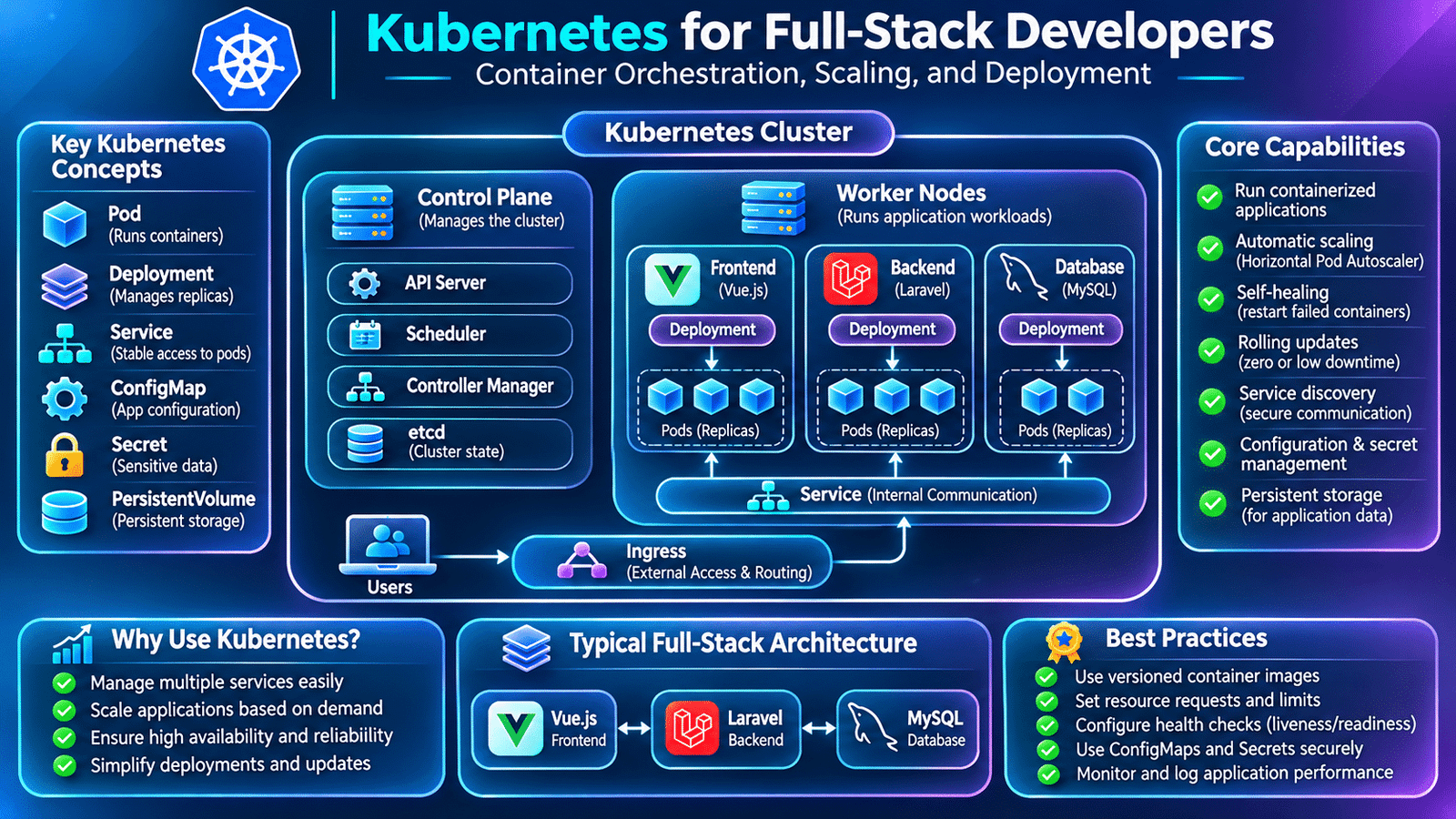
Kubernetes for full stack development helps developers deploy, manage, and scale containerized applications across different environments. It simplifies container orchestration, application availability, service communication, and automated scaling in modern production systems.
However, running containers is only one part of managing a production application.
Consider an application that serves thousands of users. It may contain multiple backend services, frontend instances, background workers, and supporting infrastructure. As traffic increases, teams need to manage container availability, distribute requests, replace failed instances, and scale application services.
Managing these operations manually becomes increasingly difficult as the application grows.
This is where Kubernetes for full stack development becomes valuable. Kubernetes is a container orchestration platform that helps teams deploy, manage, scale, and maintain containerized applications across a cluster of machines.
For full-stack developers, understanding Kubernetes provides a practical foundation for working with modern cloud-native applications and production deployment environments.
Let’s explore how Kubernetes works and how development teams use it to manage real-world applications.
1. Understanding Kubernetes for full stack development
Kubernetes, commonly called K8s, is an open-source container orchestration platform originally developed at Google.
It automates several operational tasks involved in running containerized applications.
Instead of manually starting and monitoring every container, developers describe the desired application state using Kubernetes configuration files.
Kubernetes then works to maintain that desired state.
For example, a production application may require:
- Three backend application instances.
- Two frontend application instances.
- A service that distributes incoming requests.
- Configuration values for each application.
- Secure access to sensitive credentials.
- Automatic replacement of failed containers.
Kubernetes provides resources that help manage these requirements.
It is important to understand that Kubernetes does not replace Dockerfiles or application development frameworks. It manages the deployment and operation of containerized workloads.
2. Why Kubernetes Is Important for Kubernetes for full stack development
Consider an e-commerce application built using Vue.js, Laravel, and MySQL.
Initially, the application may run comfortably on a single server. As the number of users increases, the team may need additional backend instances to handle incoming requests.
Kubernetes for full stack development makes it easier to manage frontend, backend, and supporting services as application infrastructure grows.
The team must also consider what happens if a container crashes, a server becomes unavailable, or application traffic increases suddenly.
Kubernetes helps address several of these operational requirements.
Its capabilities include:
- Managing containerized workloads.
- Maintaining the desired number of application replicas.
- Restarting or replacing failed workloads.
- Distributing traffic through Services and ingress infrastructure.
- Supporting horizontal application scaling.
- Managing application configuration.
- Performing controlled application updates.
- Supporting workload scheduling across multiple machines.
These capabilities make Kubernetes useful for applications that require reliable container orchestration.
However, Kubernetes also introduces operational complexity. Smaller applications may not need it, and a simpler deployment platform may be more appropriate depending on the project’s requirements.
3. Understanding Kubernetes Architecture
A Kubernetes cluster consists of two main parts:
Control Plane: Manages the overall cluster and makes decisions about workload scheduling and cluster state.
Worker Nodes: Run the application workloads inside the cluster.
A simplified architecture looks like this:
             Kubernetes Cluster
                     |
          +----------+----------+
          |                     |
     Control Plane         Worker Nodes
          |                     |
     API Server           Application Pods
     Scheduler            Frontend Pods
     Controllers          Backend Pods
     etcd                  Other Workloads
The control plane manages the cluster, while worker nodes execute application workloads.
Important control plane components include:
- API Server: Exposes the Kubernetes API through which cluster operations are requested.
- Scheduler: Selects suitable nodes for newly created Pods.
- Controller Manager: Runs controllers that help maintain the desired cluster state.
- etcd: Stores Kubernetes cluster state and configuration data.
Worker nodes commonly contain:
- Kubelet: Ensures assigned Pods are running as expected.
- Container Runtime: Runs containers using a supported container runtime.
- Kube-proxy: Implements Service networking behavior in common cluster configurations.
Understanding these components helps developers understand how Kubernetes manages application workloads.
4. Understanding Pods and Containers
A Pod is the smallest deployable unit in Kubernetes.
It represents one or more containers that share networking and storage resources.
For example, a Laravel backend application may run inside a Pod containing its application container.
A simple structure looks like:
Kubernetes Cluster
       |
       v
    Backend Pod
       |
       v
 Laravel Container
       |
       v
 Application Process
Most application Pods contain a single primary application container. Multiple containers may be placed in the same Pod when they need to work closely together.
Pods are generally replaceable. When a Pod fails, Kubernetes controllers can create a replacement to maintain the desired number of replicas.
Developers should avoid treating a Pod as a permanent server because its lifecycle is managed by Kubernetes.
5. Creating Kubernetes Deployments
A Deployment manages a set of identical application Pods.
Instead of manually creating multiple Pods, developers define a Deployment with the desired number of replicas.
Consider a Laravel backend that should run with three instances.
One important advantage of Kubernetes for full stack development is the ability to maintain multiple application instances through Deployment resources.
A simplified deployment configuration might look like:
apiVersion: apps/v1
kind: Deployment

metadata:
  name: laravel-backend

spec:
  replicas: 3

  selector:
    matchLabels:
      app: laravel-backend

  template:
    metadata:
      labels:
        app: laravel-backend

    spec:
      containers:
        - name: backend
          image: myregistry/laravel-backend:v1.0.0

          ports:
            - containerPort: 9000
This configuration tells Kubernetes to maintain three Pods matching the specified labels.
To apply the configuration:
kubectl apply -f backend-deployment.yamlTo check the Deployment:
kubectl get deploymentsTo view the Pods:
kubectl get podsThe Deployment controller continuously works toward the desired replica count.
For production workloads, the container image, health checks, resource requirements, security context, and application startup configuration should also be defined appropriately.
6. Exposing Applications Using Kubernetes Services
Pods are replaceable, and their IP addresses can change when they are recreated.
Frontend applications and other services therefore need a stable way to communicate with backend workloads.
Kubernetes Services provide a stable network endpoint for a group of Pods.
For example, a backend Service can expose Laravel Pods:
apiVersion: v1
kind: Service

metadata:
  name: backend-service

spec:
  selector:
    app: laravel-backend

  ports:
    - port: 80
      targetPort: 9000

  type: ClusterIP
Here:
selectoridentifies the backend Pods.portdefines the Service port.targetPortidentifies the application container port.ClusterIPmakes the Service available inside the cluster.
Other application components can communicate with the backend using the Service name.
This removes the need for frontend or other services to track individual Pod IP addresses.
7. Managing Application Configuration with ConfigMaps
Applications often require configuration values that differ between development, staging, and production.
For example, an application may need to know which API endpoint to use or which feature flags are enabled.
Kubernetes ConfigMaps provide a way to store non-sensitive configuration separately from container images.
Example:
apiVersion: v1
kind: ConfigMap

metadata:
  name: backend-config

data:
  APP_ENV: production
  LOG_LEVEL: info
A Deployment can load these values into the application container:
envFrom:
  - configMapRef:
      name: backend-config
This separation makes it easier to maintain environment-specific settings without rebuilding the application image for every configuration change.
ConfigMaps should not be used for passwords, API keys, or other confidential information.
8. Managing Sensitive Information with Kubernetes Secrets
Applications commonly need sensitive configuration such as database credentials, API tokens, and service passwords.
Kubernetes Secrets are designed to store sensitive configuration data separately from ordinary application configuration.
For example:
apiVersion: v1
kind: Secret

metadata:
  name: database-secret

type: Opaque

stringData:
  DB_USERNAME: app_user
  DB_PASSWORD: example-password
A Deployment can reference these values:
envFrom:
  - secretRef:
      name: database-secret
Kubernetes Secrets are not automatically secure simply because they are called Secrets. Teams should configure appropriate access controls, enable encryption at rest, restrict permissions, and use an external secret-management solution where appropriate.
Production credentials should never be committed to a public repository.
9. Connecting Frontend and Backend Applications
In a full-stack application, the frontend needs to communicate with backend APIs.
Consider a Vue.js frontend and Laravel backend running as separate Kubernetes Deployments.
A simplified architecture looks like:
                Users
                  |
                  v
            Ingress / Gateway
                  |
          +-------+-------+
          |               |
          v               v
      Frontend         Backend
       Service         Service
          |               |
          v               v
     Vue.js Pods      Laravel Pods
                          |
                          v
                     Database
The frontend can communicate with the backend through the appropriate internal or externally exposed endpoint.
For browser-based applications, developers must also configure the public API URL correctly because browser requests originate from the user’s device, not from the frontend container.
CORS, authentication, HTTPS, and routing must be configured according to the application’s architecture.
In Kubernetes for full stack development, Services provide stable communication between frontend and backend application workloads.
For databases, production systems commonly use managed database services or dedicated database infrastructure rather than treating an ordinary application Pod as permanent database storage.
10. Scaling Applications with Kubernetes
One of Kubernetes’ important capabilities is managing application replicas.
For example, a backend may initially run three Pods. When traffic increases, the team may decide to increase the number of replicas.
Kubernetes for full stack development supports application scaling by adjusting the number of running Pods according to workload requirements.
This can be done manually:
kubectl scale deployment laravel-backend \
  --replicas=5
Kubernetes then works toward maintaining five backend Pods.
For more dynamic scaling, teams can use the Horizontal Pod Autoscaler (HPA).
An HPA can adjust replica counts based on configured metrics, such as CPU utilization.
A simplified example:
apiVersion: autoscaling/v2
kind: HorizontalPodAutoscaler

metadata:
  name: backend-autoscaler

spec:
  scaleTargetRef:
    apiVersion: apps/v1
    kind: Deployment
    name: laravel-backend

  minReplicas: 2
  maxReplicas: 10

  metrics:
    - type: Resource
      resource:
        name: cpu
        target:
          type: Utilization
          averageUtilization: 70
This configuration defines a scaling range and a CPU utilization target.
The cluster must have the necessary metrics infrastructure and resource requests configured for CPU-based autoscaling to work correctly.
Scaling also requires application-level considerations, such as shared session storage, centralized cache, database capacity, and queue management.
11. Health Checks and Automatic Recovery
A container may be running without the application being ready to serve requests.
For example, a Laravel service may start while waiting for its dependencies or performing application initialization.
Kubernetes provides probes to monitor application health.
Three important probes are:
Liveness Probe: Determines whether an application container should be restarted.
Readiness Probe: Determines whether a container should receive traffic.
Startup Probe: Allows applications additional time to complete startup before other probes are evaluated.
Example:
livenessProbe:
  httpGet:
    path: /health
    port: 8080
  initialDelaySeconds: 15
  periodSeconds: 10

readinessProbe:
  httpGet:
    path: /health
    port: 8080
  periodSeconds: 5
The application must provide the configured health endpoint.
These probes help Kubernetes manage application availability, but they should be designed carefully. A health endpoint should not report failure simply because an optional external service is temporarily unavailable unless that dependency is essential to the application’s operation.
12. Managing Application Updates with Rolling Deployments
Application releases often introduce new code, dependency changes, or bug fixes.
Replacing every running instance simultaneously can interrupt application availability.
Kubernetes Deployments support rolling updates, allowing new Pods to replace old ones gradually.
For example:
kubectl set image deployment/laravel-backend \
  backend=myregistry/laravel-backend:v2.0.0
Kubernetes updates the Deployment using its configured rollout strategy.
Developers can monitor the rollout:
kubectl rollout status deployment/laravel-backendIf a release introduces a problem, the previous Deployment revision may be restored:
kubectl rollout undo deployment/laravel-backendHowever, rolling back application code does not automatically reverse database changes.
Teams must plan database migrations and application compatibility separately.
13. Persistent Storage and Database Considerations
Many applications require persistent information such as uploaded files, reports, and database records.
Kubernetes supports persistent storage through PersistentVolumes and PersistentVolumeClaims.
A PersistentVolume represents storage available to the cluster, while a PersistentVolumeClaim requests storage for an application.
This allows Pods to use persistent storage independently of their lifecycle.
For example, a Laravel application may require shared storage for uploaded files.
However, the storage design must consider access modes, performance, backups, availability, and whether multiple application instances need concurrent access.
For production databases, managed services are often preferred because they provide dedicated database operations, backups, monitoring, and recovery capabilities.
Kubernetes can run databases, but doing so requires additional expertise in persistent storage, replication, backup, recovery, and operational management.
14. Monitoring and Troubleshooting Kubernetes Applications
Deploying an application is only the beginning of production operations.
Development teams must monitor the cluster and investigate failures when application behavior changes.
Useful commands include:
kubectl get pods

kubectl describe pod <pod-name>

kubectl logs <pod-name>

kubectl get services

kubectl get deployments
These commands help developers inspect application state, review events, and investigate container logs.
For larger environments, teams commonly use monitoring and observability platforms to track:
- CPU and memory usage.
- Application response times.
- Error rates.
- Pod restarts.
- Deployment health.
- Network behavior.
- Database performance.
- Cluster resource availability.
Tools such as Prometheus and Grafana are commonly used for metrics collection and visualization, while centralized logging systems help investigate application failures.
Good observability makes it easier to identify whether a problem originates in application code, container configuration, cluster resources, or an external dependency.
15. Common Kubernetes Challenges in Real Projects
Kubernetes provides powerful orchestration capabilities, but it introduces operational considerations that development teams must understand.
Image pull failures: Kubernetes may be unable to retrieve a container image because of an incorrect image name, unavailable registry, or missing credentials.
CrashLoopBackOff: A container repeatedly exits and Kubernetes attempts to restart it.
Pending Pods: Pods may remain unscheduled because of insufficient resources, node constraints, or storage requirements.
Incorrect Service selectors: A Service may fail to route traffic because its selector does not match the intended Pod labels.
Configuration errors: Missing or incorrect environment variables can prevent applications from starting.
Resource limits: Incorrect CPU or memory settings can affect application stability and performance.
Database connectivity: Network, DNS, credentials, or firewall configuration can prevent backend Pods from reaching a database.
Developers should use Kubernetes events, logs, resource descriptions, and monitoring tools to investigate these issues rather than changing configurations without understanding the cause.
16. Best Practices for Kubernetes-Based Applications
A maintainable Kubernetes environment should be designed around application requirements, security, and operational reliability.
Consider these practices:
- Use versioned container images.
- Define CPU and memory requests and limits.
- Configure readiness, liveness, and startup probes appropriately.
- Store configuration separately from container images.
- Protect sensitive values using suitable secret-management practices.
- Apply role-based access control.
- Use namespaces to organize workloads.
- Monitor resource utilization and application health.
- Review deployment and rollback procedures.
- Plan persistent storage and database backups.
- Keep Kubernetes components and container images updated.
- Test application changes in staging before production release.
Kubernetes configuration should be maintained as version-controlled infrastructure code so that deployment behavior can be reviewed and reproduced.
17. Frequently Asked Questions
What is Kubernetes used for?
Kubernetes is used to deploy, manage, scale, and orchestrate containerized applications across a cluster of machines.
What is the difference between Docker and Kubernetes?
Docker provides tools for building and running containers. Kubernetes manages containerized workloads across a cluster, including scaling, scheduling, and recovery.
What is a Pod in Kubernetes?
A Pod is the smallest deployable unit in Kubernetes. It contains one or more containers that share networking and storage resources.
What is a Kubernetes Deployment?
A Deployment manages application Pods and maintains a specified number of replicas. It also supports controlled updates and rollback of Deployment revisions.
What is the purpose of a Kubernetes Service?
A Service provides a stable network endpoint for accessing a group of Pods.
Is Kubernetes necessary for every application?
No. Smaller applications may work perfectly well with simpler deployment solutions. Kubernetes becomes more valuable when application orchestration, scaling, and operational requirements justify its complexity.
Can Laravel and Vue.js applications run on Kubernetes?
Yes. Laravel and Vue.js can be packaged into container images and deployed as separate workloads. Their communication, configuration, storage, and networking must be designed appropriately.
Final Thoughts
Kubernetes provides a structured way to manage containerized applications as they grow in complexity and scale.
For full-stack developers, understanding Pods, Deployments, Services, ConfigMaps, Secrets, storage, scaling, and monitoring helps connect application development with modern production infrastructure.
Docker makes it easier to package an application into a container. Kubernetes helps manage those containers across a cluster.
Learning both technologies gives developers a stronger foundation for building, deploying, and maintaining reliable cloud-native applications.
Internal links
Docker for Full-Stack Developers
CI/CD for Full-Stack Applications
Web Application Performance Optimization