
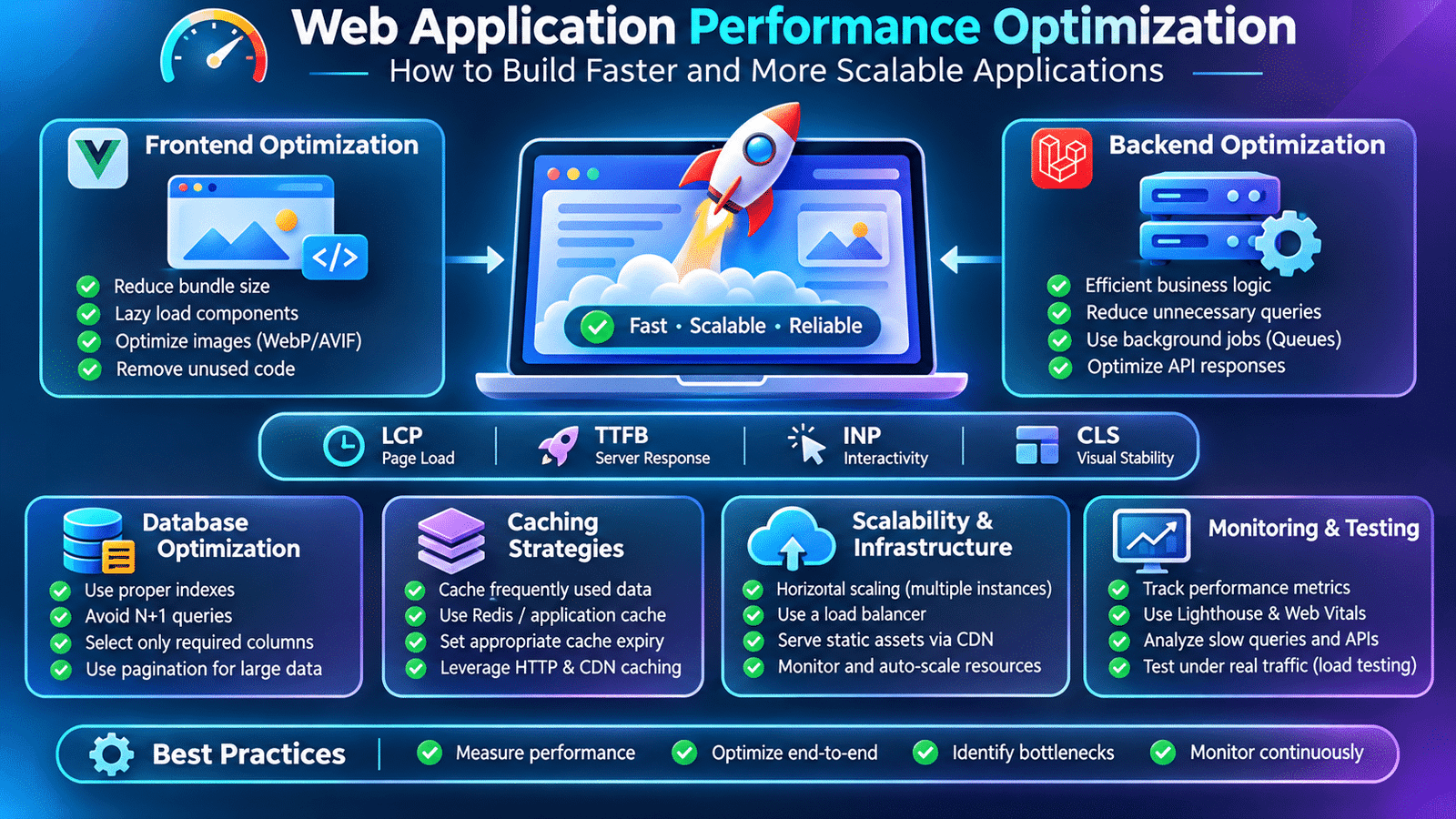
Web application performance optimization is an essential part of building fast, reliable, and scalable software systems. It helps developers improve page loading speed, reduce API response times, optimize database operations, and deliver a better user experience as applications grow.
Consider an e-commerce platform where customers browse products, apply filters, add items to their carts, and complete purchases. If product listings take several seconds to appear or checkout requests frequently time out, the problem affects more than the user experience. It can also impact conversions, customer satisfaction, and business operations.
These performance issues often become more noticeable as an application grows. More users, larger datasets, additional API requests, and complex frontend components can place increasing pressure on application infrastructure.
This is where web application performance optimization becomes an important part of software engineering.
Performance optimization involves identifying bottlenecks and improving how an application loads, processes requests, retrieves information, and uses system resources. It requires developers to examine the frontend, backend, APIs, databases, and deployment environment together.
Let’s explore how full-stack developers approach application performance in real-world development projects.
1. Understanding Web Application Performance
Web application performance describes how efficiently an application responds to user interactions and completes operations.
A fast application should not only load its initial page quickly. It should also respond efficiently when users navigate between screens, submit forms, search records, or perform transactions.
Several measurements help developers understand application performance:
- Page load time: How long the page takes to load its important content.
- Time to First Byte (TTFB): How quickly the browser receives the first byte of the server response.
- Largest Contentful Paint (LCP): How quickly the largest visible content element appears.
- Interaction to Next Paint (INP): How responsive the application feels when users interact with it.
- Cumulative Layout Shift (CLS): How much unexpected visual movement occurs during page loading.
- API response time: How long backend endpoints take to process and return responses.
These measurements help teams identify whether performance problems originate in frontend rendering, network communication, backend processing, or database operations.
2. Identifying Performance Bottlenecks Before Optimization
One of the common mistakes in performance engineering is making changes without first identifying the actual problem.
For example, developers may attempt to optimize database queries when the real issue is that the frontend downloads unnecessarily large JavaScript bundles.
Similarly, reducing image sizes will not resolve an API endpoint that takes several seconds to execute because of inefficient database queries.
Effective web application performance optimization starts with identifying measurable bottlenecks across frontend rendering, backend processing, database queries, and network communication.
Performance investigation should begin with measurement.
Developers can use tools such as:
- Chrome DevTools for browser performance analysis.
- Lighthouse for website performance assessments.
- Laravel logs and application monitoring for backend investigation.
- Database query logs for identifying expensive queries.
- EXPLAIN for understanding database query execution plans.
- Application Performance Monitoring (APM) tools for tracking production behavior.
A useful approach is to establish a baseline, reproduce the slow operation, identify the bottleneck, implement a targeted improvement, and measure the result again.
Optimization should be based on observed behavior rather than assumptions.
3. Frontend Performance Optimization
The frontend directly influences how quickly users can see and interact with an application.
Modern frameworks such as Vue.js, Nuxt, and React provide useful development capabilities, but applications still need careful optimization as their codebase grows.
Reducing JavaScript Bundle Size
Large JavaScript bundles increase the amount of code browsers must download, parse, and execute.
For example, an application may import several large libraries even though a particular page uses only a small portion of their functionality.
Developers can reduce unnecessary code through:
- Tree shaking.
- Dynamic imports.
- Code splitting.
- Lazy loading.
- Removing unused dependencies.
- Avoiding duplicate libraries.
In Vue.js, dynamic imports can be used to load a component only when required:
import { defineAsyncComponent } from 'vue';

const ReportsDashboard = defineAsyncComponent(
    () => import('./ReportsDashboard.vue')
);
This can reduce the amount of JavaScript required during the initial page load.
Lazy Loading Components and Images
Applications often contain components that users do not immediately need.
For example, an analytics dashboard may include charts, reports, filters, and detailed tables. Loading all these components immediately can increase the initial rendering workload.
Lazy loading allows developers to load certain components or images when they become necessary.
For images, developers can use:
<img
    src="/images/product.webp"
    alt="Product"
    loading="lazy"
/>
Images below the initial viewport are good candidates for lazy loading. Important above-the-fold images should generally be loaded without unnecessary delay.
Optimizing Images and Static Assets
Large images can significantly increase page weight.
Developers should consider:
- Using modern image formats such as WebP or AVIF.
- Compressing images appropriately.
- Serving responsive image sizes.
- Avoiding unnecessarily large dimensions.
- Using caching for static assets.
- Removing unused CSS and JavaScript.
These changes help reduce network transfer and improve loading performance, particularly on mobile devices.
4. Backend Performance Optimization
Backend performance depends on how efficiently the server processes incoming requests and executes application logic.
Consider an API endpoint that retrieves a user’s order history. Its response time may depend on authentication, authorization, database queries, business rules, and response transformation.
If each request performs unnecessary operations, response times can increase as application traffic grows.
Developers can improve backend performance by:
- Reducing unnecessary database queries.
- Avoiding repeated calculations.
- Using efficient data structures.
- Limiting unnecessary processing.
- Applying caching where appropriate.
- Moving long-running operations into background jobs.
- Reviewing expensive application logic.
Optimization should preserve the application’s business rules and data consistency.
5. Database Query Optimization
Database performance is one of the most important areas to examine in data-intensive applications.
A poorly optimized query can become expensive when a table contains hundreds of thousands or millions of records.
Consider an application that displays a user’s orders:
$orders = Order::where(
    'user_id',
    $userId
)->get();
This query may be reasonable for a small result set. However, retrieving every matching record may become inefficient when a user has a large order history.
Pagination can limit the number of records returned:
$orders = Order::where(
    'user_id',
    $userId
)->paginate(20);
Using Database Indexes
Indexes can improve query performance when frequently used columns are involved in filtering, sorting, or joining.
For example:
CREATE INDEX idx_orders_user_id
ON orders(user_id);
This index may improve queries that retrieve orders using user_id.
However, indexes also require storage and introduce additional work during insert and update operations. Developers should create them based on actual query patterns.
Avoiding the N+1 Query Problem
The N+1 query problem occurs when an application retrieves a collection of records and then executes additional queries for related information on each record.
For example:
$orders = Order::all();

foreach ($orders as $order) {
    echo $order->user->name;
}
If each order triggers a separate query to retrieve its user, the total number of queries can increase significantly.
Laravel Eloquent provides eager loading:
$orders = Order::with('user')->get();This allows related records to be retrieved more efficiently.
Developers should also avoid retrieving unnecessary columns and should inspect query execution plans when investigating slow database operations.
6. API Performance Optimization
APIs connect frontend applications with backend services. Their response times directly influence how quickly application features become available.
An endpoint that returns excessive information or performs unnecessary processing can negatively affect the entire user experience.
For example, a product listing API should not return every product field when the frontend only needs the product name, image, price, and identifier.
Laravel allows developers to select specific columns:
$products = Product::query()
    ->select([
        'id',
        'name',
        'price',
        'image'
    ])
    ->paginate(20);
Other useful API optimization techniques include:
- Pagination for large datasets.
- Filtering and sorting on the backend.
- Returning only required fields.
- Avoiding unnecessary nested relationships.
- Compressing HTTP responses where appropriate.
- Caching suitable responses.
- Monitoring slow endpoints.
- Setting reasonable request and response limits.
API optimization should also consider network latency and the number of requests required to complete a user interaction.
7. Caching Strategies for Faster Applications
Caching stores frequently accessed information so the application does not need to repeatedly perform the same expensive operation.
For example, a dashboard may display category information that changes only occasionally.
Instead of querying the database every time the dashboard loads, the application can temporarily store the result in a cache.
Laravel provides a convenient cache interface:
$categories = Cache::remember(
    'product_categories',
    now()->addMinutes(30),
    function () {
        return Category::all();
    }
);
The application retrieves the cached result when available. If it has expired or does not exist, the callback executes and stores the new result.
Common caching approaches include:
Application caching: Stores frequently used application data.
Database query caching: Uses caching strategies to avoid repeatedly executing expensive data retrieval operations.
HTTP caching: Allows browsers and intermediary caches to reuse suitable responses.
CDN caching: Distributes static assets and other cacheable content through geographically distributed infrastructure.
Caching requires careful invalidation strategies. When underlying information changes, the application must ensure that users do not continue receiving outdated data.
8. Background Jobs and Asynchronous Processing
Not every operation needs to complete before the application responds to the user.
Consider a registration workflow that sends a welcome email, generates a document, and creates an activity notification.
Executing every operation synchronously can increase the response time of the registration request.
Background jobs allow suitable operations to run asynchronously.
Laravel provides queue functionality for this purpose:
SendWelcomeEmail::dispatch($user);The application can process the queued job separately through a queue worker.
Background processing is useful for:
- Sending emails.
- Generating reports.
- Processing uploaded files.
- Importing large datasets.
- Sending notifications.
- Performing scheduled maintenance tasks.
However, asynchronous processing introduces additional considerations, including job retries, failure handling, duplicate execution, monitoring, and data consistency.
The user-facing request should complete only after the essential synchronous operations have succeeded.
9. Server and Infrastructure Optimization
Even well-optimized application code can perform poorly when the deployment environment is incorrectly configured.
Server performance depends on available resources, web server configuration, PHP worker capacity, database connections, storage, and network infrastructure.
For a Laravel application, developers should review:
- PHP and OPcache configuration.
- PHP-FPM worker settings.
- Web server configuration.
- Database connection limits.
- Redis availability and configuration.
- Queue worker capacity.
- Application and infrastructure monitoring.
- Storage and network performance.
Laravel also provides production optimization commands:
php artisan optimizeThis command runs Laravel’s available optimization steps for production deployment.
Developers should also ensure that production debug mode is disabled and configuration is managed correctly.
Infrastructure changes should be based on actual resource utilization and performance measurements.
10. Understanding Scalability and High-Traffic Applications
Performance optimization focuses on making operations more efficient. Scalability focuses on maintaining acceptable performance as application usage increases.
For example, an application may work perfectly when 100 users are active but experience delays when 10,000 users access it simultaneously.
Developers must consider how application components behave under increasing traffic.
Common scalability approaches include:
- Horizontal scaling through multiple application instances.
- Load balancing incoming requests.
- Using Redis for suitable caching and shared state.
- Moving long-running operations to queue workers.
- Optimizing database queries.
- Using database read replicas where appropriate.
- Serving static assets through a CDN.
- Monitoring resource utilization and request latency.
Scaling an application is not simply adding more servers. Developers must identify bottlenecks and understand which components are limiting the system.
11. Monitoring Application Performance in Production
Performance testing during development is important, but production monitoring reveals how the application behaves under real usage conditions.
Developers should monitor:
- API response times.
- Error rates.
- Database query duration.
- CPU and memory utilization.
- Queue processing time.
- Cache hit and miss rates.
- Traffic volume.
- Slow transactions.
For example, an API endpoint that normally responds within 150 milliseconds may begin taking 2 seconds after a new feature is deployed.
Monitoring helps developers identify this change and investigate whether it is caused by a new query, additional business logic, increased traffic, or an infrastructure issue.
Performance monitoring should be part of the application’s ongoing maintenance process.
12. Practical Performance Optimization Workflow
A structured optimization workflow helps development teams improve performance without introducing unnecessary complexity.
Consider a product dashboard that takes several seconds to load.
A practical investigation could follow these steps:
- Measure the initial page load using browser performance tools.
- Identify whether the delay occurs during asset loading or API communication.
- Inspect the slow API endpoint.
- Review database queries and identify unnecessary operations.
- Add appropriate indexes if query analysis supports them.
- Introduce pagination and select only required fields.
- Cache suitable data that does not change frequently.
- Optimize frontend components and static assets.
- Test the changes under realistic conditions.
- Compare performance measurements before and after optimization.
This approach helps teams address the actual bottleneck rather than making random changes.
13. Common Performance Optimization Mistakes
Performance improvements can introduce new problems when they are implemented without considering application behavior.
Some common mistakes include:
Adding indexes everywhere: Excessive indexes increase storage requirements and can slow down write operations.
Caching everything: Incorrect caching can expose outdated information or create consistency problems.
Loading all records at once: Large database responses consume memory and increase network transfer.
Optimizing without measurement: Changes made without a baseline may not improve the actual bottleneck.
Overusing background jobs: Moving every operation to a queue can complicate workflows and create unnecessary delays.
Ignoring frontend performance: A fast backend does not guarantee a responsive application if the browser must execute excessive JavaScript.
Scaling infrastructure too early: Increasing server capacity without identifying the bottleneck may increase costs without solving the problem.
Good performance engineering balances speed, reliability, maintainability, and infrastructure cost.
14. Best Practices for Web Application Performance Optimization
Developers should consider the following practices when building and maintaining production applications:
- Measure performance before making changes.
- Optimize frontend assets and JavaScript bundles.
- Use lazy loading for suitable components and images.
- Reduce unnecessary API requests.
- Apply pagination to large datasets.
- Review database query execution plans.
- Add indexes based on actual query requirements.
- Use eager loading to avoid N+1 queries.
- Cache frequently accessed data when appropriate.
- Process long-running tasks asynchronously.
- Monitor application and infrastructure metrics.
- Test application behavior under realistic traffic.
- Review performance after significant releases.
Performance optimization should remain an ongoing engineering activity as application requirements and usage patterns change.
15. Frequently Asked Questions
What is web application performance optimization?
Web application performance optimization is the process of improving loading speed, request processing, database operations, and resource usage to make applications faster and more responsive.
How can developers improve website loading speed?
Developers can compress images, reduce JavaScript bundle sizes, implement lazy loading, optimize API requests, configure caching, and improve server response times.
Why is database optimization important?
Database optimization helps applications retrieve and update information efficiently. Proper indexing, pagination, query analysis, and eager loading can reduce unnecessary database work.
What is caching in web development?
Caching temporarily stores frequently accessed information so the application can reuse it without repeatedly performing the same expensive operations.
What is the difference between performance and scalability?
Performance describes how efficiently an application operates under a given workload. Scalability describes how well the application maintains performance as users, requests, and data volumes increase.
How can Laravel applications be optimized?
Laravel applications can benefit from optimized database queries, eager loading, caching, queue processing, efficient API responses, production configuration, and continuous monitoring.
Final Thoughts
Web application performance is not determined by a single technology or optimization technique. It depends on how efficiently the frontend, backend, APIs, databases, and infrastructure work together.
For full-stack developers, understanding performance bottlenecks is an important engineering skill. A well-optimized application should load efficiently, respond consistently, manage increasing traffic, and remain maintainable as new features are introduced.
Rather than optimizing everything at once, developers should measure application behavior, identify the most important bottlenecks, and apply targeted improvements.
Building an application that works is the first step. Building one that remains fast and reliable as it grows is what makes it production-ready.
https://www.enigmacommunity.com
Internal links
Database Design for Web Applications