
Full-stack development remains one of the most sought-after skill sets in the technology industry. Companies want people who can move across the entire application, from the screen a user taps to the database that stores their data. If you are planning to become a full-stack developer, this roadmap lays out the path in a clear, practical order, without the noise of chasing every new framework that appears each month.
This guide covers frontend development, backend development, databases, version control, deployment, and the soft skills that separate a working developer from a hobbyist. Whether you are a complete beginner or someone switching careers into web development, you can use this as a checklist to track your own progress.
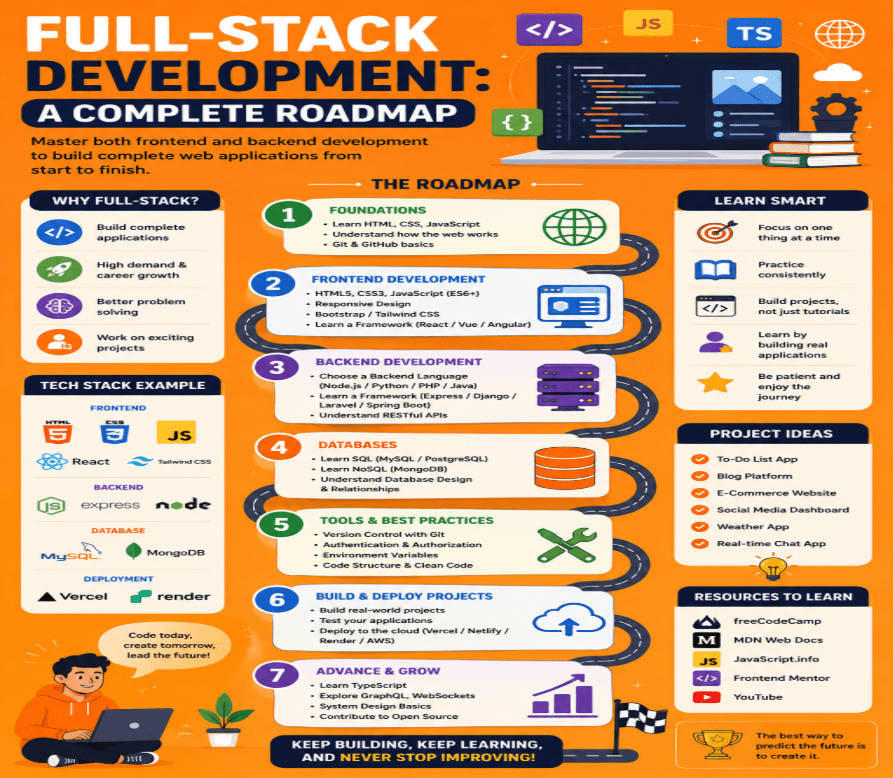
What Is Full-Stack Development?
A full-stack developer is a person who can build both sides of a web application. The frontend is what the user sees and interacts with: buttons, forms, layouts, and animations. The backend is what happens behind the scenes: servers, business logic, authentication, and the database that stores everything. A full-stack developer understands how these two sides talk to each other and can build a complete, working product without depending on a large team.
This does not mean a full-stack developer has to be an expert in every single tool that exists. It means having a solid, working knowledge of each layer of the stack so that you can build, debug, and ship a real application on your own.
Step 1: Learn the Building Blocks of the Web
Every full-stack developer roadmap starts in the same place, and there is no shortcut around it.
HTML gives structure to a web page. It tells the browser what is a heading, what is a paragraph, and what is a form.
CSS controls how that structure looks. Colours, spacing, fonts, and layout all come from CSS. Learning flexbox and grid early will save you a great deal of frustration later, since almost every modern layout uses one or both.
JavaScript is what makes a page interactive. Buttons that respond to clicks, forms that validate input, and pages that update without a full reload all rely on JavaScript. Spend real time here. Skipping a proper understanding of JavaScript fundamentals is one of the most common mistakes beginners make, and it tends to catch up with them once they start learning frameworks.
Once these three are comfortable, responsive design and basic accessibility practices should follow. A site that only works on a large desktop monitor is not finished; it has to work on a phone, a tablet, and for users relying on screen readers too.
Step 2: Pick Up a Frontend Framework
Plain HTML, CSS, and JavaScript can only take a project so far before the code becomes difficult to manage. This is where frontend frameworks come in.
- React is still the most widely used library for building user interfaces, and it remains a strong choice for beginners because of the size of its community and the number of tutorials available.
- Next.js, built on top of React, adds server-side rendering, routing, and performance improvements that are expected in production applications today.
- Vue and Angular are worth knowing about as alternatives, particularly if a job posting asks for them specifically.
The underlying ideas are what matter most: components, state management, props, and how data flows through an application. Once you understand these concepts in one framework, picking up a second one becomes far easier.
Step 3: Move to the Backend
The backend handles everything the user does not see directly: processing requests, running business logic, talking to a database, and keeping data secure.
Common backend paths include:
- Node.js with Express, which lets you write backend code in JavaScript, so the transition from frontend feels natural.
- Python with Django or Flask, popular for its readability and for how well it fits into data-heavy and AI-related projects.
- Java with Spring Boot, still widely used inside large enterprises.
- PHP, Ruby on Rails, or Go, each with its own strong community depending on the industry.
At this stage you should learn how to build a REST API, how authentication and authorization work, how to handle errors properly, and how to write code that does not fall over the moment something unexpected happens.
Step 4: Understand Databases
No application is complete without a place to store data.
SQL databases such as PostgreSQL and MySQL organise data into tables with defined relationships. PostgreSQL in particular has grown in popularity in recent years and is now a common default choice for new projects.
NoSQL databases such as MongoDB store data in a more flexible, document-based format, which suits applications where the shape of the data changes often.
A working full-stack developer should be able to design a simple database schema, write queries, and understand when a relational database is the right tool versus when a document store makes more sense.
Step 5: Learn Git and Version Control
Almost all professional code today lives inside a Git repository, hosted on platforms like GitHub or GitLab. Learning Git is not optional. You need to know how to commit changes, create and merge branches, resolve conflicts, and collaborate with other developers through pull requests. This single skill shows up in nearly every technical interview and every real job.
Step 6: Get Comfortable with Deployment and the Cloud
Building an application locally on your own laptop is only half the job. It needs to reach real users, which means learning how to deploy it.
- Docker packages an application so it runs the same way everywhere, removing the “it works on my machine” problem.
- CI/CD pipelines automate testing and deployment so that new code reaches production safely and consistently.
- Cloud platforms such as AWS, Google Cloud, or Azure host applications at scale. You do not need to become a dedicated DevOps engineer, but basic cloud literacy, including how to deploy a simple app and manage environment variables, is now expected of most full-stack developers.
Step 7: Build Real Projects
Tutorials teach you syntax; projects teach you how to think. Build a handful of projects that increase in difficulty:
- A simple static portfolio site to practise HTML, CSS, and layout.
- A small interactive app, such as a to-do list, to practise JavaScript and state.
- A full-stack application with user accounts, a database, and a working API, such as a blog platform or a booking system.
- One larger project that ties everything together and is deployed live, with the code hosted publicly so others can review it.
Hiring managers care far more about a working, deployed project with a public repository than about a certificate. A strong portfolio with live demos is one of the clearest ways to prove your skills.
Step 8: Add AI-Assisted Development to Your Toolkit
The role of a full-stack developer has expanded. Alongside frontend, backend, and databases, familiarity with AI-assisted development is now a genuine hiring signal. This includes knowing how to use AI coding assistants effectively, understanding how to call APIs from large language models, and being comfortable working with tools that speed up debugging and code review. This does not replace fundamentals; it sits on top of them.
Common Mistakes to Avoid
- Jumping into frameworks before understanding core JavaScript.
- Trying to learn every language and tool at once instead of going deep in a smaller set.
- Skipping Git and version control until a job forces the issue.
- Building projects that never get deployed, so nobody can actually see them work.
- Ignoring database design until a project already has a mess of data.
Avoiding these puts a learner well ahead of most people following the same path.