
Introduction
Managing tasks efficiently can feel overwhelming—especially when juggling studies, work, and personal goals. That’s where tools like Trello come in. Built on a simple visual system, Trello helps you organize tasks, track progress, and collaborate with ease.
What is Trello?
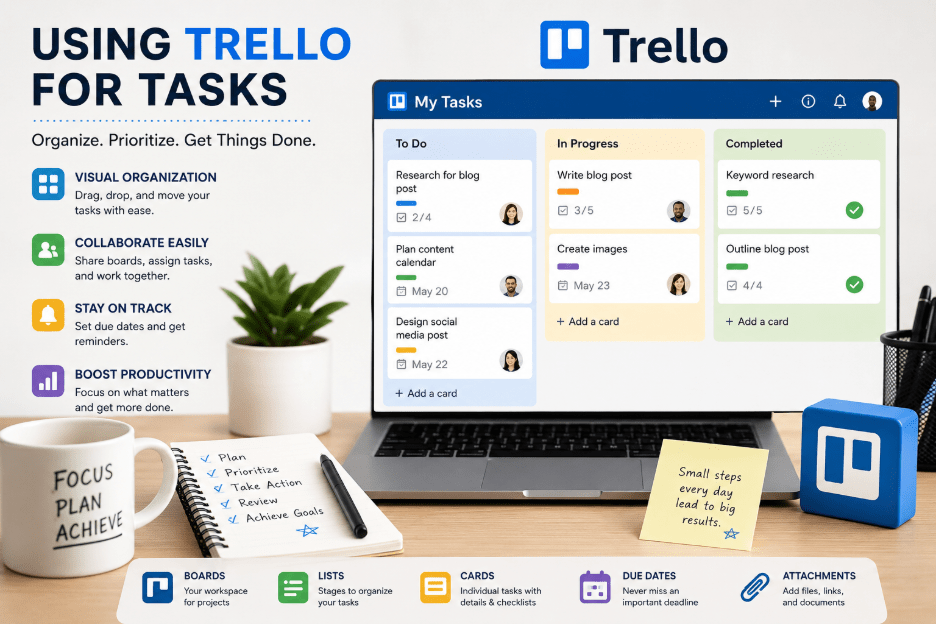
Trello is a visual project management tool that uses boards, lists, and cards to organize your work. Whether you’re planning a project, managing daily tasks, or tracking long-term goals, Trello gives you a clear overview of everything in one place.
How Trello Works
1. Boards – Your Workspace
A board represents a project or a major area of your life (e.g., “Study Plan”, “Work Tasks”, “Personal Goals”).
2. Lists – Task Stages
Lists help you organize tasks into stages like:
- To Do
- In Progress
- Completed
3. Cards – Individual Tasks
Each card represents a task. You can:
- Add descriptions
- Set due dates
- Attach files
- Add checklists
- Assign members
Benefits of Using Trello
Visual Organization
Trello’s drag-and-drop interface makes it easy to track progress at a glance.
Collaboration
You can invite team members, assign tasks, and leave comments—all in one place.
Task Reminders
Set deadlines and get notifications so nothing slips through the cracks.
Accessibility
Trello works across devices—desktop, tablet, and mobile—so your tasks are always with you.
Best Ways to Use Trello
For Students
- Create boards for each subject
- Track assignments and deadlines
- Plan study schedules
For Professionals
- Manage projects and workflows
- Track team progress
- Organize meetings and deliverables
For Personal Productivity
- Daily to-do lists
- Habit tracking
- Goal planning
Tips to Use Trello Effectively
- Keep your boards simple and focused
- Use labels to categorize tasks
- Add checklists for multi-step tasks
- Review and update your board daily
- Use Power-Ups (like calendar view) for better insights
Pros and Cons
Pros:
- Easy to use
- Highly visual
- Great for collaboration
Cons:
- Can get cluttered with too many cards
- Limited advanced features in free version
Conclusion
Trello is a powerful yet simple tool that can transform the way you manage tasks. Whether you’re a student, professional, or someone looking to stay organized, Trello helps you stay focused, productive, and in control.
Final Thought
If you’re looking for a clean, visual way to manage your tasks, Trello is definitely worth trying. Start small, stay consistent, and watch your productivity improve!