Using Notion for Learning: A Complete Guide to Smarter Studying
In today’s fast-paced learning environment, staying organized is just as important as understanding concepts. That’s where Notion comes in—a powerful all-in-one workspace that helps students and professionals manage notes, tasks, and knowledge in one place.
Whether you’re preparing for exams, learning a new skill, or managing multiple subjects, Notion can transform how you learn.
Why Use Notion for Learning?
Notion isn’t just a note-taking app—it’s a flexible system you can customize to match your learning style.
Key benefits:
- Centralized notes and resources
- Easy organization with pages and databases
- Custom study planners and trackers
- Supports text, images, links, and embeds
- Accessible across devices
Instead of juggling multiple apps, you can keep everything—from lecture notes to revision plans—in one place.
Setting Up Your Learning Dashboard
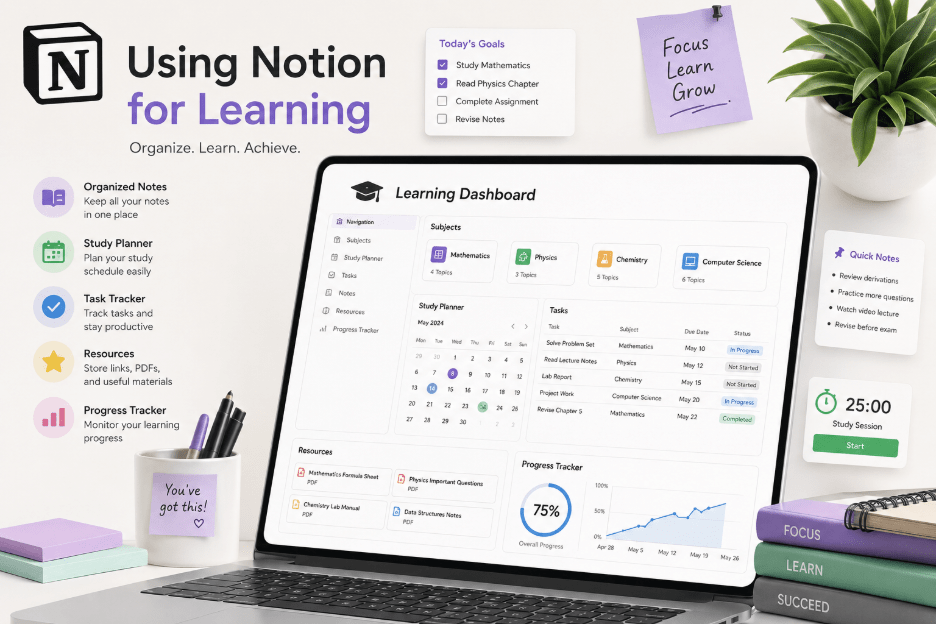
Start by creating a Learning Dashboard—your central hub.
What to include:
- Subject pages (Math, Science, Coding, etc.)
- Study planner or calendar
- Task tracker
- Important resources (links, PDFs, videos)
This structure helps you quickly access everything without wasting time searching.
Organizing Notes Effectively
Notion allows you to structure notes in a way that improves retention.
Best practices:
- Use headings and subheadings for clarity
- Add toggle lists for summaries
- Highlight key points using colors
- Link related topics using internal pages
Tip: Create a “Summary Section” at the top of each note for quick revision before exams.
Using Databases for Study Tracking
Databases are where Notion really shines.
You can track:
- Study progress
- Assignment deadlines
- Revision status
- Learning goals
Example fields:
- Subject
- Topic
- Status (Not Started / In Progress / Completed)
- Priority
- Deadline
This makes your study process more structured and measurable.
Creating a Study Routine
Consistency beats intensity when it comes to learning.
Use Notion to:
- Plan daily and weekly study sessions
- Set realistic goals
- Track completed tasks
- Reflect on what you learned
You can even create a habit tracker to build discipline over time.
Collaboration and Sharing
Notion also supports collaborative learning.
- Share notes with classmates
- Work on group projects
- Create shared knowledge bases
- Give and receive feedback
This is especially useful for team assignments or peer learning.
Tips to Maximize Learning with Notion
- Keep your setup simple—don’t overcomplicate
- Use templates to save time
- Review and update notes regularly
- Combine Notion with active learning (practice, quizzes)
- Avoid spending too much time designing instead of studying
Common Mistakes to Avoid
- Over-designing pages instead of focusing on content
- Creating too many sections without using them
- Not reviewing notes regularly
- Treating Notion as storage instead of a learning tool
Final Thoughts
Using Notion for learning can significantly boost your productivity, organization, and focus. The key is to build a system that works for you and stick to it.
Start simple, stay consistent, and refine your setup as you go. Over time, Notion can become your personal learning assistant—helping you study smarter, not harder.