
Most people learn about cybersecurity the hard way. A friend loses access to their email. A relative gets a strange call asking for a bank code. A coworker clicks a link that looked exactly like a message from HR. None of these people were careless by nature. They simply never learned the handful of habits that keep most attacks out in the first place.
This guide covers the cybersecurity tips that matter right now, written in plain language, without the jargon that usually fills articles like this one. You do not need a technical background to use any of it.
Why Cybersecurity Habits Matter More Than Ever
Online threats have changed shape over the years. Old viruses were often clumsy and easy to spot. Today’s attacks are quieter and better disguised. Phishing emails now read like real messages from your bank or employer. Fake websites copy real ones down to the logo and layout. Scam calls can even mimic a familiar voice.
None of this means you need expensive software or a computer science degree. It means the basics deserve more attention than most people give them. Below are the tips worth building into daily habits.
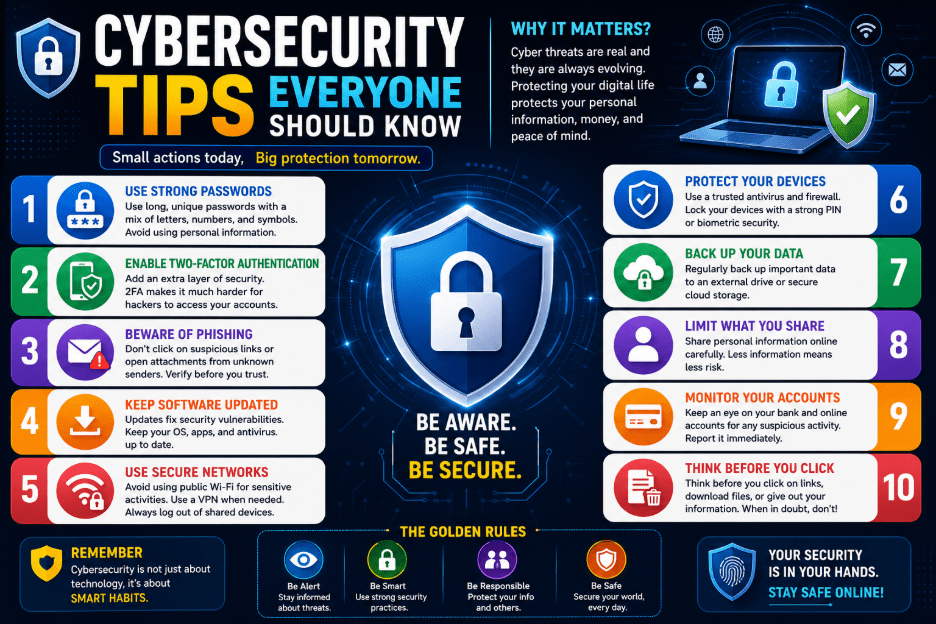
1. Use Strong, Unique Passwords
A weak password is still one of the easiest ways into an account. Avoid names, birthdays, or common words. A strong password should be long, mixed with numbers and symbols, and different for every account you own.
Reusing one password across many sites is risky. If a single website is breached, that same password can be tried on your email, your bank, and your social accounts. A password manager can store and generate strong passwords for you, so you are not left trying to remember dozens of combinations.
2. Turn On Multi-Factor Authentication
Multi-factor authentication, often shortened to MFA, adds a second step after your password. This might be a code sent to your phone, a prompt in an authentication app, or a fingerprint scan.
Where possible, choose an authentication app over a text message code. Text messages can be intercepted through a trick called SIM swapping, where a criminal convinces your phone carrier to move your number to a device they control. An app-based code sitting on your own phone is much harder to steal this way.
3. Think Before You Click
Phishing remains the most common way attackers get into an account. These messages are built to create urgency: an unpaid invoice, a locked account, a prize you must claim today. The goal is to make you act before you think.
Before clicking any link in an email or text, look closely at the sender’s address, the spelling, and the tone of the message. If something feels slightly off, do not click. Instead, open your browser and go to the official website directly, or call the company using a number you already know is correct.
4. Keep Your Software Updated
Software updates are not just new features. Many of them close security holes that criminals are actively trying to use. Delaying an update leaves that door open longer than it needs to be.
This applies to your phone, your laptop, your browser, and any app you use often. Turning on automatic updates is the simplest way to stay protected without having to think about it.
5. Install Antivirus Software With Real-Time Protection
A basic antivirus program is no longer enough on its own. Look for software that offers behavior-based detection, meaning it watches for suspicious activity rather than only checking against a list of known threats. This catches newer attacks that have not been seen before.
6. Be Careful on Public Wi-Fi
Free Wi-Fi at a coffee shop, airport, or hotel is convenient, but it is also an easy target. Some public networks are set up by criminals with names made to look like the real one. Once connected, they can watch what you send and receive.
Avoid logging into banking or email accounts on public Wi-Fi. If you must use it, a virtual private network, or VPN, adds a layer of protection by encrypting your connection.
7. Back Up Your Data Regularly
Ransomware attacks lock people out of their own files until a payment is made. A recent backup, kept separate from your main device, means a ransomware attack loses most of its power over you. Cloud backups and an external drive both work well. The key is doing it regularly, not just once.
8. Protect Your Email Account Above All
Your email is often the master key to everything else. Password reset links, account alerts, and identity checks all pass through it. If someone gets into your email, they can often work their way into your bank, your social media, and your online shopping accounts one by one.
Use a strong password on your email, turn on multi-factor authentication, and check your account settings now and then for forwarding rules you did not set up yourself.
9. Watch for AI-Generated Scams
Criminals are now using artificial intelligence to write more convincing phishing messages, clone voices, and build fake websites in minutes. A call that sounds like a family member asking for money, or an email written with perfect grammar and a familiar tone, is no longer proof that a message is genuine.
If a message or call asks for money, passwords, or personal details, pause. Confirm the request through a separate channel, such as calling the person back on a number you already have saved.
10. Clean Up Old Accounts
Accounts you no longer use are easy to forget and hard to watch. Close accounts sitting idle, remove saved card details where you can, and delete personal information you no longer need stored online. The less of your data sitting out there, the less there is for anyone to steal.
11. Review App Permissions
Many apps ask for more access than they actually need, such as your location, contacts, or microphone. Take a few minutes to review app permissions on your phone and remove access that has nothing to do with what the app actually does.
12. Trust Your Instincts
If something about a message, a call, or a website feels wrong, it probably is. Years of scams have taught most people to notice bad grammar or strange formatting, but modern scams are often polished and convincing. A gut feeling that something is off is still worth listening to. Slow down, check twice, and ask someone before you act.
Building These Habits Into Everyday Life
None of these tips require constant effort once they become habits. A password manager, an authentication app, and automatic updates run quietly in the background. The rest comes down to slowing down for a moment before clicking, sharing, or paying.
Cybersecurity is no longer a topic only for IT departments. It is a daily life skill, the same as locking your front door or checking your mirrors before changing lanes. The people who stay safe online are rarely the most technical. They are simply the ones who built a few good habits and stuck with them.