
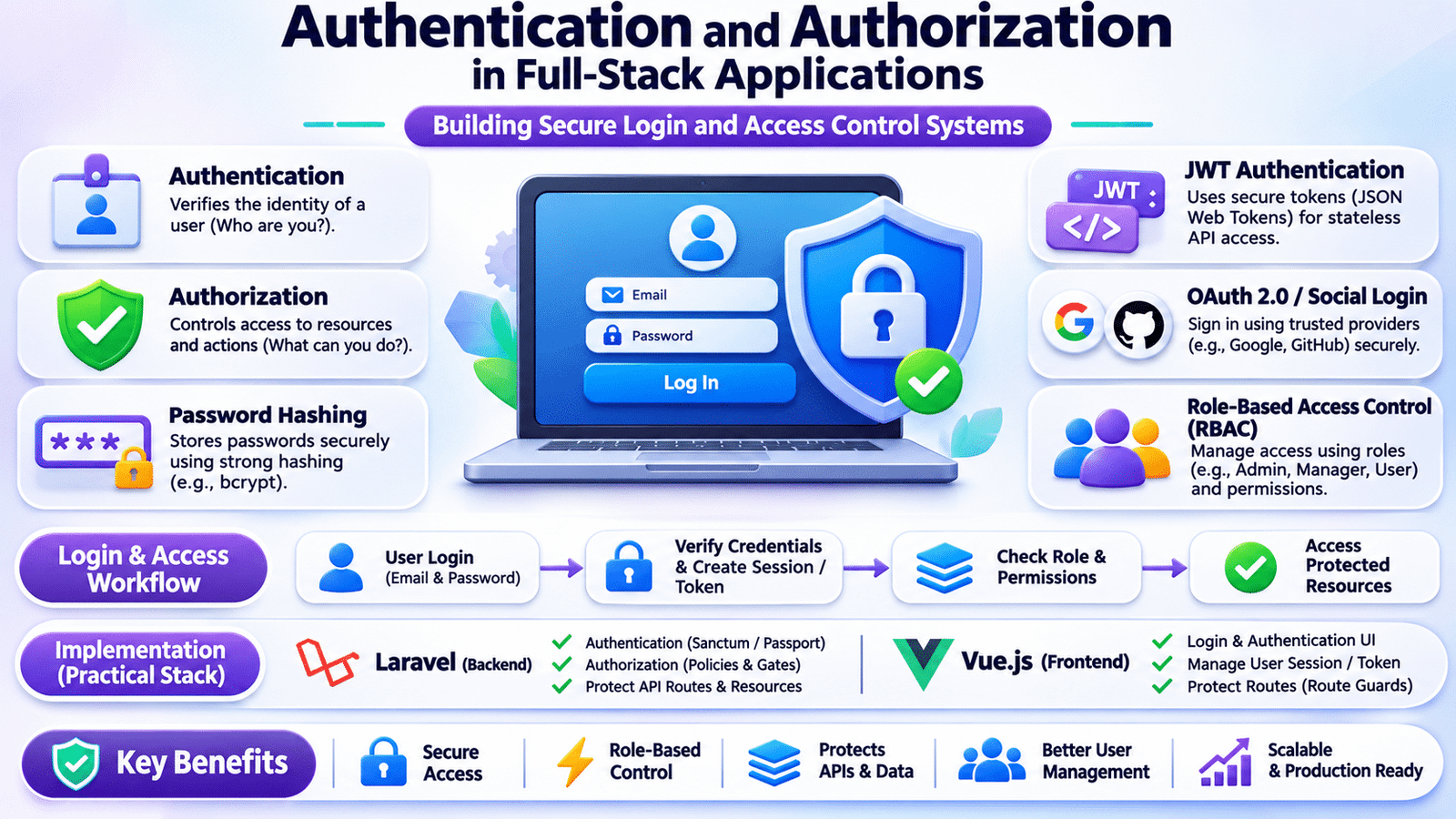
Secure API access is essential for protecting modern full-stack applications and sensitive user information. Developers need to implement reliable authentication and authorization mechanisms to verify user identities, manage permissions, and prevent unauthorized access to application resources.
These differences must be enforced by the application, not simply hidden through frontend interface conditions.
API authentication is a fundamental part of securing full-stack applications. It establishes the identity of a user or client before allowing access to protected resources. Authorization builds on this process by determining which actions that authenticated identity is permitted to perform.
Consider an e-commerce platform with customers, support agents, and administrators. Each user needs to log in, access the appropriate application features, and interact with backend APIs according to their assigned permissions.
Implementing this correctly requires coordination between the frontend, backend, authentication mechanisms, database, and security policies.
For full-stack developers, understanding authentication and authorization is essential when building applications that protect user accounts, business data, and sensitive operations.
This article explores practical security workflows, common authentication mechanisms, and implementation approaches using Laravel and Vue.js.
1. Understanding API Authentication in Modern Applications
API authentication is the process of verifying the identity of a user, application, or service before granting access to protected resources.
When a user enters their email address and password on a login page, the backend verifies those credentials.
If they are valid, the application establishes an authenticated session or issues an authentication token, depending on the selected approach.
The frontend can then use the authentication state to make requests to protected API endpoints.
A typical workflow looks like this:
       User Opens Application
                 |
                 v
            Login Page
                 |
                 v
       Submit Login Credentials
                 |
                 v
          Backend API
                 |
                 v
       Verify User Credentials
                 |
           +-----+-----+
           |           |
         Valid       Invalid
           |           |
           v           v
     Create Session   Return Error
       or Token
           |
           v
      Access Protected
          Resources
Authentication should always be handled by a trusted backend or identity provider. The frontend can manage the user interface and authentication state, but it must not independently decide whether credentials are valid.
2. Authentication vs. Authorization
Authentication and authorization are related security concepts, but they solve different problems.
Authentication
Authentication answers the question:
Who are you?
For example, when a user logs in with an email address and password, the backend verifies their identity.
Other authentication methods include:
- Session-based authentication.
- Token-based authentication.
- Multi-factor authentication.
- OAuth-based identity providers.
- Passkeys and other passwordless mechanisms.
Authorization
Authorization answers the question:
What are you allowed to do?
After authentication, the application determines which resources and operations the user can access.
For example:
- A customer can view their own orders.
- A support agent can access assigned support tickets.
- An administrator can manage user accounts.
- A finance user can access financial reports.
A user can be successfully authenticated but still be unauthorized to perform a particular operation.
| Area | Authentication | Authorization |
|---|---|---|
| Purpose | Verify identity | Control access |
| Main question | Who are you? | What can you do? |
| Happens | During identity verification | When accessing protected resources |
| Example | User login | Admin-only API access |
Both mechanisms are required for a secure application.
3. Understanding the Secure Login Workflow
A secure login process involves more than checking whether an email and password match.
Consider a typical application login workflow:
- The user enters their credentials.
- The frontend sends the login request over HTTPS.
- The backend validates the request.
- The backend retrieves the corresponding user record.
- The submitted password is verified against the stored password hash.
- If valid, the application creates a session or issues an authentication token.
- The frontend receives the appropriate authentication response.
- Subsequent protected requests include the required authentication credentials.
An important security rule is that passwords should never be stored as plain text.
The application should store passwords using an appropriate password-hashing algorithm and verify submitted credentials against those hashes.
The backend should also return generic login errors rather than revealing whether a particular email address exists.
4. Understanding Password Hashing and Verification
Password hashing protects user credentials if the database is exposed.
Hashing transforms a password into a one-way representation that is designed to be computationally expensive to reverse.
Laravel supports secure password hashing through its hashing facilities.
For example:
use Illuminate\Support\Facades\Hash;

$hashedPassword = Hash::make($request->password);
The resulting hash can be stored in the users table.
During login, the application verifies the submitted password:
if (Hash::check(
    $request->password,
    $user->password
)) {
    // Credentials are valid.
}
Developers should never compare plain-text passwords or implement their own password-hashing algorithms.
Other important practices include:
- Enforcing suitable password policies.
- Applying rate limits to login attempts.
- Protecting password-reset workflows.
- Using secure password-hashing configurations.
- Preventing passwords from appearing in application logs.
- Requiring additional verification for sensitive account changes.
Password hashing is only one part of account security. Applications should also protect the login and recovery processes.
5. Understanding Session-Based Authentication
Session-based authentication is a common approach for traditional web applications.
After a successful login, the server creates an authenticated session and maintains the relevant authentication state.
The browser receives a session identifier, usually through a cookie.
Subsequent requests include the session cookie, allowing the server to identify the authenticated user.
A simplified workflow looks like this:
        User Login
            |
            v
      Verify Credentials
            |
            v
      Create Server Session
            |
            v
       Set Session Cookie
            |
            v
    Browser Sends Cookie
            |
            v
      Server Verifies Session
            |
            v
      Access Protected Route
Session-based authentication is commonly used in server-rendered applications and first-party web applications.
Security considerations include:
- Secure cookie configuration.
- HttpOnly cookies.
- Appropriate SameSite settings.
- HTTPS.
- Session expiration.
- Session ID regeneration after login.
- Protection against cross-site request forgery (CSRF).
Laravel provides session and cookie functionality that can support this approach.
For a first-party Vue.js application using Laravel Sanctum’s SPA authentication, cookie-based authentication is also a practical option.
6. Understanding Token-Based Authentication
Token-based authentication is commonly used when frontend applications communicate with backend APIs.
After successful authentication, the backend issues a token that the client can use when accessing protected endpoints.
The token represents an authenticated identity or authorization grant, depending on the authentication system.
A typical request includes an authorization header:
GET /api/profile
Authorization: Bearer YOUR_ACCESS_TOKEN
Accept: application/json
The backend validates the token before processing the protected request.
Token-based approaches are useful for:
- Mobile applications.
- Third-party API integrations.
- Distributed application architectures.
- Applications with separate frontend and backend deployments.
- Service-to-service communication.
However, tokens must be protected carefully.
Developers should consider token expiration, revocation, storage, permissions, and secure transport.
A token should never be treated as proof that every operation is permitted. Authorization checks are still required.
7. Understanding JWT Authentication
JSON Web Token (JWT) is a standardized token format used to represent claims between parties.
A JWT typically contains three parts:
- Header.
- Payload.
- Signature.
These parts are encoded and combined into a token string.
A simplified JWT structure looks like:
HEADER.PAYLOAD.SIGNATUREThe payload may contain claims such as:
{
  "sub": "user_101",
  "role": "customer",
  "iat": 1794220000,
  "exp": 1794223600
}
The signature allows the receiving system to verify that the token has not been modified and was issued by a trusted party using the expected signing configuration.
JWTs are commonly used in distributed authentication systems.
However, developers should understand several important points:
- JWT payloads are encoded, not automatically encrypted.
- Sensitive information should not be placed in token claims.
- Expiration should be configured appropriately.
- Signing algorithms and key management must be handled securely.
- Revocation requires additional design because a self-contained token may remain valid until expiration unless the system provides a revocation mechanism.
JWT is not automatically more secure than session-based authentication. The right approach depends on the application architecture.
8. Understanding OAuth 2.0 and Third-Party Login
Many applications allow users to sign in through external identity providers.
For example, a platform may provide a Google sign-in option so users do not need to create another password.
OAuth 2.0 is an authorization framework that allows applications to obtain limited access to protected resources.
OpenID Connect (OIDC) adds an identity layer on top of OAuth 2.0 and is commonly used for user authentication.
A simplified third-party login workflow looks like this:
       User Selects Google Login
                  |
                  v
       Redirect to Identity Provider
                  |
                  v
        User Authenticates
                  |
                  v
       Authorization Response
                  |
                  v
        Backend Validates Flow
                  |
                  v
       Establish Application Session
For modern applications, the Authorization Code flow with PKCE is generally recommended for public clients such as browser-based and mobile applications.
Developers should use established OAuth and OIDC libraries rather than implementing token exchange and signature verification manually.
Important security considerations include redirect URI validation, state validation, PKCE, token handling, and provider configuration.
9. Implementing API Authentication Using Laravel
Laravel provides authentication features and packages that help developers implement secure authentication workflows.
For applications requiring API authentication, Laravel Sanctum is a common option.
Sanctum supports personal access tokens and first-party SPA authentication using Laravel’s session and cookie mechanisms.
Consider a login endpoint that validates user credentials and issues an access token.
A simplified example:
use Illuminate\Http\Request;
use Illuminate\Support\Facades\Auth;
use Illuminate\Support\Facades\Hash;
use App\Models\User;

public function login(Request $request)
{
    $credentials = $request->validate([
        'email' => ['required', 'email'],
        'password' => ['required', 'string'],
    ]);

    $user = User::where(
        'email',
        $credentials['email']
    )->first();

    if (
        !$user ||
        !Hash::check(
            $credentials['password'],
            $user->password
        )
    ) {
        return response()->json([
            'message' => 'Invalid credentials.',
        ], 401);
    }

    $token = $user->createToken(
        'web-application'
    )->plainTextToken;

    return response()->json([
        'token' => $token,
        'user' => $user,
    ]);
}
This example assumes Sanctum is installed and configured, and that the User model uses the appropriate token trait.
For a production implementation, developers should also add login rate limiting, account-state checks, token abilities where needed, and careful response-field selection.
The example demonstrates token issuance; it should not be treated as a complete production authentication system by itself.
10. Protecting Laravel API Routes
After authentication is configured, protected API routes must use the appropriate authentication middleware.
For a Sanctum token-based API, a route can be protected using:
use Illuminate\Http\Request;
use Illuminate\Support\Facades\Route;

Route::middleware('auth:sanctum')
    ->get('/profile', function (Request $request) {
        return $request->user();
    });
The middleware verifies the authentication credentials before allowing access to the route.
If the request does not contain valid authentication credentials, the API returns an unauthorized response.
For additional protection, developers should use policies, gates, or permission checks to determine whether the authenticated user can perform the requested operation.
Authentication middleware alone does not establish that the user owns the requested resource.
For example, an authenticated customer should not be able to retrieve another customer’s private order simply by changing an order ID in the API URL.
The backend must verify resource ownership or the relevant permission.
11. Implementing Authentication in a Vue.js Application
A Vue.js frontend typically needs to manage login forms, authentication state, protected navigation, and API communication.
Consider a login service that sends credentials to the backend.
export async function login(
  email: string,
  password: string
) {
  const response = await fetch('/api/login', {
    method: 'POST',
    headers: {
      'Content-Type': 'application/json',
      'Accept': 'application/json',
    },
    body: JSON.stringify({
      email,
      password,
    }),
  });

  if (!response.ok) {
    throw new Error('Unable to authenticate');
  }

  return response.json();
}
The component can call this service when the user submits the login form.
For a token-based application, subsequent API requests need to include the access token using the configured authentication mechanism.
For a first-party Sanctum SPA using cookie-based authentication, the frontend instead follows the CSRF-cookie and session-cookie workflow. It should not store or invent a bearer token for that setup.
Authentication state can be managed through a suitable application store, such as Pinia.
However, frontend route protection is only a navigation and user-experience feature. The backend must independently enforce authentication and authorization on every protected operation.
12. Understanding Role-Based Access Control (RBAC)
Authentication establishes who the user is. Role-Based Access Control (RBAC) determines which operations the user can perform based on assigned roles.
Consider an enterprise application with the following roles:
| Role | Example permissions |
|---|---|
| Administrator | Manage users, settings, and application resources |
| Manager | View reports and manage assigned teams |
| Employee | Access permitted work-related resources |
| Customer | Manage personal account and orders |
Instead of checking individual user identities throughout the application, the backend can associate users with roles.
A simplified relationship looks like:
Users
  |
  v
User Roles
  |
  v
Roles
  |
  v
Permissions
  |
  v
Allowed Actions
This structure makes access control easier to manage as the application grows.
However, roles should not become an unlimited collection of hardcoded conditions. A permission-based design provides more flexibility when different users need different combinations of capabilities.
13. Implementing Authorization with Laravel Policies and Gates
Laravel provides Gates and Policies for organizing authorization rules.
A Gate is useful for defining a specific authorization ability.
For example:
use Illuminate\Support\Facades\Gate;

Gate::define(
    'manage-users',
    function ($user) {
        return $user->role === 'admin';
    }
);
A route or controller can check the ability:
if (Gate::denies('manage-users')) {
    abort(403);
}
Policies are useful when authorization is closely related to a model or resource.
For example, an OrderPolicy can determine whether a user is allowed to view a particular order.
public function view(User $user, Order $order): bool
{
    return $user->id === $order->user_id;
}
The controller can authorize access:
$this->authorize('view', $order);This approach keeps authorization rules organized and prevents business permissions from being scattered across controllers.
For complex applications, teams can combine roles, individual permissions, resource ownership, and organizational boundaries.
14. Protecting Frontend Routes and Navigation
Vue.js applications often contain routes that should only be accessible after login.
For example:
/dashboard/profile/orders/admin/users
A route guard can check whether the frontend currently considers the user authenticated.
A simplified Vue Router example:
router.beforeEach((to) => {
  const authStore = useAuthStore();

  if (
    to.meta.requiresAuth &&
    !authStore.isAuthenticated
  ) {
    return '/login';
  }

  if (
    to.meta.requiresAdmin &&
    authStore.user?.role !== 'admin'
  ) {
    return '/unauthorized';
  }
});
Routes can define metadata:
{
  path: '/admin/users',
  component: AdminUsers,
  meta: {
    requiresAuth: true,
    requiresAdmin: true,
  },
}
This helps prevent users from navigating to pages they should not access.
However, frontend route guards are not security boundaries.
A user can bypass frontend restrictions and send API requests directly. Therefore, Laravel must enforce the same permissions independently.
15. Understanding Refresh Tokens, Expiration, and Logout
Authentication credentials should not remain valid indefinitely without a clear security strategy.
Applications need to manage authentication lifetimes and logout behavior.
For token-based systems, common considerations include:
Access Token Expiration: Limits how long an access token can be used.
Refresh Tokens: Allow eligible clients to obtain new access tokens without requiring the user to enter credentials again.
Token Revocation: Invalidates credentials when a user logs out, an account is compromised, or access is withdrawn.
Session Expiration: Ends inactive or expired sessions.
Logout: Removes or invalidates the appropriate authentication state.
For systems using refresh tokens, they should be protected carefully and rotated when the chosen authentication design supports rotation.
For Sanctum personal access tokens, applications can revoke the current token or other tokens according to their requirements.
For first-party session-based authentication, logout should invalidate the session and regenerate the relevant CSRF state.
The exact implementation depends on the authentication mechanism.
16. Common Authentication and Authorization Security Risks
Authentication systems can introduce security vulnerabilities when implemented incorrectly.
Broken Access Control
A user accesses information or operations that should be restricted to another user or role.
Applications should validate resource ownership and permissions on the backend.
Brute-Force Login Attempts
Attackers repeatedly attempt passwords against an account.
Rate limiting, monitoring, and additional account-protection mechanisms help reduce this risk.
Cross-Site Scripting (XSS)
Malicious scripts may execute within a user’s browser and attempt to access application data.
Developers should use safe rendering practices, validate untrusted input, and apply suitable content security controls.
Cross-Site Request Forgery (CSRF)
A malicious website may attempt to make a browser send unauthorized requests using an existing authenticated session.
Cookie-based applications should implement appropriate CSRF protections.
Token Exposure
Authentication tokens may be exposed through insecure storage, application logs, URLs, or compromised scripts.
Tokens should be transported over HTTPS and stored according to the security model of the application.
Weak Password Recovery
An insecure password-reset workflow may allow attackers to take over accounts.
Reset tokens should be unpredictable, time-limited, and invalidated appropriately after use.
17. Security Best Practices for Production Applications
Development teams should follow a structured security approach when building authentication systems.
- Always use HTTPS for authentication and protected API communication.
- Store passwords using secure password-hashing algorithms.
- Apply rate limiting to login and recovery endpoints.
- Use established authentication libraries and frameworks.
- Configure secure cookies for session-based applications.
- Protect cookie-based requests against CSRF.
- Validate token signatures, expiration, and intended use.
- Apply backend authorization to every protected operation.
- Verify resource ownership where necessary.
- Avoid storing sensitive information in JWT payloads.
- Use appropriate token expiration and revocation strategies.
- Implement secure password-reset workflows.
- Monitor suspicious login and access activity.
- Keep authentication packages and dependencies updated.
- Test unauthorized access and permission boundaries.
Security should be part of the application architecture from the beginning rather than added after the core features are completed.
18. Frequently Asked Questions
What is API authentication?
API authentication is the process of verifying the identity of a user, application, or service before allowing access to protected API resources.
What is the difference between authentication and authorization?
Authentication verifies identity, while authorization determines which resources and operations an authenticated identity is permitted to access.
What is the difference between session-based and token-based authentication?
Session-based authentication typically uses server-managed sessions and browser cookies. Token-based authentication uses credentials such as access tokens to authorize requests.
What is JWT authentication?
JWT authentication uses signed JSON Web Tokens to represent claims that a receiving application can validate. JWTs are commonly used in distributed API architectures.
Does Laravel support API authentication?
Yes. Laravel supports authentication workflows through its authentication facilities and packages such as Sanctum and Passport.
What is Role-Based Access Control?
RBAC is an authorization approach in which users receive permissions based on their assigned roles.
Is frontend route protection enough to secure an application?
No. Frontend route protection improves navigation and user experience, but the backend must enforce authentication and authorization independently.
What is OAuth 2.0?
OAuth 2.0 is an authorization framework that allows applications to obtain limited access to protected resources. OpenID Connect adds an identity layer for authentication.
Final Thoughts
Authentication and authorization are essential components of modern full-stack application security.
Authentication verifies the identity of users and services, while authorization ensures that each identity can access only the resources and operations permitted by the application’s business rules.
For full-stack developers working with Laravel and Vue.js, understanding sessions, tokens, JWT, OAuth, RBAC, policies, and protected API routes provides a strong foundation for building secure applications.
A reliable security implementation does not depend on hiding frontend pages or issuing tokens alone. It requires coordinated backend verification, clear authorization rules, secure credential handling, and continuous testing.
When these principles are implemented correctly, applications can protect user information, enforce business permissions, and support secure interactions as they grow.
Internal links
https://vyasanexus.com/rest-api-development/
https://vyasanexus.com/full-stack-development