
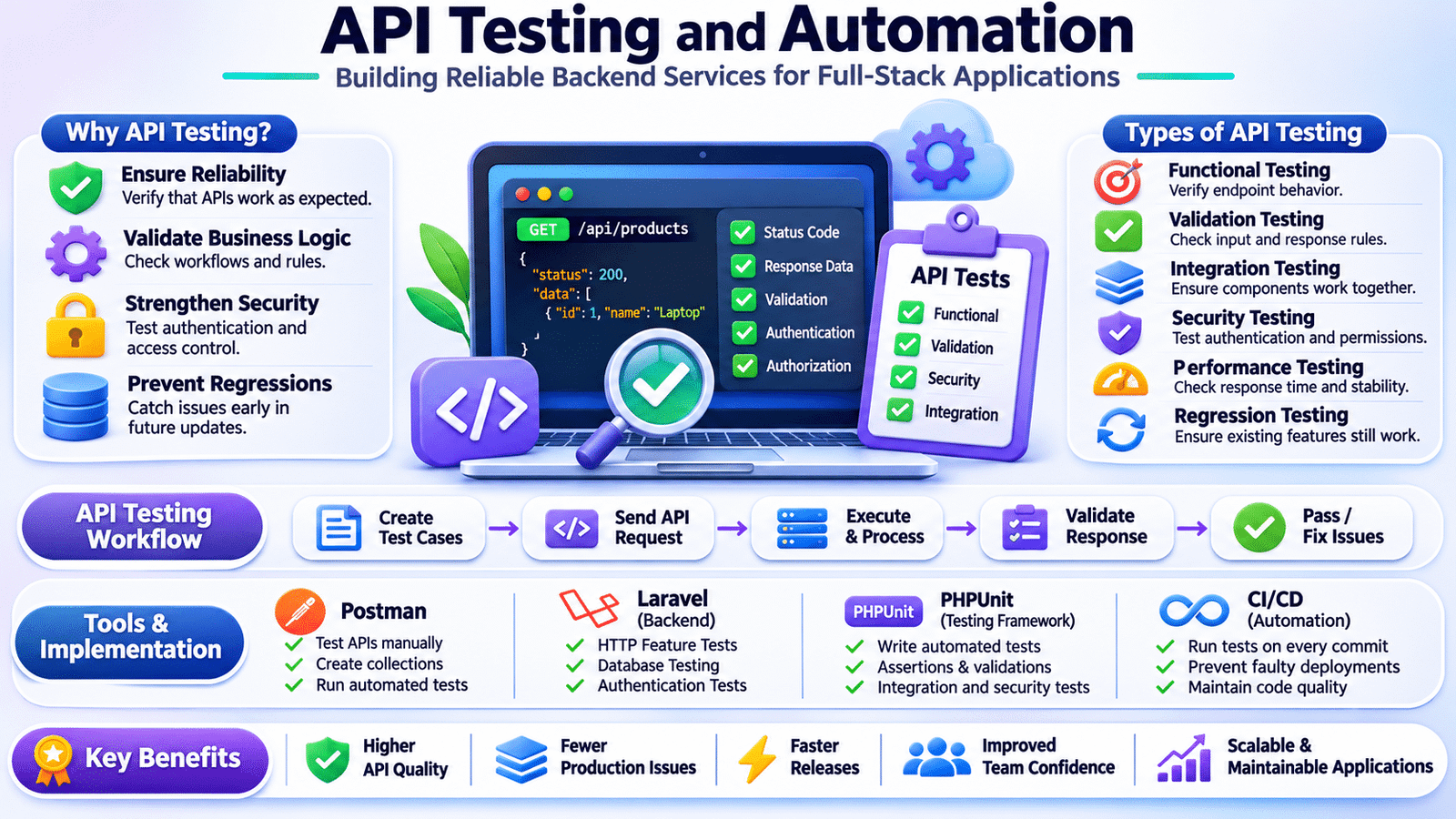
API Testing and Automation: Building Reliable Backend Services for Full-Stack Applications
Modern applications depend on APIs to exchange information between frontend interfaces, backend services, databases, and external platforms. A user submitting an order, updating a profile, or completing a payment may trigger several API requests before the operation is finished.
An API can return a successful response during development and still fail under different conditions. Invalid input, expired authentication tokens, missing database records, concurrent requests, and external service failures can all produce unexpected behavior.
These issues become more difficult to identify when an application contains multiple endpoints and interconnected services.
API testing is the process of verifying that application programming interfaces behave correctly under different inputs, conditions, and execution scenarios. It helps development teams identify defects, validate business logic, and maintain consistent communication between application components.
For full-stack developers, API testing is an important part of the development lifecycle. It ensures that backend services work as expected and that frontend applications receive predictable responses.
This article explores practical API testing strategies, automated testing techniques, and real-world implementation examples using Postman, Laravel, and PHPUnit.
1. Understanding API Testing in Modern Application Development
API testing focuses on validating the behavior of backend endpoints independently of the frontend interface.
Consider an e-commerce application with endpoints for:
- User authentication.
- Product listing.
- Shopping cart management.
- Order creation.
- Payment processing.
- Order history.
Each endpoint performs a specific operation and communicates with other parts of the application.
For example, when a customer creates an order, the backend must validate the request, verify product availability, calculate the total amount, save the order, and return an appropriate response.
API testing verifies that each part of this process behaves correctly.
A typical API testing workflow looks like this:
       API Test Case
            |
            v
       Send Request
            |
            v
       Backend API
            |
            v
    Execute Business Logic
            |
            v
       Database Operations
            |
            v
       Return API Response
            |
            v
    Validate Expected Results
            |
       +----+----+
       |         |
      Pass      Fail
Testing APIs independently helps developers identify backend problems without depending on the complete frontend application.
2. Why API Testing Is Important for Full-Stack Applications
A frontend application may display a successful interface while the backend processes incorrect information.
For example, an order confirmation page may appear after checkout, but the backend might have failed to update the product inventory.
Without proper API testing, these problems may reach production.
API testing helps teams verify:
Business Logic: Ensures backend operations follow the application’s requirements.
Request Validation: Confirms that invalid or incomplete data is rejected correctly.
Response Consistency: Checks whether APIs return the expected response structure.
Authentication: Verifies that protected endpoints require valid credentials.
Authorization: Ensures users cannot access resources or operations outside their permissions.
Database Integrity: Confirms that API operations create, update, and delete records correctly.
Error Handling: Checks whether failures produce appropriate status codes and useful error responses.
Integration Reliability: Validates communication between internal and external services.
Testing these areas helps reduce production defects and makes application changes safer.
3. Understanding Different Types of API Testing
API testing includes several testing approaches. Each focuses on a different level of application behavior.
Functional Testing
Functional testing verifies whether an endpoint performs the operation it was designed to handle.
For example, a product API should return the requested product when a valid product ID is supplied.
Validation Testing
Validation testing checks how the API handles invalid input.
Examples include:
- Missing required fields.
- Invalid email addresses.
- Negative product quantities.
- Unsupported values.
- Incorrect data types.
Integration Testing
Integration testing verifies whether different application components work together correctly.
For example, an order API may interact with the order model, inventory service, payment service, and database.
Security Testing
Security testing checks whether APIs enforce authentication, authorization, and other security requirements.
It also helps identify vulnerabilities such as unauthorized data access and improper input handling.
Performance Testing
Performance testing evaluates how APIs behave under different workloads.
It can help identify slow endpoints, excessive database queries, and response-time problems.
Regression Testing
Regression testing ensures that previously working API functionality continues to work after code changes.
Automated regression tests are particularly useful in applications that receive frequent updates.
4. Understanding HTTP Methods and API Endpoint Testing
REST APIs use HTTP methods to define the operations performed on application resources.
Common methods include:
| HTTP method | Purpose | Example |
|---|---|---|
| GET | Retrieve information | Get product details |
| POST | Create a resource | Create an order |
| PUT | Replace a resource | Update product details |
| PATCH | Partially update a resource | Change order status |
| DELETE | Remove a resource | Delete a product |
Consider a product management API:
GET     /api/products
GET     /api/products/101
POST    /api/products
PUT     /api/products/101
PATCH   /api/products/101
DELETE  /api/products/101
Each endpoint should be tested with valid and invalid requests.
For example, when testing product creation, developers should verify:
- Whether a valid product is created.
- Whether required fields are enforced.
- Whether duplicate records are handled correctly.
- Whether the response contains the expected information.
- Whether the database contains the new record.
Testing only successful requests is insufficient. Failure scenarios are equally important.
5. Testing API Requests and Responses
An API request contains information sent from the client to the backend.
A typical JSON request for creating a product might look like:
{
  "name": "Wireless Keyboard",
  "price": 1499,
  "category_id": 5,
  "stock_quantity": 20
}
The backend processes the request and returns a response.
For example:
{
  "message": "Product created successfully",
  "data": {
    "id": 101,
    "name": "Wireless Keyboard",
    "price": 1499,
    "category_id": 5
  }
}
API testing should verify more than whether the response contains data.
Developers should check:
- HTTP status code.
- Response structure.
- Required fields.
- Data types.
- Expected values.
- Error messages.
- Database changes.
- Response headers where relevant.
A response that returns HTTP 200 but contains incorrect business information should still be considered a failed test.
6. Understanding HTTP Status Codes During API Testing
HTTP status codes communicate the result of an API request.
Common status codes include:
| Status code | Meaning | Example |
|---|---|---|
| 200 | OK | Successfully retrieved data |
| 201 | Created | Successfully created an order |
| 204 | No Content | Successfully deleted a resource |
| 400 | Bad Request | Invalid request structure |
| 401 | Unauthorized | Missing or invalid authentication |
| 403 | Forbidden | User lacks permission |
| 404 | Not Found | Requested record does not exist |
| 422 | Unprocessable Content | Validation failed |
| 500 | Internal Server Error | Unexpected backend failure |
Testing should confirm that each endpoint returns an appropriate status code for its success and failure scenarios.
For example, an unauthenticated request to a protected profile endpoint should not return the user’s private information.
The status code and response body should communicate the failure consistently.
7. API Testing Using Postman
Postman is a widely used tool for sending HTTP requests and inspecting API responses.
It allows developers to test endpoints without building the complete frontend interface.
Consider testing a product listing endpoint:
GET http://localhost:8000/api/products
Accept: application/json
After sending the request, developers can inspect:
- Response status.
- Response time.
- Response body.
- Response headers.
- Cookies and authentication information.
Writing Postman Tests
Postman supports JavaScript-based test scripts.
For example, a test can verify whether the product listing endpoint returns HTTP 200:
pm.test("Status code is 200", function () {
    pm.response.to.have.status(200);
});
A test can also validate the response structure:
pm.test("Response contains products", function () {
    const response = pm.response.json();

    pm.expect(response).to.have.property("data");
    pm.expect(response.data).to.be.an("array");
});
Developers can combine multiple requests into a Postman collection and execute them as a group.
This makes it easier to repeat API tests during development and before releases.
8. Automated API Testing with Laravel and PHPUnit
Manual API testing is useful during development, but repeating the same checks for every code change can become time-consuming.
Laravel provides testing facilities that allow developers to automate HTTP request and response validation.
Consider a product listing endpoint.
A Laravel feature test might look like this:
<?php

namespace Tests\Feature;

use Tests\TestCase;
use App\Models\Product;
use Illuminate\Foundation\Testing\RefreshDatabase;

class ProductApiTest extends TestCase
{
    use RefreshDatabase;

    public function test_products_endpoint_returns_products()
    {
        Product::factory()->count(3)->create();

        $response = $this->getJson('/api/products');

        $response->assertOk()
            ->assertJsonCount(3, 'data');
    }
}
This test:
- Creates sample products.
- Sends a request to the API endpoint.
- Verifies that the response status is successful.
- Checks that the response contains three products.
The test runs automatically whenever the testing suite is executed.
This is particularly useful for APIs that are modified frequently.
9. Testing API Validation in Laravel
Request validation ensures that the backend receives data in the expected format.
Consider a product creation endpoint that requires a product name, price, and category ID.
A Laravel controller might validate the request:
public function store(Request $request)
{
    $validated = $request->validate([
        'name' => ['required', 'string', 'max:255'],
        'price' => ['required', 'numeric', 'min:0'],
        'category_id' => ['required', 'exists:categories,id'],
    ]);

    $product = Product::create($validated);

    return response()->json([
        'message' => 'Product created successfully',
        'data' => $product,
    ], 201);
}
A validation test can verify that invalid requests are rejected:
public function test_product_creation_requires_valid_data()
{
    $response = $this->postJson('/api/products', [
        'name' => '',
        'price' => -10,
    ]);

    $response->assertUnprocessable()
        ->assertJsonValidationErrors([
            'name',
            'price',
            'category_id',
        ]);
}
This test checks whether the API rejects missing or invalid values.
Validation testing is especially important for financial operations, user registration, inventory management, and data-import workflows.
10. Testing Authentication and Authorization
Protected API endpoints should be tested with different authentication and permission scenarios.
Consider an endpoint that allows authenticated users to view their profile.
A Laravel test can authenticate a user before making the request:
public function test_authenticated_user_can_view_profile()
{
    $user = User::factory()->create();

    $response = $this->actingAs($user)
        ->getJson('/api/profile');

    $response->assertOk()
        ->assertJsonPath('id', $user->id);
}
Developers should also test unauthenticated requests:
public function test_guest_cannot_view_profile()
{
    $response = $this->getJson('/api/profile');

    $response->assertUnauthorized();
}
For authorization, tests should verify that users cannot access resources belonging to other users or perform administrator-only operations.
For example, an authenticated customer should not be able to retrieve another customer’s private order.
These tests help prevent broken access control and accidental data exposure.
11. Testing Database Operations and Transactions
Many APIs perform multiple database operations within a single request.
Consider an order creation endpoint that creates an order and its order items.
Testing should verify both the API response and the resulting database state.
Laravel provides database assertions:
$response->assertCreated();

$this->assertDatabaseHas('orders', [
    'user_id' => $user->id,
    'status' => 'pending',
]);
For failure scenarios, developers should verify that incomplete database operations are not left behind.
For example, if an order item cannot be created, the application should roll back the associated order transaction when the business workflow requires atomicity.
Useful database testing scenarios include:
- Record creation.
- Record updates.
- Record deletion.
- Foreign key constraints.
- Unique constraints.
- Transaction rollback.
- Relationship integrity.
- Inventory updates.
Testing the final database state helps identify issues that cannot be detected by checking the response alone.
12. Testing API Pagination, Filtering, and Sorting
Applications frequently provide APIs for displaying large collections of records.
For example, a product listing API may support:
GET /api/products?page=2
GET /api/products?category_id=5
GET /api/products?sort=price
Testing should verify that:
- Pagination returns the expected number of records.
- Page information is correct.
- Filters return only matching records.
- Sorting follows the requested order.
- Invalid query parameters are handled appropriately.
- Empty results return a consistent response.
A Laravel test might look like:
public function test_products_can_be_filtered_by_category()
{
    $category = Category::factory()->create();

    Product::factory()->count(2)->create([
        'category_id' => $category->id,
    ]);

    Product::factory()->create();

    $response = $this->getJson(
        '/api/products?category_id=' . $category->id
    );

    $response->assertOk()
        ->assertJsonCount(2, 'data');
}
This verifies that the endpoint returns products belonging to the requested category.
13. Mocking External API Dependencies
Applications frequently communicate with external services such as payment gateways, email providers, shipping platforms, and third-party data services.
Testing against live external services can make automated tests slow and unreliable.
It may also introduce unnecessary costs or affect real business data.
Mocking allows developers to simulate external service responses during testing.
Laravel provides HTTP client fakes:
use Illuminate\Support\Facades\Http;

Http::fake([
    'api.payment-provider.com/*' => Http::response([
        'status' => 'success',
        'transaction_id' => 'TXN101',
    ], 200),
]);
The application can then execute its normal service logic while receiving a controlled response.
Developers should test different external service outcomes:
- Successful responses.
- Validation failures.
- Authentication errors.
- Timeouts.
- Server errors.
- Unexpected response structures.
Mocking makes integration tests more predictable while allowing teams to test how their application handles external failures.
14. Automating API Tests in CI/CD Pipelines
Testing should not depend entirely on developers remembering to run commands manually.
Continuous Integration and Continuous Delivery (CI/CD) pipelines allow automated tests to run when code is pushed or a pull request is created.
A typical workflow looks like:
       Developer Pushes Code
                 |
                 v
          CI/CD Pipeline
                 |
                 v
          Install Dependencies
                 |
                 v
          Configure Test Database
                 |
                 v
          Run Automated Tests
                 |
            +----+----+
            |         |
          Passed    Failed
            |         |
            v         v
       Continue     Report Error
       Deployment
For a Laravel project, the testing stage may execute:
php artisan testA CI pipeline can also run:
- Static analysis.
- Code formatting checks.
- Unit tests.
- Feature tests.
- API integration tests.
- Security checks.
When automated tests fail, the pipeline can prevent the affected changes from progressing to deployment.
This helps teams identify defects earlier and maintain application quality across development environments.
15. Understanding API Test Coverage
Test coverage describes which parts of the application are exercised by automated tests.
A high coverage percentage does not automatically mean that an application is well tested.
For example, a test may execute a controller method without checking whether the returned data is correct.
Developers should focus on meaningful test scenarios rather than simply increasing coverage numbers.
Important areas include:
Endpoint Coverage: Verify that important API routes are tested.
Business Logic Coverage: Test important calculations and workflows.
Validation Coverage: Check valid, invalid, and boundary inputs.
Security Coverage: Verify authentication and permission restrictions.
Error Coverage: Confirm that expected failures are handled correctly.
Integration Coverage: Verify communication between application components.
Critical business operations such as payments, checkout, user permissions, and inventory updates deserve particular attention.
16. Common API Testing Mistakes
Several mistakes can reduce the effectiveness of API testing.
Testing Only Successful Requests
Developers sometimes test only valid requests and ignore error conditions.
Better approach: Include invalid input, missing resources, unauthorized access, and external service failures.
Depending Only on Manual Testing
Manual requests are useful for exploration but become difficult to repeat consistently.
Better approach: Convert important scenarios into automated tests.
Ignoring Database State
An endpoint may return a successful response without correctly updating related database records.
Better approach: Verify database changes using appropriate assertions.
Testing Only the Frontend
A frontend may hide backend problems through local state or mocked responses.
Better approach: Test APIs independently of the frontend.
Using Production Services in Automated Tests
Live external integrations can make test execution unpredictable.
Better approach: Mock external dependencies and maintain separate integration testing environments.
Ignoring Security Scenarios
An endpoint may work correctly for an authorized user but expose information to unauthorized users.
Better approach: Include authentication, authorization, and resource-ownership tests.
17. Best Practices for Reliable API Testing
Development teams should follow a structured testing approach:
- Write automated tests for important API endpoints.
- Test successful and unsuccessful requests.
- Validate response structures and HTTP status codes.
- Test authentication and authorization separately.
- Verify database changes after important operations.
- Include edge cases and boundary values.
- Use factories and controlled test data.
- Mock external services when appropriate.
- Test pagination, filtering, and sorting.
- Include regression tests for fixed defects.
- Run automated tests through CI/CD pipelines.
- Keep test cases independent and repeatable.
- Avoid relying only on test coverage percentages.
- Prioritize critical business workflows.
Effective API testing is not about creating the largest possible test suite. It is about building tests that identify meaningful defects and protect application behavior as the codebase evolves.
18. Frequently Asked Questions
What is API testing?
API testing verifies that backend endpoints process requests correctly, return expected responses, enforce security requirements, and interact with application components as intended.
What is the difference between manual and automated API testing?
Manual testing involves sending requests and checking responses directly. Automated testing uses scripts and testing frameworks to execute predefined scenarios repeatedly.
Which tools are commonly used for API testing?
Common tools include Postman, PHPUnit, Laravel testing utilities, and automated CI/CD platforms.
What is API integration testing?
API integration testing verifies that backend endpoints work correctly with databases, internal services, and external dependencies.
How does Laravel support API testing?
Laravel provides HTTP testing methods, database assertions, authentication helpers, and HTTP client fakes that help developers write automated API tests.
Why is API validation testing important?
It ensures that invalid, incomplete, or incorrectly formatted requests are rejected before they cause unexpected application behavior.
What is regression testing in API development?
Regression testing checks whether previously working API functionality continues to behave correctly after code changes.
Should API tests run before deployment?
Yes. Automated API tests should be included in the development pipeline so critical defects can be identified before changes reach production.
https://www.enigmacommunity.com
Final Thoughts
API testing is an essential part of building reliable full-stack applications. APIs connect frontend interfaces with backend business logic, databases, and external services. Even a small defect in an endpoint can affect multiple application features.
For developers working with Laravel, Vue.js, Postman, and PHPUnit, understanding functional testing, validation, authentication, database assertions, mocking, and CI/CD automation provides a practical foundation for maintaining backend quality.
A dependable API is not simply one that returns a successful response. It is one that behaves predictably under valid requests, handles failures correctly, protects sensitive information, and continues working as application requirements change.
By incorporating automated API testing into everyday development workflows, teams can identify defects earlier, reduce regression risks, and release more reliable applications.
Internal links
Authentication and Authorization