
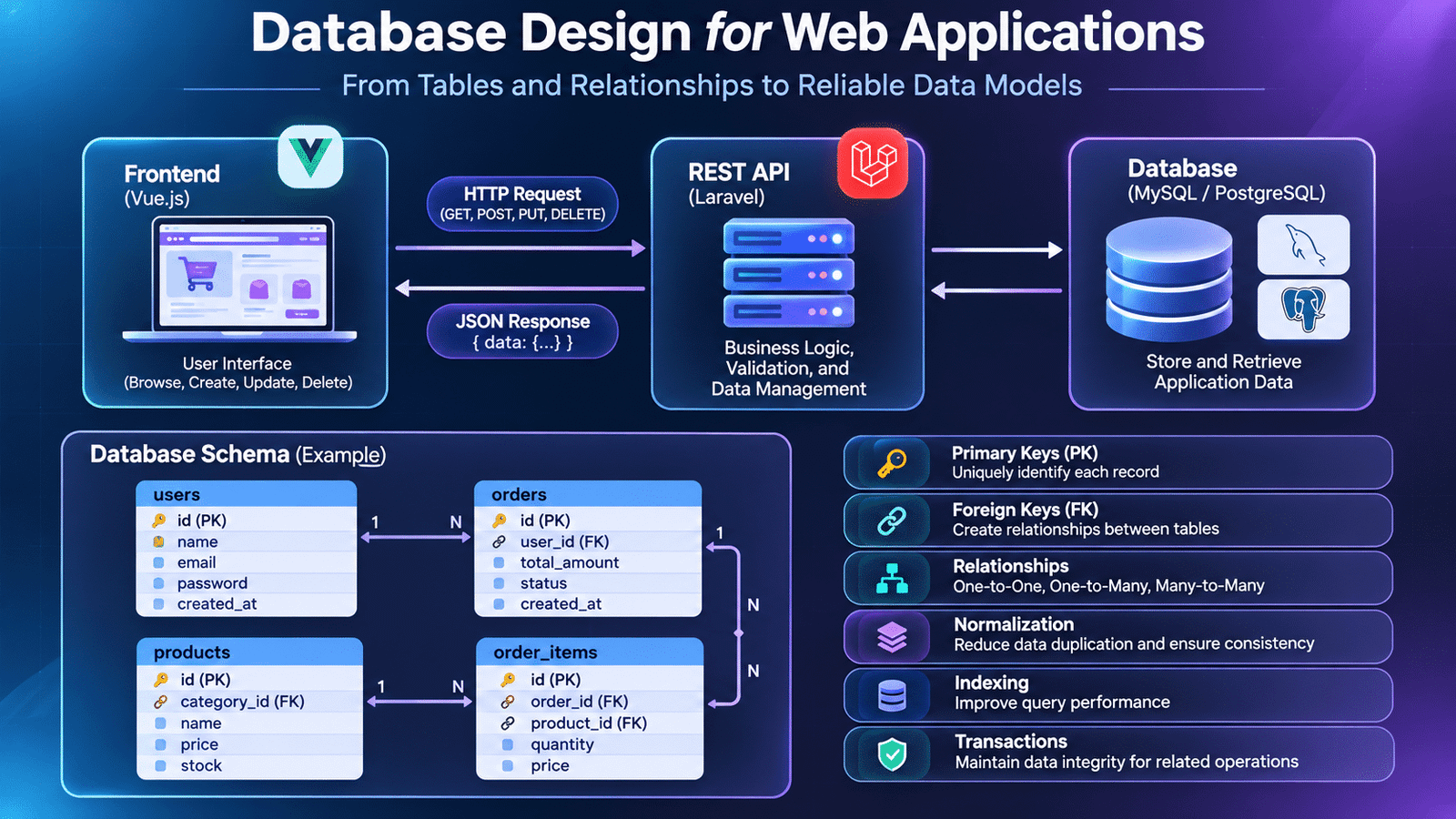
Database design for web applications is an essential part of building reliable software systems, helping developers organize data, establish relationships, and maintain consistency across application features.
Modern web applications depend on more than attractive interfaces and well-written backend code. Behind every user account, product listing, order, payment, and transaction is a database responsible for storing and organizing application data.
When an application grows, the quality of its database structure becomes increasingly important. Poorly designed tables, duplicated records, missing relationships, and inefficient queries can create problems that affect application performance, data consistency, and future development.
This is why database design is an essential part of full-stack development. It helps developers organize information logically, establish relationships between records, and build applications that can handle changing business requirements.
Let’s explore how database design works in real-world web application development.
1. Understanding Database Design in Application Development
Database design is the process of planning how application data will be stored, organized, connected, and retrieved.
Before creating database tables, developers need to understand the information an application manages and how different pieces of information relate to one another.
Consider an e-commerce application. It may need to manage:
- Customers and their account information
- Products and product categories
- Shopping carts and cart items
- Orders and order details
- Payments and delivery information
Storing all this information in a single table would make the application difficult to maintain. Instead, developers create separate tables and establish relationships between them.
A well-designed database provides a structured foundation for application features and makes future modifications easier.
2. Identifying Application Requirements Before Creating Tables
Database design should begin with business requirements rather than immediately creating tables.
For example, consider an online shopping application with the following requirements:
- Customers can register and log in.
- Customers can browse multiple products.
- Each product belongs to a category.
- Customers can place multiple orders.
- An order can contain multiple products.
- Every order should maintain its own payment and delivery information.
These requirements help developers identify the entities, attributes, and relationships needed in the database.
A practical approach is to create an initial data model before writing migrations or SQL queries.
For example:
| Entity | Important attributes |
|---|---|
| Users | id, name, email, password |
| Categories | id, name |
| Products | id, category_id, name, price |
| Orders | id, user_id, total_amount, status |
| Order Items | id, order_id, product_id, quantity |
| Payments | id, order_id, payment_status, amount |
This initial structure gives developers a clear understanding of the information the application needs to manage.
3. Understanding Tables, Rows, and Columns
Relational databases organize information using tables.
A table represents a particular entity, columns represent its attributes, and rows represent individual records.
For example, a users table might contain:
| id | name | |
|---|---|---|
| 1 | Rahul | rahul@example.com |
| 2 | Priya | priya@example.com |
| 3 | Arjun | arjun@example.com |
Here:
- The table represents users.
- Each column stores a specific type of information.
- Each row represents one user.
- The id column uniquely identifies each record.
Choosing appropriate column names and data types is important. For example, prices should use an appropriate decimal type rather than a text field, while creation timestamps should use date-time types.
Consistent naming conventions also make database structures easier to understand across development teams.
4. Primary Keys and Foreign Keys
Primary keys and foreign keys establish the foundation of relationships in relational databases.
A primary key uniquely identifies each record in a table.
For example:
CREATE TABLE users (
    id BIGINT PRIMARY KEY AUTO_INCREMENT,
    name VARCHAR(100) NOT NULL,
    email VARCHAR(150) UNIQUE NOT NULL
);
Here, the id column uniquely identifies each user.
A foreign key connects one table to another by referencing its primary key.
For example:
CREATE TABLE orders (
    id BIGINT PRIMARY KEY AUTO_INCREMENT,
    user_id BIGINT NOT NULL,
    total_amount DECIMAL(10, 2),

    FOREIGN KEY (user_id)
        REFERENCES users(id)
);
The user_id column connects each order to the user who created it.
Foreign key constraints help maintain referential integrity. They prevent an order from referencing a user who does not exist, subject to the configured database constraints.
5. Understanding Database Relationships
Different application requirements create different types of database relationships.
One-to-One Relationship
A one-to-one relationship means one record in a table is associated with one record in another table.
For example, a user may have one profile.
Users
  |
  | 1:1
  |
User Profiles
A user_profiles table can contain a user_id column with a unique constraint to enforce this relationship.
One-to-Many Relationship
A one-to-many relationship means one record can be associated with multiple records in another table.
For example, one customer can place multiple orders.
Users
  |
  | 1:N
  |
Orders
The orders table contains user_id as a foreign key.
Many-to-Many Relationship
A many-to-many relationship means multiple records from one table can be associated with multiple records from another table.
For example, an order can contain multiple products, and the same product can appear in multiple orders.
Orders
   |
   | 1:N
   |
Order Items
   |
   | N:1
   |
Products
The order_items table acts as a pivot or junction table.
This structure also allows developers to store additional information, such as quantity and product price at the time of purchase.
Understanding these relationships is essential when designing databases for applications with multiple connected modules.
6. Database Normalization and Data Consistency
Database normalization is the process of organizing data to reduce unnecessary duplication and improve consistency.
Consider an orders table that stores customer name, customer email, product name, and order information in every row.
If a customer places multiple orders, the same customer information is repeated. Updating the customer’s email then requires modifying multiple records.
A normalized structure separates users, products, orders, and order items into appropriate tables.
Common normalization levels include:
- First Normal Form (1NF): Each column should contain atomic values, without repeating groups.
- Second Normal Form (2NF): The table should satisfy 1NF, and non-key attributes should depend on the entire candidate key.
- Third Normal Form (3NF): The table should satisfy 2NF and avoid inappropriate dependencies between non-key attributes.
Normalization helps reduce duplication and makes updates more reliable.
However, database design is not simply about splitting everything into separate tables. Developers must also consider application requirements, query patterns, and performance.
7. Database Indexing and Query Performance
As applications grow, database queries may need to process large amounts of information.
Without appropriate indexes, the database may need to examine many records to find the requested information.
An index helps the database locate records more efficiently for supported query patterns.
For example:
CREATE INDEX idx_orders_user_id
ON orders(user_id);
This index can improve queries that frequently retrieve orders using user_id.
A typical application query might look like:
SELECT *
FROM orders
WHERE user_id = 10;
Indexes are useful for frequently filtered, joined, or sorted columns, depending on the query and database engine.
However, adding indexes to every column is not a good strategy. Indexes consume storage and can increase the cost of insert, update, and delete operations.
Developers should examine actual query patterns and use tools such as EXPLAIN to understand query execution plans before optimizing.
8. Implementing Database Design Using Laravel Migrations
In Laravel applications, migrations provide a structured way to create and modify database tables.
Instead of manually changing database structures, developers define schema changes through version-controlled migration files.
For example, creating a products table:
Schema::create('products', function (Blueprint $table) {
    $table->id();
    $table->foreignId('category_id')
          ->constrained()
          ->cascadeOnDelete();

    $table->string('name');
    $table->decimal('price', 10, 2);
    $table->timestamps();
});
This migration creates a products table with:
- An auto-incrementing primary key.
- A foreign key referencing categories.
- A product name.
- A decimal price.
- Created and updated timestamps.
Developers can execute migrations using:
php artisan migrateLaravel migrations make database changes easier to review, reproduce, and manage across development environments.
For larger applications, migration changes should be reviewed carefully, especially when they affect existing production data.
9. Connecting Database Tables with Laravel Eloquent Models
Laravel Eloquent provides an object-relational mapping system that allows developers to interact with database records through models.
For example, a User model can define a one-to-many relationship with orders:
public function orders()
{
    return $this->hasMany(Order::class);
}
The Order model can define the inverse relationship:
public function user()
{
    return $this->belongsTo(User::class);
}
Developers can then retrieve a user’s orders:
$user = User::find(10);

$orders = $user->orders;
Instead of manually writing every SQL join, developers can use Eloquent relationships to work with related records.
Understanding these relationships also helps avoid inefficient database access patterns, such as the N+1 query problem. Laravel’s eager loading can help address this:
$users = User::with('orders')->get();The correct approach depends on the data being retrieved and how it is used by the application.
10. Database Transactions and Data Integrity
Some application operations involve multiple database changes that must succeed together.
Consider an e-commerce checkout process:
- Create an order.
- Insert order items.
- Update inventory quantities.
- Save payment information.
If one operation fails after the earlier operations have succeeded, the database could contain incomplete information.
Database transactions help prevent this problem.
In Laravel:
DB::transaction(function () use ($user, $items) {
    $order = Order::create([
        'user_id' => $user->id,
        'total_amount' => 1500,
    ]);

    foreach ($items as $item) {
        $order->items()->create([
            'product_id' => $item['product_id'],
            'quantity' => $item['quantity'],
        ]);
    }
});
If an exception occurs inside the transaction, Laravel rolls back the database changes made within it.
For production checkout workflows, developers should also consider inventory locking, payment-provider behavior, retry handling, and idempotency. A database transaction alone cannot automatically reverse an external payment operation.
11. Common Database Design Mistakes in Real Projects
Database problems often become visible when an application starts handling more users, records, and business operations.
Some common mistakes include:
Duplicating information across multiple tables: Repeated data increases the risk of inconsistent updates.
Ignoring relationships: Missing foreign keys can allow records to reference entities that do not exist.
Choosing inappropriate data types: Storing numeric values as strings can complicate calculations and validation.
Adding unnecessary columns: Storing unrelated information in the same table makes the structure harder to maintain.
Ignoring indexes: Frequently executed queries may become slower as the database grows.
Deleting important historical data: Removing records without considering business requirements can affect orders, reports, and audit history.
Making production schema changes without planning: Database modifications can affect existing records and application availability.
Avoiding these mistakes requires developers to think beyond the immediate feature and consider how the application will evolve.
12. Best Practices for Building Maintainable Databases
A maintainable database should support current application requirements while remaining flexible enough for future changes.
Consider these practices during development:
- Identify application entities before creating tables.
- Use consistent table and column naming conventions.
- Define primary keys and foreign key constraints.
- Choose appropriate data types for every column.
- Normalize data where it improves consistency.
- Add indexes based on actual query requirements.
- Use migrations to manage schema changes.
- Use transactions for operations that require multiple related database changes.
- Review query performance as data volume increases.
- Plan backup, recovery, and production migration strategies.
Database design should be treated as an ongoing engineering responsibility rather than a one-time setup activity.
13. How Database Design Connects Frontend, Backend, and APIs
Database design is closely connected to the rest of the application architecture.
Consider a product listing page built with Vue.js and Laravel.
The frontend sends a request to the backend:
GET /api/productsThe backend retrieves product records from the database, processes the results, and returns a JSON response.
{
    "data": [
        {
            "id": 1,
            "name": "Laptop",
            "price": 55000
        },
        {
            "id": 2,
            "name": "Keyboard",
            "price": 1500
        }
    ]
}
The frontend then displays the returned information.
Each layer has a separate responsibility:
- Frontend: Displays information and handles user interactions.
- Backend: Applies business rules, validates requests, and manages application operations.
- API: Provides structured communication between frontend and backend.
- Database: Stores and retrieves application information.
A well-planned database structure makes it easier to develop APIs, implement business logic, and maintain consistent application behavior.
14. Frequently Asked Questions
What is database design?
Database design is the process of organizing application data into tables, defining relationships, selecting data types, and establishing constraints for reliable data storage and retrieval.
Why is database normalization important?
Normalization helps reduce unnecessary data duplication and improves consistency when records are inserted, updated, or deleted.
What is the difference between a primary key and a foreign key?
A primary key uniquely identifies a record in a table. A foreign key references a key in another table to establish a relationship between records.
What is the purpose of database indexing?
Indexes help databases locate records more efficiently for supported queries. They are especially useful for frequently filtered, joined, or sorted columns.
What are database migrations?
Migrations are version-controlled files that define database schema changes. They allow development teams to create, modify, and manage database structures consistently.
Which database should developers learn first?
MySQL and PostgreSQL are both widely used relational databases. Beginners can start with either one and learn SQL, relationships, constraints, indexing, and normalization.
Final Thoughts
Database design is one of the foundations of reliable web application development. A well-structured database helps developers manage complex relationships, maintain data consistency, and support application growth.
For full-stack developers, understanding how to design tables, establish relationships, optimize queries, and manage schema changes is an important practical skill.
Rather than focusing only on writing queries, developers should learn to understand the data requirements behind each feature and design structures that support real application workflows.
The ability to create reliable data models is what helps turn a working application into a maintainable software system.
Internal links
Technical Interview Preparation