
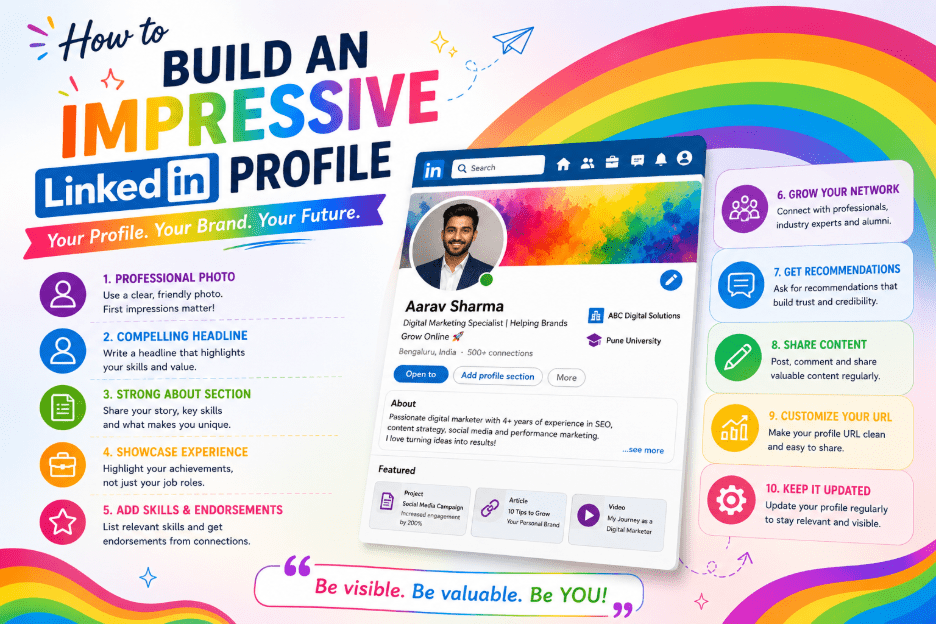
Your LinkedIn profile is often the first thing a recruiter, client, or business partner sees before they ever speak with you. It works harder than a resume, because it never stops circulating.
A resume sits in an inbox until someone opens it. A LinkedIn profile is live, searchable, and visible around the clock.
Yet most profiles are half-finished: a blurry photo, a headline that just repeats a job title, a summary that was never written at all.
The good news: fixing these gaps doesn’t take long, and the payoff is disproportionate to the effort. This guide walks through every part of your profile, in the order that matters most — so you end up with something that reads well to a person and ranks well in a search.
Why Your Profile Matters More Than You Think
LinkedIn is no longer just a place to list your job history. It’s become the default background check for anyone doing business with you.
- Before a first meeting, most people will look you up.
- Before shortlisting a candidate, most recruiters will check the profile against the resume.
- A weak or incomplete profile raises quiet doubts — even when nothing on it is technically wrong.
There’s also a search dimension. LinkedIn’s internal search, and general web search engines, both index profile content. That means the words in your headline, About section, and experience descriptions decide whether the right people can find you at all.
Building an impressive LinkedIn profile is really two projects at once: writing something a human wants to read, and writing something a search algorithm can understand.
1. Start With a Professional Profile Photo
A profile with a photo gets far more views and connection requests than one without. It’s the easiest fix on this list — and the one most people skip.
A good photo doesn’t need a professional photographer, though it helps. What it needs:
| Element | What to do |
|---|---|
| Lighting | Good, even lighting |
| Background | Plain or softly blurred |
| Framing | Shoulders up |
| Outfit | What you’d wear to a client meeting or interview |
| Expression | A natural smile, like greeting a colleague |
Avoid group photos, vacation shots, and heavily filtered images. Recruiters spend only a few seconds scanning a profile before deciding whether to read further — the photo sets the tone for everything that follows.
Suggested image alt text: “Professional smiling headshot used as a LinkedIn profile photo”
2. Use the Banner as a Second Headline
The banner (or cover photo) sits behind your name and photo, and almost nobody uses it well. Left blank, it’s wasted space. Used properly, it becomes a second headline.
Use it to:
- State your value proposition in a short line of text
- Show company branding
- Display a relevant image tied to your industry
Keep text large enough to read on a phone screen — most LinkedIn browsing happens on mobile. One clear message beats five small ones.
Suggested image alt text: “LinkedIn profile banner image with personal branding text and logo”
3. Write a Headline That Does More Than State a Job Title
By default, LinkedIn fills your headline with your current job title and company — the least effective option available, since it wastes 220 characters of prime, keyword-rich real estate.
Your headline is the first line people read in search results, in connections’ feeds, and in messaging previews. It should include:
- The role or specialty you want to be known for
- The value you deliver
- Keywords a recruiter or client would actually search for
A stronger headline might read:
Senior Product Manager | B2B SaaS Growth | Helping Teams Ship Faster With Data-Driven Roadmaps
This line contains a job title, an industry, and a specific outcome — all of which double as search terms. Think about the exact phrases a hiring manager would search for (“digital marketing manager,” “financial analyst,” “full stack developer”) and work the most relevant ones in without forcing the sentence.
4. Turn Your About Section Into a Real Story
The About section (still labeled “summary” by longtime users) is where most profiles fall flat — either left empty or filled with dry, third-person corporate language copied from a resume.
A simple structure that works:
- Open with a sentence explaining what you do and who you help
- Follow with 2–3 sentences on your background, biggest wins, and what makes your approach different
- Close with a clear call to action — an invitation to connect, or a link to your work
Keep paragraphs short. LinkedIn only shows the first few lines before a “see more” link appears, so the opening sentence has to earn the click. Naturally weave in the core keywords tied to your industry and role — this section carries real weight in LinkedIn’s internal search ranking.
5. Detail Your Experience With Outcomes, Not Just Duties
Resist the urge to paste your job description. Describe what you actually accomplished, with numbers wherever possible: revenue generated, time saved, team size managed, campaigns launched.
| Weak | Strong |
|---|---|
| “Responsible for onboarding flow.” | “Led a team of six to redesign the onboarding flow, cutting new-user drop-off by eighteen percent.” |
Each role description is another chance to work in relevant keywords tied to your field — “supply chain management,” “content strategy,” “cloud infrastructure.” Search engines and recruiters alike reward specificity over vague corporate phrasing.
6. Add Skills, and Get Them Endorsed
LinkedIn allows up to fifty skills — be selective, not exhaustive. List the skills central to the work you want next, with the most important ones at the top, since that’s what shows by default.
Endorsements matter more than people assume. A skill with a dozen endorsements looks credible; a skill with none looks like filler.
Ask a handful of colleagues to endorse your top three or four skills, and return the favor where it’s genuine. LinkedIn’s search weighs endorsed skills more heavily than unendorsed ones.
7. Collect a Few Strong Recommendations
A recommendation from a manager, client, or colleague carries more weight than almost anything you could write about yourself. It doesn’t need to be long — three or four specific recommendations beat twenty generic ones.
When you ask someone, give them a starting point: remind them of a specific project you worked on together and ask them to speak to that. This produces a far more believable result than a vague request to “say something nice.”
8. Fill Out the Featured Section
The Featured section sits just below About and lets you pin articles, posts, presentations, or work samples directly to your profile. This is prime visual real estate — leaving it empty is a missed opportunity.
Use it to showcase a portfolio piece, a well-performing post, a press mention, or a project link. Update it periodically so it stays current.
Suggested image alt text: “LinkedIn Featured section showcasing a portfolio project and article”
9. Customize Your Profile URL
By default, LinkedIn assigns your profile a URL full of random numbers. Under profile settings, edit it to a clean version of your name — linkedin.com/in/yourname.
This small change makes your profile far more presentable on a resume, email signature, or business card. It’s one of the fastest edits on this entire list.
10. Stay Active, Not Just Present
A profile that never posts or comments tends to rank lower in LinkedIn’s internal search and shows up less in other people’s feeds.
You don’t need to publish daily. Try:
- Commenting thoughtfully on posts in your field
- Sharing an article with a short point of view attached
- Posting a short project update once every week or two
If you publish original articles or long-form posts regularly, consider turning on Creator Mode, which highlights your content at the top of your profile and adds a follow option.
11. Build Your Network With Intent
Connections aren’t just a vanity number. A larger, relevant network extends your reach every time you post or comment, and widens the pool of people who might see a job opening or recommendation you share.
Rather than accepting every request, connect deliberately with people in your industry, former colleagues, clients, and professionals you genuinely want in your circle.
Add a short note when you send a request:
“We both worked with the same client on the Meridian project last year — would love to stay connected.”
Notes like this get accepted far more often than blank requests.