
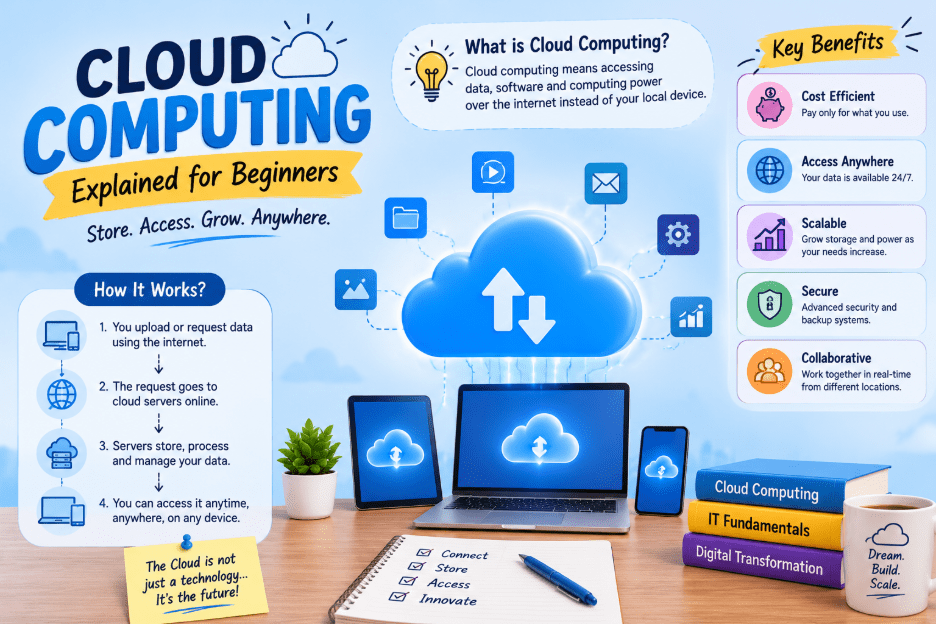
Cloud computing is the delivery of computing services — storage, servers, databases, software, and networking — over the internet instead of through equipment sitting in your own office or home. Rather than buying a physical server and maintaining it yourself, you rent computing power from a provider and pay only for what you use.
Think of it the way you might think of electricity. Most homes don’t generate their own power — they draw electricity from a shared grid and pay the utility company for what they use each month. Cloud computing works the same way, except instead of electricity, you’re drawing on processing power, storage space, and software tools.
A Short History: Why Did Businesses Move to the Cloud?
Before cloud computing became common, companies had to:
- Buy their own servers
- Install them in a physical room
- Cool that room
- Hire staff to maintain the hardware
- Plan years in advance for how much storage or processing power they might need
If they guessed wrong, they either wasted money on unused equipment or ran out of capacity during busy periods.
Cloud computing removed most of that guesswork. Instead of owning hardware, a business can rent exactly what it needs and adjust that amount up or down as demand changes. This shift from ownership to rental is really the whole story of why cloud computing spread so quickly across industries, from small startups to large banks and hospitals.
How Does Cloud Computing Actually Work?
Behind the scenes, cloud providers such as Amazon Web Services, Microsoft Azure, and Google Cloud operate enormous data centers packed with servers, storage drives, and networking equipment, spread across different regions of the world.
When you use a cloud service, your request travels over the internet to one of these data centers. The provider’s software figures out which server has free capacity, processes your request, and sends the result back to your device — typically in a fraction of a second, which is why most people never notice their files, apps, or websites are actually running on someone else’s hardware.
A technology called virtualization makes this possible. Virtualization allows one physical server to be divided into several separate virtual machines, each behaving like its own independent computer. This is what lets a single data center serve thousands of customers at once without those customers interfering with one another.
The Three Main Types of Cloud Computing Services
Cloud services are usually grouped into three categories, often shortened to IaaS, PaaS, and SaaS.
| Model | What the provider manages | What you manage | Examples |
|---|---|---|---|
| IaaS (Infrastructure as a Service) | Physical hardware, virtual servers, storage, networking | Operating system, applications | Amazon EC2, Google Compute Engine |
| PaaS (Platform as a Service) | Servers, operating systems, infrastructure | Just your application code | Google App Engine, Azure App Service |
| SaaS (Software as a Service) | Everything — the full application | Nothing; you just use it | Gmail, Dropbox, Zoom |
A simple way to remember the difference: IaaS gives you the land, PaaS gives you the house, and SaaS gives you a fully furnished apartment you can move into right away.
Public, Private, and Hybrid Cloud: What’s the Difference?
Beyond service types, cloud computing is also divided by deployment model.
- Public cloud — Owned and operated by a third-party provider and shared among multiple customers, though each customer’s data stays separate and protected. This is the most common and usually the most affordable option, since costs are spread across many users.
- Private cloud — Dedicated to a single organization. It might be hosted on the company’s own premises or by a third party, but resources aren’t shared with anyone else. Banks, government agencies, and healthcare providers often choose this route because of stricter data privacy requirements.
- Hybrid cloud — Combines both. A company might keep sensitive data on a private cloud while running less sensitive workloads on a public cloud, balancing cost, control, and compliance.
Benefits of Cloud Computing
Cloud computing has become the default choice for many organizations for a few key reasons:
- Lower upfront costs — No need to purchase expensive hardware before you know how much capacity you’ll need.
- Scalability — Storage and processing power can be increased or decreased as demand changes, often within minutes.
- Accessibility — Files and applications can be reached from almost any device with an internet connection, which matters a great deal for remote work.
- Maintenance handled by the provider — Software updates, security patches, and hardware failures are largely the provider’s responsibility, not yours.
- Disaster recovery — Data stored across multiple locations is far less likely to be lost entirely if one server or data center fails.
Are There Any Downsides?
Cloud computing isn’t without trade-offs:
- It depends on a stable internet connection — an outage on your end or the provider’s end can interrupt access.
- Handing data over to a third party raises legitimate questions about privacy and security, which is why many regulated industries lean toward private or hybrid setups.
- Costs can climb unexpectedly if usage isn’t monitored carefully, since pay-as-you-go pricing means the bill grows along with demand.
Real-World Examples of Cloud Computing
- Streaming a movie on Netflix, where the video files sit on remote servers rather than your device
- Storing files in Dropbox or Google Drive so they can be reached from any computer or phone
- Running a small business website hosted through AWS or a similar provider
- Using Microsoft 365 or Google Workspace to edit documents directly in a browser
- Training and running artificial intelligence models on rented cloud servers with far more processing power than a personal computer could offer
Getting Started: What Should a Beginner Learn First?
If you’re new to the subject and want to go beyond just reading about it, a sensible starting point is to create a free-tier account with one of the major providers and try launching a basic virtual server or storage bucket. Most providers, including AWS, Azure, and Google Cloud, offer free usage limits specifically so beginners can experiment without cost.
From there, learning the basics of networking, security groups, and the difference between the service models covered above will build a solid foundation before moving into more specialized areas like cloud security or DevOps.
Final Thoughts
Cloud computing is, at its core, a shift from owning technology to renting it. That single change has reshaped how software gets built, how businesses budget for technology, and how people access their own data.
It can sound intimidating from the outside, given all the acronyms and provider names thrown around, but the underlying idea is genuinely simple: someone else runs the computers, and you use what you need through the internet. Once that clicks, the rest of the terminology becomes a lot easier to follow.