
Every day, we type website names like google.com, youtube.com, netflix.com, or amazon.com without giving it a second thought. Within a fraction of a second, the website opens, videos start playing, and information appears on our screens.
But have you ever wondered how your computer knows where these websites are located?
The answer is DNS (Domain Name System)—one of the most fundamental technologies that powers the internet.
Often referred to as the Internet’s Phonebook, DNS translates easy-to-remember domain names into numerical IP addresses that computers use to communicate. Without DNS, browsing the internet would mean memorizing long strings of numbers instead of simple website names
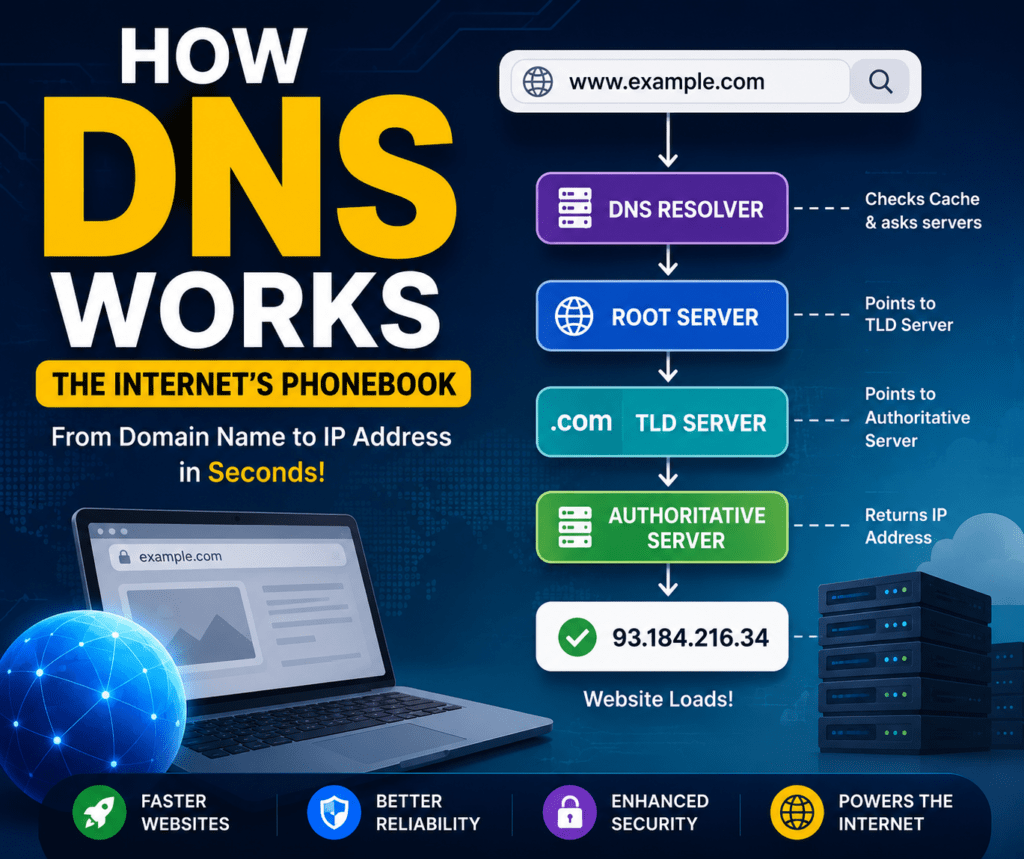
What is DNS?
The Domain Name System (DNS) is a distributed system that converts domain names into IP addresses.
For example:
- google.com → 142.250.xxx.xxx
- youtube.com → 142.251.xxx.xxx
- netflix.com → 52.xxx.xxx.xxx
Humans are good at remembering names, while computers communicate using numbers. DNS acts as the translator between the two, making the internet easy and accessible for everyone.
Think of it like your phone’s contact list. You search for “Mom” instead of remembering a 10-digit phone number. DNS works in exactly the same way—it lets you type a website name while it remembers the IP address.
Why is DNS Important?
Imagine if every website required you to remember its IP address instead of its name.
Instead of typing:
google.com
You would need to type something like:
142.250.xxx.xxx
Now imagine remembering the IP addresses of hundreds of websites you visit every month. It would be nearly impossible.
DNS solves this problem by allowing users to access websites using simple and memorable names.
It is one of the key reasons the internet is easy to use today.
What Happens When You Type a Website Address?
Let’s understand the complete journey of a DNS request.
Suppose you type:
Step 1: Browser Cache
Your browser first checks whether it has recently visited Netflix.
If the IP address is already stored locally, it immediately connects to the website without performing another DNS lookup.
This makes repeat visits much faster.
Step 2: DNS Resolver
If the browser doesn’t know the IP address, the request is sent to a DNS Resolver.
This resolver is usually provided by:
- Your Internet Service Provider (ISP)
- Google Public DNS (8.8.8.8)
- Cloudflare DNS (1.1.1.1)
Its responsibility is to find the correct IP address for the requested domain.
Step 3: Root DNS Server
If the resolver doesn’t already have the answer, it contacts a Root DNS Server.
The Root Server doesn’t know the exact IP address of Netflix.
Instead, it knows where to find information about top-level domains such as:
- .com
- .org
- .net
- .edu
It points the resolver toward the appropriate Top-Level Domain (TLD) Server.
Step 4: Top-Level Domain (TLD) Server
Since Netflix ends with .com, the request is forwarded to the .com TLD Server.
This server knows which authoritative server manages the netflix.com domain.
It then redirects the resolver to Netflix’s Authoritative Name Server.
Step 5: Authoritative DNS Server
This is where the actual answer exists.
The Authoritative Server stores DNS records that contain Netflix’s IP address.
It returns the correct IP address back to the DNS Resolver.
Step 6: Website Loads
The DNS Resolver sends the IP address back to your browser.
Now your browser knows exactly where Netflix’s server is located.
It establishes a connection with the server and loads the website.
The entire process usually completes in less than 100 milliseconds.
Types of DNS Servers
Every DNS lookup involves multiple types of servers working together.
DNS Resolver
The first server contacted by your device.
Its job is to locate the requested IP address.
Examples include Google DNS, Cloudflare DNS, and your ISP’s DNS servers.
Root DNS Server
The Root Server is the starting point of every DNS lookup.
It directs requests to the correct Top-Level Domain server.
Although there are only 13 logical root server clusters, they are replicated worldwide through hundreds of physical servers to ensure reliability and speed.
Top-Level Domain (TLD) Server
These servers manage domain extensions such as:
- .com
- .org
- .net
- .edu
- .gov
They don’t know the website’s IP address but know which Authoritative Server does.
Authoritative DNS Server
This server stores the official DNS records for a domain.
It provides the final IP address that browsers need to connect to the website.
Can DNS Affect Internet Speed?
Yes—but only during the website lookup process.
A faster DNS provider reduces the time it takes to find a website’s IP address, helping pages start loading more quickly.
Popular public DNS providers include:
- Google Public DNS (8.8.8.8)
- Cloudflare DNS (1.1.1.1)
- Quad9 (9.9.9.9)
However, DNS does not increase your internet bandwidth or download speed. It simply speeds up the process of locating websites.
Why Every Tech Enthusiast Should Learn DNS
Whether you’re a student, developer, or IT professional, DNS is a foundational concept.
Understanding DNS helps you better understand:
- Computer Networks
- Web Development
- Cloud Computing
- DevOps
- Cybersecurity
- System Design
It’s also a frequently asked topic in technical interviews for software engineering and networking roles.
Final Thoughts
DNS is one of the internet’s most essential technologies, yet it’s something most people never notice. Every website you visit begins with a DNS lookup, allowing your browser to quickly find the correct server without you having to remember complex IP addresses.
The next time you type google.com or netflix.com, remember that a global network of DNS servers is working behind the scenes in milliseconds to connect you to the right destination.
Understanding DNS is the first step toward mastering networking and gaining a deeper appreciation of how the internet works.